“Google AI Overviews” are AI-generated answer summaries that now appear at the top of search results for many queries. They appeared in 13.14% of all U.S. searches in March 2025, more than doubling from January.
This rapid rise means over 1 in 8 searches now includes an AI Overview, which is a massive shift that businesses can’t afford to ignore.
Why?
Because these rich, instant answers steal attention (and clicks) from the traditional organic results below. It’s both a challenge and an opportunity: if your content is featured in an AI Overview, your brand gets top-of-page visibility, but if it’s not, you risk losing traffic to those that are.
So how do you turn this disruption into an advantage? Enter Semrush. As a leading SEO and AI visibility platform, Semrush provides user-friendly tools to help you adapt and thrive in this AI-driven search landscape.
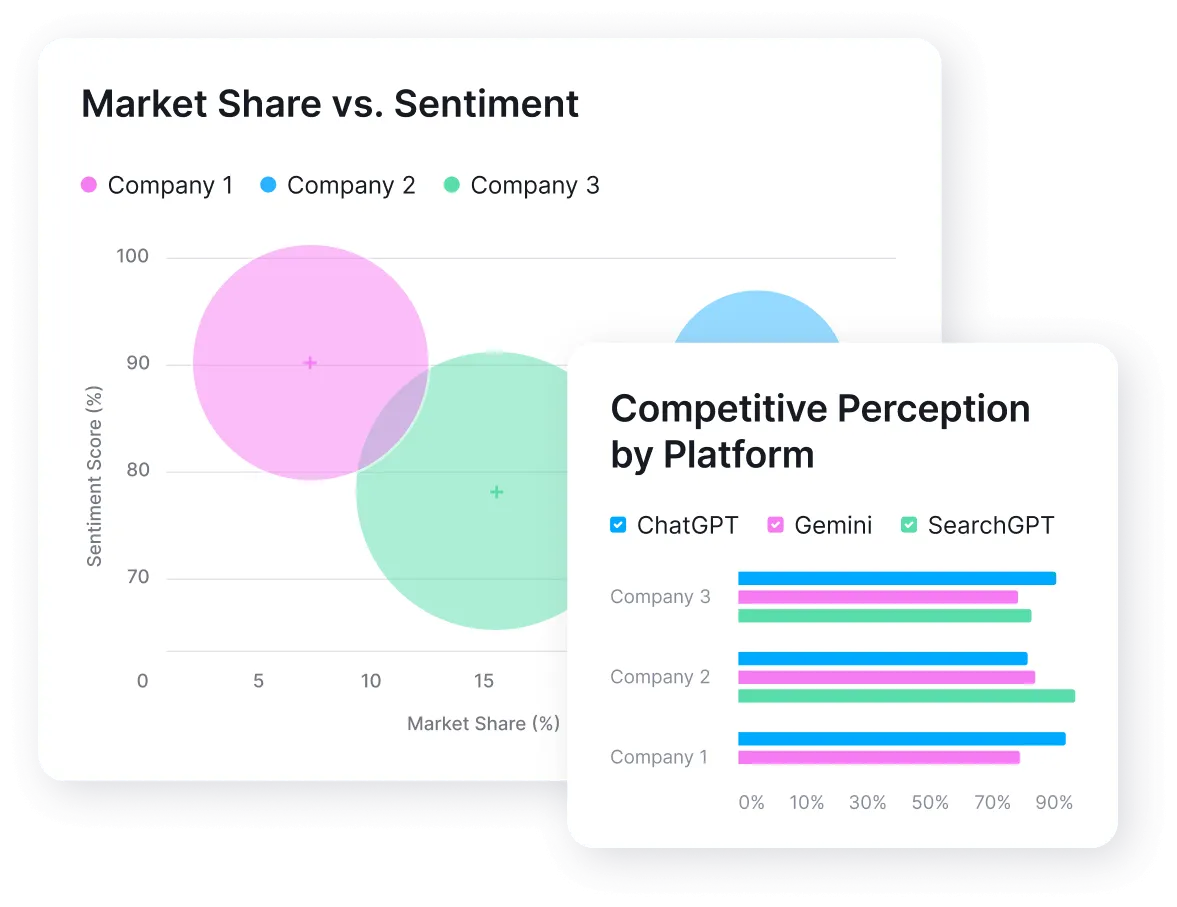
Semrush AI Visibility Toolkit
From researching what Google’s AI prefers and optimising your content to tracking results, Semrush’s AI Visibility Toolkit is like your compass for AI-powered search optimisation.
In this article, I will show exactly what Google’s AI Overviews are, why they matter, and a step-by-step strategy (with a bit of wit and wisdom) to help your business get featured – all using Semrush.
What are Google AI Overviews?
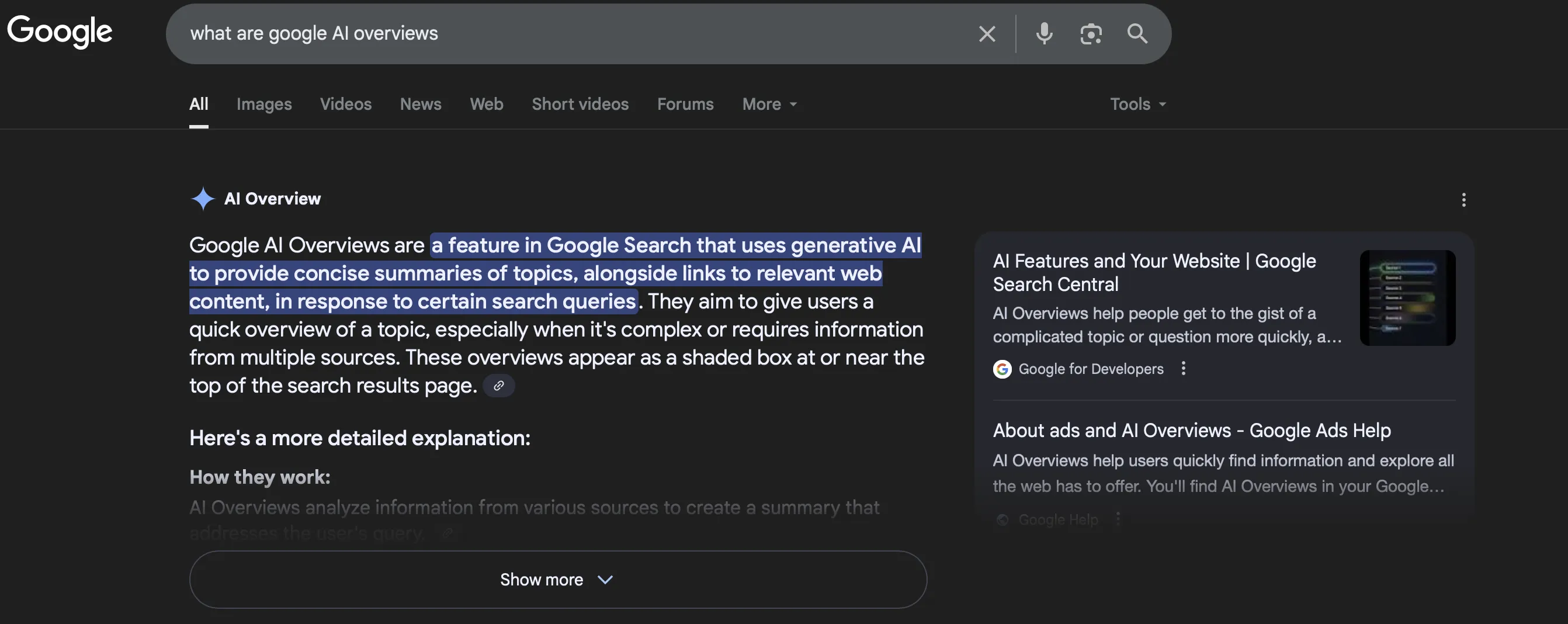
Google AI Overviews are a new search feature that delivers an on-the-spot, AI-generated answer at the very top of the results page.
Think of them as Google’s own summary “overview” of the answer you’re looking for – often presented in a neat paragraph or bullet list with sources cited below it.
Unlike a featured snippet (which quotes a single source), an AI Overview is compiled from multiple sources and powered by Google’s generative AI, Gemini, to synthesise information into a concise answer.
To understand the broader architecture of AI systems, check out our primer on how AI works in practice.
In short, Google is becoming both a search engine and an answer engine.
This overhaul is already shifting user behaviour. Searchers get answers immediately, so they often don’t click additional results if the overview satisfies their need.
Overviews currently trigger most for informational queries – about 88% of AI Overviews appear on questions asking “what is…”, “how to…”, “tips for…”, etc.
Google tends to show them for “low-risk,” factual topics (e.g., definitions, how-tos, science, health), avoiding very fresh news or sensitive queries for now.
And the content AI Overviews prefer to feature is concise, structured, direct answers, step-by-step advice, bullet-pointed strategies, definitions, and other actionable content that can be easily summarised.
How to create content for the Google AI overview?
To create high-quality content that appeals to Google’s AI, aim for clarity and structure. Start with immediate answers, then layer in detail. Use subheadings, bullet lists, and short paragraphs.
A well-organised how-to article with a summary box and FAQ is more likely to be featured than a dense wall of text. In the AI era, this approach is sometimes called GEO (Generative Engine Optimization) – optimising content so that AI systems can easily parse and reference it.
Finally, a quick note on terminology: Google initially launched these AI answers in 2024 under the experimental name Search Generative Experience (SGE). They were later rebranded as “AI Overviews” as they rolled out widely. If you see references to SGE online, it’s the same concept now known as AI Overviews.
AI Overviews are here, and growing rapidly, so let’s see why that matters for your brand.
Why AI overviews matter for Brands & Publishers
Appearing in an AI Overview is more than SEO; is about your online visibility and brand trust. It’s like getting a VIP feature above the #1 organic result. And it’s part of how AI is reshaping digital marketing strategies across industries.
Here are a few big benefits and impacts:
Traffic & Conversion Boost (if you’re featured)
When your content is cited in an AI Overview, you instantly stand out on the SERP. Users see your site name associated with the answer, building trust and interest.
Google’s early testing found that being included in AI summaries can increase click-through rates (CTR) to your site, because people want to explore deeper after reading the preview.
Some users may find their answer and leave, which is known as a ‘zero-click‘ AI Overview. However, the people who do visit tend to be more qualified visitors – they arrive interested and ready to engage.
This can lead to better results for your site.
Impact on organic rankings
AI Overviews reshape how search results are seen and clicked. For one, if an overview satisfies the query, users might ignore even the #1 result below it. That means even a top-ranked page could see traffic drop if it’s not in the overview and a competitor is.
On the flip side, your page can win visibility even without ranking #1. Interestingly, one analysis showed that 89% of sources cited in AI Overviews were not in the traditional top-10 results for that query.
Put simply, Google can choose a great answer from lower down in the results, even from page two or beyond. This gives content that was once buried a real chance to jump to the top through an AI Overview.
For brands, the key takeaway is to optimize for AI Overviews as well as traditional SEO. Doing both maximises your chances of being seen, regardless of your traditional ranking.
Brand authority & Trust
When Google’s AI chooses your content to inform its answer, it’s a bit of an implied endorsement. It signals your content is authoritative and trustworthy on that topic (at least in the eyes of Google’s algorithms).
If users repeatedly see your brand cited for answers, it builds brand recognition. Some savvy search marketers are already calling AI Overview appearances a key brand authority signal.
Consistently appearing in overviews can thus elevate your brand’s perceived expertise, which is marketing gold.
Even so, AI Overviews present both challenges and opportunities for publishers. They can reduce clicks because Google answers the query on the page, but they can also boost your brand visibility and trust when you’re cited.
Rather than focusing on the changes Google is making, successful businesses are finding ways to adapt. That’s where Semrush can help as a valuable partner.
Semrush’s AI Visibility Data
Semrush has been at the forefront of analysing and responding to this AI Overview trend. For example, Semrush research confirmed the 13% (and climbing) prevalence of AI Overviews and noted they’re most common in sectors like health and science.
In response, Semrush rolled out new AI visibility features to help brands track and optimise for these overviews. The Semrush Position Tracking tool now flags when your site (or a competitor’s) appears in an AI Overview, and their Organic Research lets you filter for keywords that trigger AI Overviews.
In short, Semrush provides the analytics and tools to turn AI Overviews from a mystery into a manageable part of your SEO strategy.
I’ll introduce specific Semrush tools in the steps below, but the key point is: you don’t have to navigate the AI search era blindly.
Semrush AI Visibility Toolkit: Your Command Center for AI Search
Before we jump into the step-by-step optimization process, let’s talk about the tool Semrush built specifically for this challenge: the AI Visibility Toolkit.
Originally launched as the “AI SEO Toolkit,” this product has been rebranded and expanded into a full suite designed to help you win every search – from traditional SEO to AI discovery. It’s now part of Semrush One, the unified platform that tracks both Google rankings and AI-generated mentions in a single dashboard.
What the AI Visibility Toolkit does
The toolkit gives you five key capabilities that traditional SEO tools simply don’t offer:
- Track your brand’s AI visibility: See your overall visibility and share of voice across AI platforms like ChatGPT, Perplexity, Gemini, and Google AI Overviews – with clear priorities for improvement
- Discover prompts driving AI conversations: Explore real prompts your audience asks across industries, analyze AI responses including brand mentions and sources, and uncover trending topics people ask AI
- Spot gaps and outperform competitors: See the prompts and sources where competitors are cited but your brand isn’t, compare mentions, sources, and sentiment to understand why they’re cited more, and get actionable steps to close the gap
- Prepare your content for AI search: Remove barriers to visibility, optimize content so AI can understand and cite it, and position your site as the trusted source in AI results
- Own your AI brand narrative: Benchmark and track the positive and negative sentiment of your brand mentions, understand gaps in how each AI platform perceives you, and collect strategic recommendations to cover blind spots
Think of it this way: traditional SEO tools tell you where you rank on Google. The AI Visibility Toolkit tells you where your brand shows up when people ask AI for advice – and how to show up more often.
Why this matters for AI Overviews specifically
Google AI Overviews are just one piece of the AI search puzzle. Your customers are also discovering brands through ChatGPT conversations, Perplexity searches, and Gemini queries. The AI Visibility Toolkit tracks all of these simultaneously, so your optimization efforts for AI Overviews also improve your visibility across every AI platform.
Semrush currently monitors 239M+ relevant LLM prompts globally – including the largest US and ChatGPT prompt databases available. That’s real data about what people ask AI, which brands get mentioned, and why.
Now that you know what tools are available, let’s put them to work with a step-by-step optimization strategy.
How to use Semrush to optimize for AI Overviews
Optimizing for Google’s AI overviews isn’t guesswork; it’s a process. Follow these steps to boost your chances of getting featured, using Semrush at each stage to work smarter.
Step 1: Discover AI-Overview opportunities with Keyword Research
First things first – find out what questions or topics in your niche are likely to trigger an AI Overview. These are the queries you want to target.
Semrush makes this easy by helping you identify trending informational queries (especially long-tail questions) that are ripe for AI-generated answers.
Use Semrush’s Keyword Magic Tool
Head to Semrush’s Keyword Magic Tool and enter a broad topic keyword relevant to your business. For example, if you run a fitness blog, you’d start with something like “home workout” and drill down into informational, long-tail keywords.
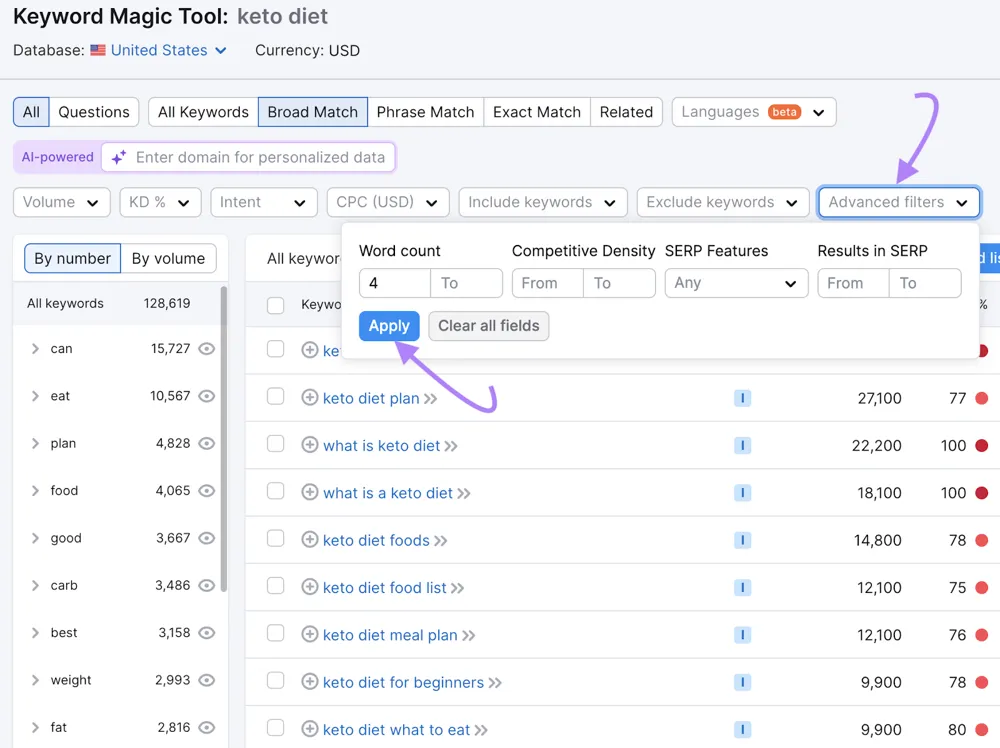
These longer queries often indicate the user is looking for a detailed answer – perfect for AI Overview targeting.
Prioritize “AI-friendly” question keywords
Look for search terms that imply a need for a quick explanation or list of tips. Phrases starting with “how to,” “ways to,” “tips for,” “best X for Y,” or “what is” are classic AI Overview triggers.
Semrush’s keyword results also label the intent of queries (e.g., Informational, Navigational). Focus on Informational queries – Semrush data shows 88% of AI-triggering queries are informational.
Additionally, Semrush’s SERP Features column can indicate if a query already shows an AI Overview (look for an “AI Overview” tag). This is gold because it confirms Google already uses AI for that topic.
Assess search volume & competition
Just like traditional SEO, you’ll want to balance volume vs. difficulty. Semrush will show you how many monthly searches each keyword gets and how hard it might be to rank. Aim to find niche questions with moderate volume but less competition – you don’t need millions of searches.
Even a few hundred searches per month, if it consistently triggers an AI overview, can be valuable since the AI box gets a ton of attention.
Remember, one well-placed answer can funnel a large share of those searchers to your brand.
By the end of this step, you should have a list of target questions or keywords to guide your content creation.
Next, let’s take a look at what content already exists.
Step 2: Analyze competitors & AI Overview results using Semrush
Once you have candidate topics, it’s time for a little competitive intelligence. Essentially, find out who’s currently “winning” those AI Overviews and learn from them.
Semrush’s tools can help you peek behind the curtain.
Check the SERP & Overview sources
Do a quick Google search for some of your target queries and see if an AI Overview appears. If it does, note which websites are cited as sources.
Are they competitors? Big authorities? Multiple small blogs? This gives you an idea of the content quality and authority needed.
For instance, if Wikipedia or a government health site is always showing up, you’ll need to emphasise authority signals in your content. But remember – Wikipedia has about an 11% inclusion rate in AI Overviews, meaning 89% of the time Google uses other sources.
Use Semrush Organic Research (SERP Features filter)
Instead of manually checking each keyword, let Semrush do it. In Semrush Organic Research, enter a competitor’s domain or your own, and navigate to the Positions tab.
Here, you can apply a filter for SERP Features – select “AI Overview” to filter keywords where that domain appears on a SERP that has an AI Overview.
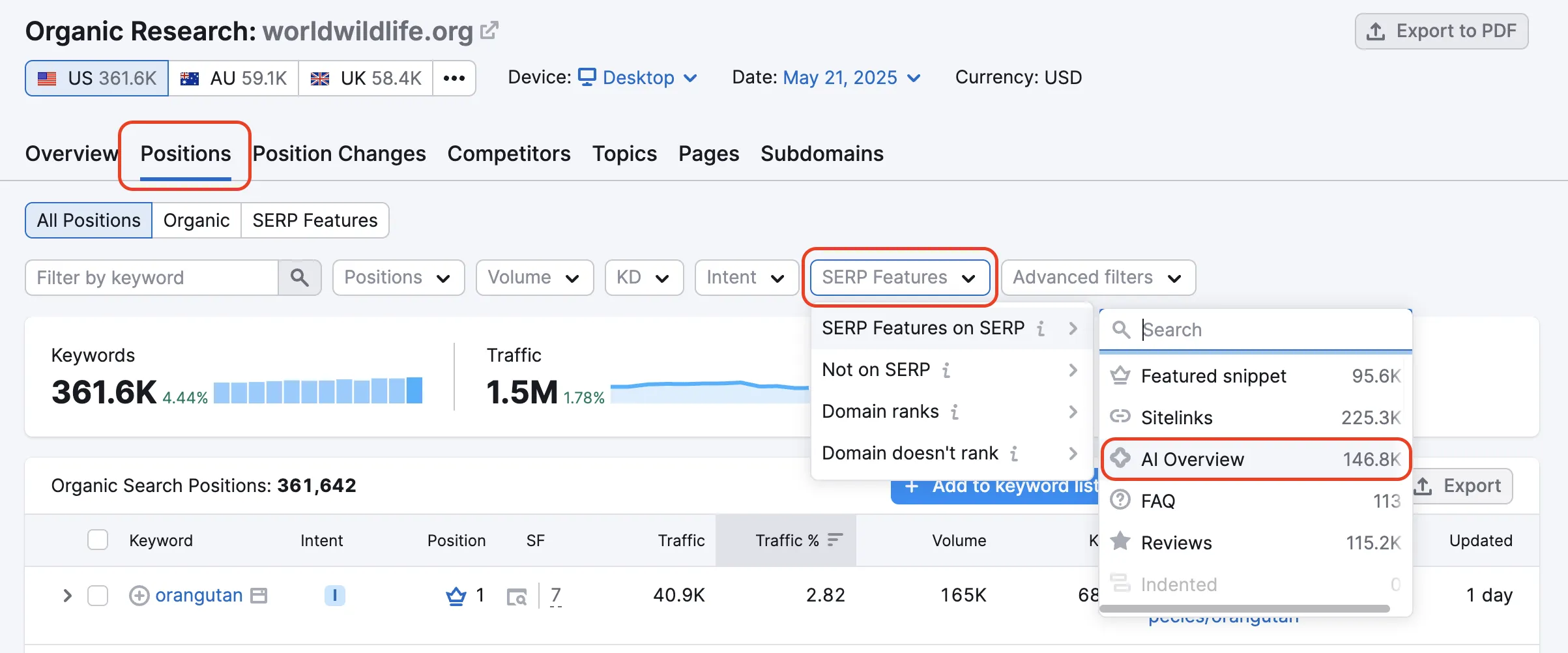
For example, if you input a top competitor site and filter by AI Overview, you’ll see all the keywords where that site is ranking and an AI summary is present on the results page. This can reveal competitor pages that are getting featured or at least competing in AI results.
Analyze a few of these: what patterns do you see in their content? Perhaps their posts all have concise intro paragraphs or FAQs (hint: likely yes!).
Leverage Position Tracking for AI visibility
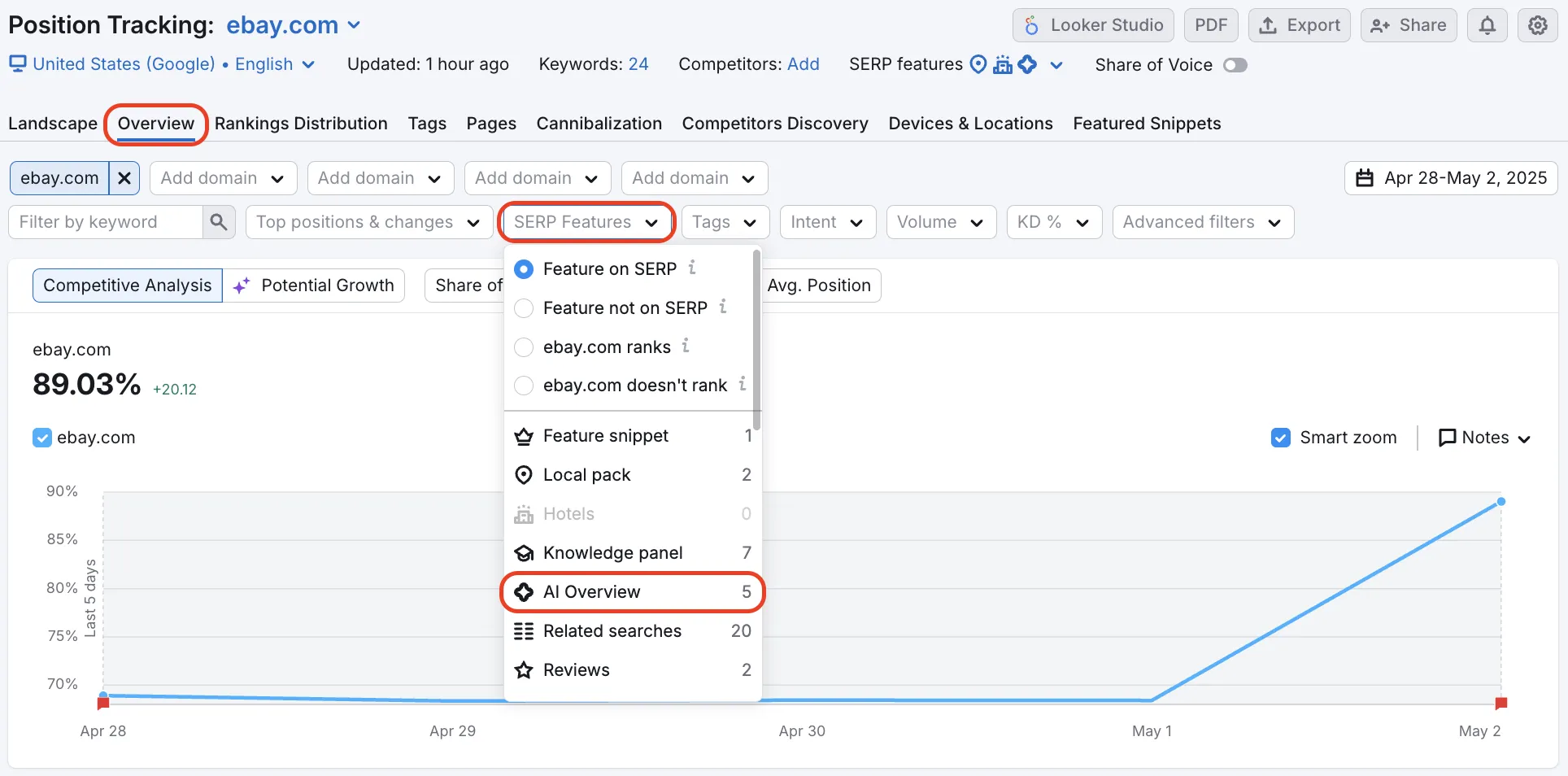
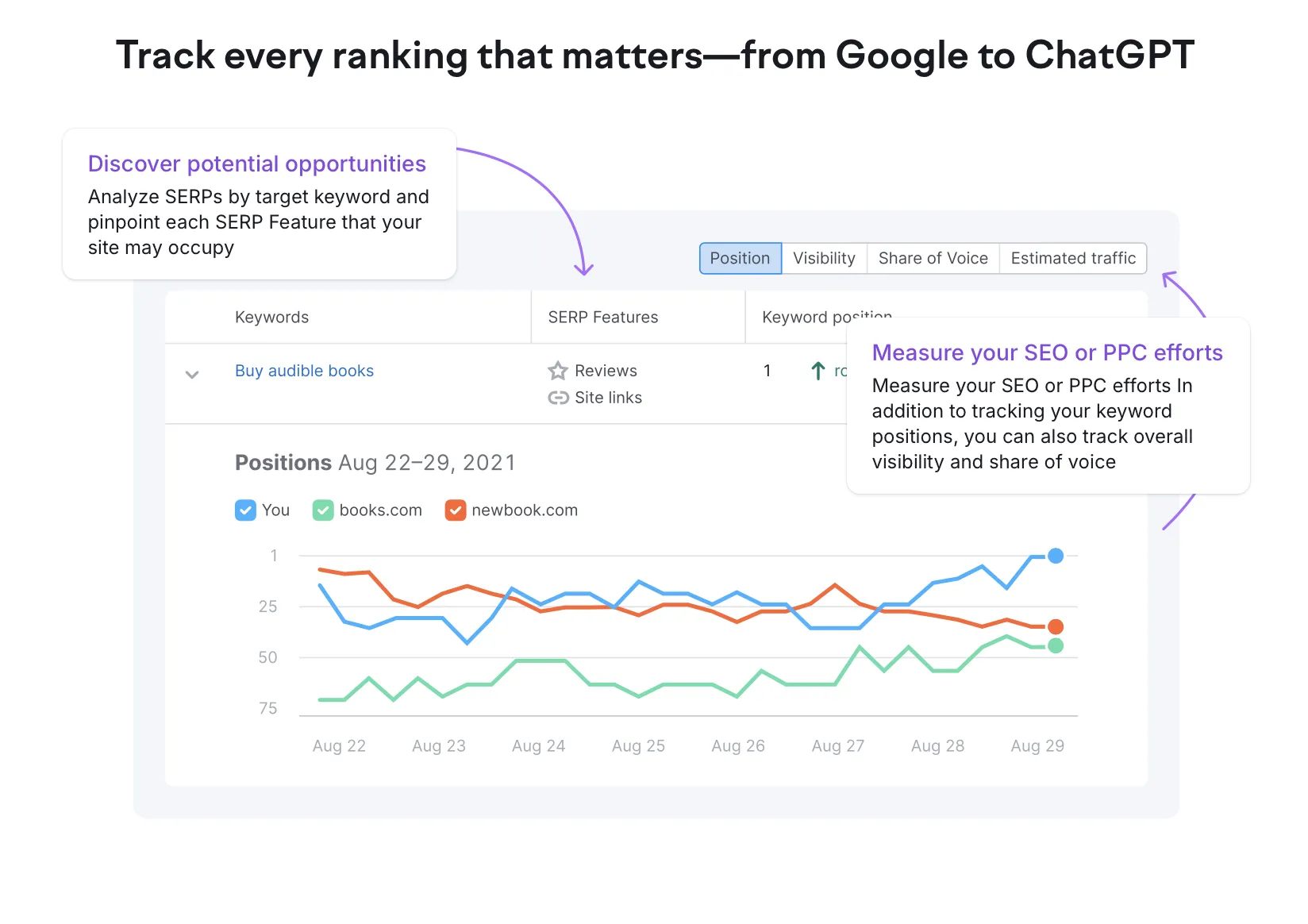
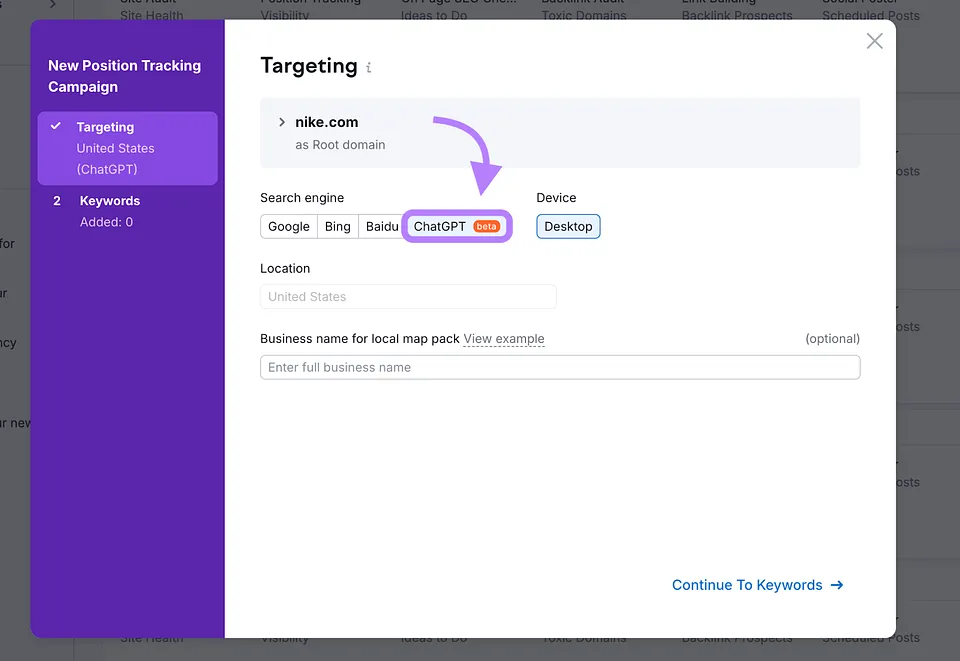
If you add your website and target keywords to Semrush’s Position Tracking tool, the system will monitor not just your traditional rank, but also whether you’re featured in any AI Overview for those keywords.
In the tracking dashboard, an “AI” indicator (often a small icon) will appear next to keywords where your site is an AI Overview source.
This is incredibly useful over time – as you implement changes, you can see if you manage to break through to an overview. (It’s also satisfying to watch that little AI icon pop up next to a keyword you optimized for!)
Study what’s working
For any query where you see an AI Overview, click the sources that are being cited. Examine their content format.
Do they answer the question in the first paragraph? Is the page structured with clear headings and lists? Did they use FAQ schema or HowTo schema (more on schema soon)?
Take notes. The goal isn’t to copy, but to identify the features that likely led Google’s AI to choose that content.
Often, you’ll find things like a succinct definition at the top, or a numbered list of steps – which are exactly the kind of structural cues we’ll build into your content.
Semrush’s Competitive Analysis
Semrush also allows deeper analysis, like comparing your site to competitors for share of AI Overview appearances.
For example, Semrush data might show your competitor appears in 5% of the AI overviews for keywords you share, while you only appear in 1%.
That gap is your opportunity.
One Semrush study even noted how content behemoths like Wikipedia had ~11% AI Overview inclusion, while other popular sites (e.g., Reddit, Quora) were included at far lower rates.
Such insights highlight the importance of content structure – Wikipedia’s highly structured, fact-forward format is exactly what the AI prefers.
The takeaway for you: be the Wikipedia of your niche in terms of clarity and organization (even if you can’t match its authority).
Let’s move on to exactly how to create that winning content.
Step 3: Create content that AI Overviews love (clear, structured, and rich)
Now comes the heart of the matter – crafting the content itself. To get featured in an AI Overview, your content must check two big boxes: Relevance/quality (it thoroughly answers the query with expertise) and Structured formatting (it’s easy for the AI to digest and extract).
Here’s how to nail both:
1. Lead with a clear, direct answer
Google’s AI prefers content that answers queries immediately. Always provide a clear answer in your first or second paragraph – think of it as writing an “overview snippet” at the top of each section.
For example, if asked “what is Google AI overview?“, begin: “Google AI overview is an AI-generated answer summary…” You can elaborate after the definition.
This approach helps both users and the AI: users appreciate a quick answer, and the AI finds a ready-made blurb to use.
Research suggests that pages that directly answer “What is…?” in the intro often rank in AI results because the model prioritizes those clear definitions.
2. Use bullet points, steps, and tables
Remember, structured content for AI search is key. Break up your content wherever it makes sense. If you’re listing tips, make them bullet points (like I’m doing here!). If you describe a process, use a numbered list for each step.
Have data to share? Consider putting it in a simple table.
AI Overviews often pull bulleted lists directly into the answer, because it’s easy for the AI to identify each point. Similarly, a brief table comparing, say, 3 products could be picked up to answer a comparative query. These elements help your content perform better with AI and make it easier for people to read. It’s a win-win.
Keep list items and table entries short; one sentence or phrase per bullet works well, so the AI is more likely to select your list over a less tidy version.
3. Add an FAQ section (with schema)
Toward the end of your content, add a FAQ section with related questions. It works two ways: readers get extra answers, and Google AI Overviews get pre-formatted Q&A to draw from.
Example: Q: How do I optimize my site for AI Overviews? A: Focus on structured content, clear answers, and schema markup…
I’ll also add FAQ schema markup, which tells search engines these are official Q&As.
Don’t be surprised if one of your answers ends up word-for-word in an AI Overview. Google loves ready-made snippets.
To see how AI fits into a real content workflow, here’s how creators are already using tools like Semrush day-to-day.
4. Emphasize actionable, “how-to” content
Include actionable “how-to” content. Google’s AI often surfaces step-by-step guides for “how do I…” queries. Even within a broader article, including a clear step list can get that section pulled into an Google AI Overviews.
Checklist: 3 steps to optimize for AI Overviews
- Identify target queries
- Add concise Q&A sections
- Use schema markup
AI loves structured, ready-to-use answers; make your key points pop.
5. Mind your writing style
Keep paragraphs short and scannable – ideally 2-3 sentences each, not a wall of text. Use subheadings (H2, H3) liberally.
This isn’t just good for readers; it helps the AI understand the content hierarchy. Imagine your page as a reference document – the AI should be able to scan it like flipping through a well-organized textbook.
And while you should thoroughly cover the topic (depth is good!), avoid fluff or off-topic tangents. Stay focused and deliver maximum value per paragraph.
6. Ensure factual accuracy and cite sources (where appropriate)
Make sure your content is factually accurate and backed by credible sources. Google’s AI favors reliable information – this connects to Google’s focus on E-E-A-T.
For example, in an article on Google AI Overviews, you could reference a recent study on how often they appear in search or cite an authoritative industry report.
Bottom line: write like an authority, check your facts, and support key claims with evidence.
7. Schema Markup
Now, a quick word on Schema Markup, as promised: Schema is code (in JSON-LD format) you add to your HTML to explicitly tell search engines what your content represents.
Using a schema doesn’t guarantee inclusion, but it’s believed to help the AI find and trust your structured info.
Specifically, implement the FAQ Page schema for your FAQ section and the How To schema for any how-to instructions. Google’s AI “relies heavily on FAQ and How To schema” when deciding what content to feature.
It makes sense – schema labels the question and each answer, or each step of a how-to, in a machine-readable way.
It’s like giving the AI a map of your content. So definitely use it.
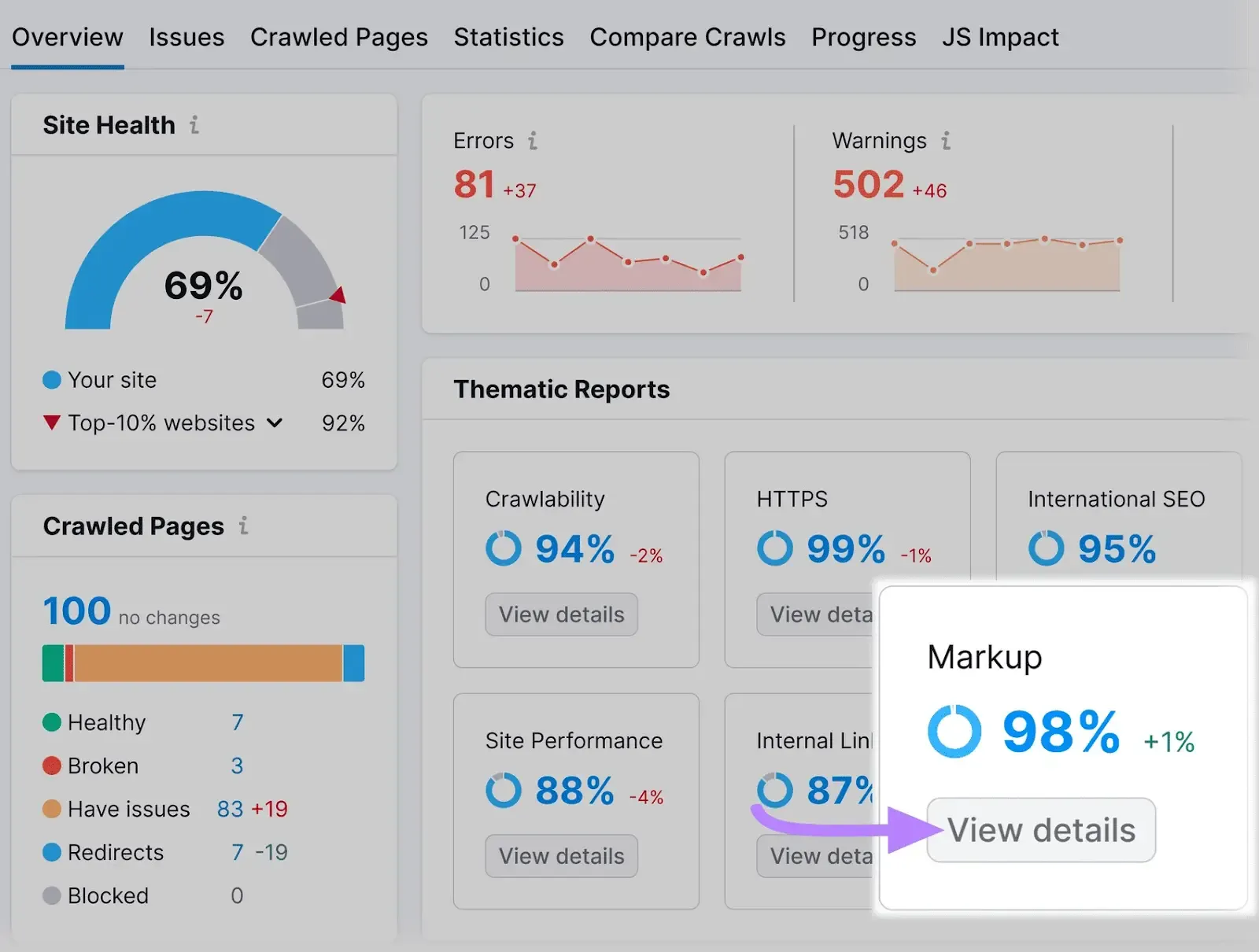
Semrush’s Site Audit or Content Audit tools can check if your schema is implemented correctly, and Google’s own Rich Results Test can verify it too.
By creating genuinely helpful, structured content that addresses the query directly, you satisfy the most important criteria for AI visibility. Content is king, formatting is queen.
Next, I’ll cover some behind-the-scenes technical steps to support your efforts.
Step 4: Technical optimization – speed, mobile & semantics (with Semrush Site Audit)
Even the best content can be held back by poor website performance or technical hiccups. Google’s AI won’t feature what it can’t properly crawl or what it deems a bad user experience.
So, make sure your site’s technical SEO is solid:
Make sure Google can crawl and index your content
This is foundational. If your page isn’t indexed, it definitely won’t show up in any overview. Double-check that you’re not accidentally blocking Googlebot.
Using Semrush’s Site Audit tool, you can scan for issues like pages blocked by robots.txt, inadvertent noindex tags, or broken links.
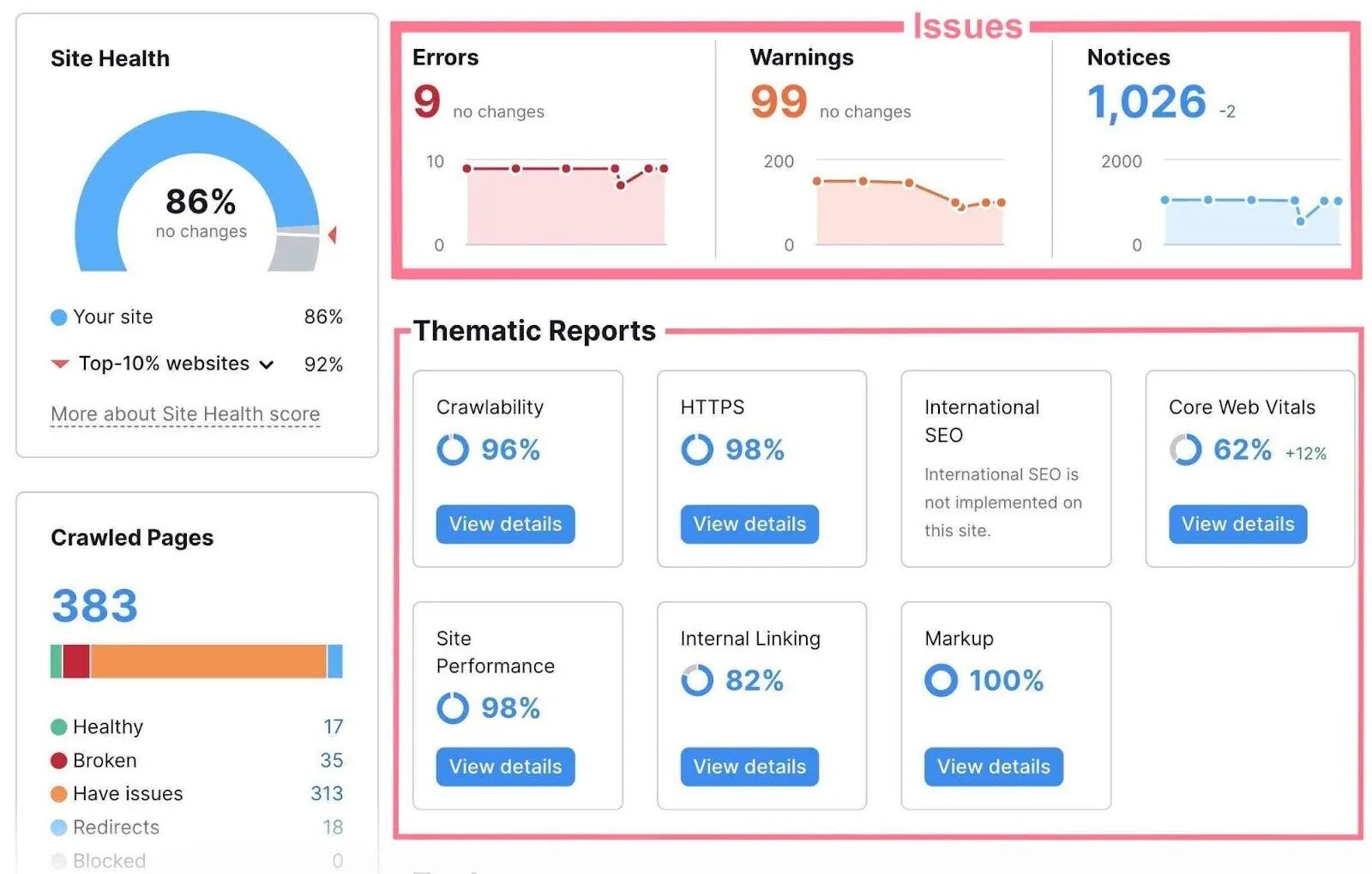
Site Audit will list any crawlability or indexability problems. Fix those first – remove unwarranted noindex tags, update your robots.txt if it’s disallowing important sections, and repair 4xx errors.
Essentially, roll out the red carpet for Google’s crawler.
Optimize for speed and mobile
Optimize for speed and mobile. Google’s AI Overviews show up on both desktop and mobile, so your site has to load fast and look good everywhere. Aim for just a few seconds of load time. While Core Web Vitals like LCP and CLS may not directly decide if you’re featured, slow pages or clunky layouts kill engagement – and Google notices.
Use Semrush’s Site Audit or Google PageSpeed Insights to spot issues like heavy images or missing caching. And don’t forget mobile design: responsive layouts, legible fonts, and easy navigation on small screens.
Since Google indexes mobile first, a messy mobile page could cost you an Overview spot.
Use semantic HTML and structured layout
This ties back to content structure, but at the code level. Use proper heading tags <h1>, <h2>, <h3>… for your titles and subheadings – don’t just bold things to look like headings.
Separated sections in HTML help crawlers (and AI) understand the hierarchy of info. Likewise, use <ul>/<ol> for lists (the AI can spot a bullet list in HTML easily).
If you have a how-to, consider using the <ol> for steps and marking it up with HowTo schema. All these little semantic cues strengthen Google’s understanding of your page.
Check for any penalties or roadblocks
Check for penalties or roadblocks. Make sure nothing on your page blocks Google from using your content in an Overview. The data-nosnippet tag tells Google not to excerpt text; bad news if you want to appear in an Overview. Review if such tags are set inadvertently.
For example, the data-nosnippet tag tells Google not to excerpt text. If it’s on your best content, remove it.
Most brands benefit from the extra exposure, so the smarter move is to focus on positive optimization.
Step 5: Monitor, track, and iterate
Congrats, you’ve created stellar, structured content and set it up for success! The final step is an ongoing one: track your results and refine your approach over time.
Google’s AI is evolving, and so must we.
Here’s how to stay on top:
Monitor your AI Overview appearances
Use Semrush’s Position Tracking to see if your optimizations pay off. Did that little AI icon light up for your target keywords?
For example, moving from rank 5 to 3 and getting pulled into the AI box. If not, don’t panic; SEO (and especially AI SEO) takes patience. Keep refining.
Use Semrush reports for insights
Semrush now tracks AI Overview data: what percentage of your keywords trigger them, and how often you appear. Compare against competitors with “Domain vs Domain.”
If they’re winning Overviews you’re missing, look at what they’re doing differently; maybe fresher content or broader coverage. For a deep dive into how Semrush’s data compares to alternatives, check out our Semrush vs Ahrefs analysis.
Track engagement metrics
Watch behavior in Google Analytics. AI traffic may bring longer dwell times if people want details beyond the summary, or bounces if the AI answer was enough. If bounce is high, hook readers with insights the AI didn’t share. If dwell time is strong, that’s a positive signal to Google.
Keep content fresh
AI favors recent info. A 2024 study found that most Overview results were current-year articles. Regularly update stats, examples, and insights, and review top pages quarterly. Even a visible “last updated” date helps. Freshness beats stale competitors.
Stay informed
AI Overviews are evolving; sometimes showing images, sometimes expanding to new query types. Follow SEO news and Semrush studies to keep pace. Google is also testing AI Overviews for certain commercial queries (e.g., “best running shoes under $100,”) which opens up new optimization opportunities.
Iterate and expand
Treat this as an ongoing loop. Replicate wins across similar queries, and test new formats – tighter summaries, step lists, or tables – to see what gets featured next.
Tips for succeeding in AI overviews
To wrap up our strategy, here are some extra tips and best practices from an expert standpoint. These apply across all the steps above:
- Leverage E-E-A-T and originality: Google’s AI values expertise, experience, authoritativeness, and trustworthiness. Bring original insights, real data, and personal expertise to your content
- Keep content fresh and relevant: Update stats, refresh examples, and add new sections quarterly. AI systems prefer current information
- Encourage user engagement: Comments, shares, and time-on-page signal quality. Make your content interactive where possible
- Use checklists and summary boxes: Quick-reference elements are AI magnets. A summary box at the top of a long article gives the AI a ready-made answer
- Implement FAQ and How-To Schema: These structured data types directly align with what AI Overviews pull from. Don’t skip them
- Be patient but persistent: Getting featured takes time. Monitor, adjust, and keep improving. The sites that consistently show up are the ones that consistently invest in quality
Google’s advice (so far) is that there’s nothing magical or separate to do for AI overviews – just build great content as you normally would.
So in chasing the new shiny thing, don’t neglect the fundamentals: good keyword targeting, useful content, solid on-page SEO, and strong backlinks (yes, backlinks still matter!).
If you focus on helping your audience better than anyone else, you’re on the right path.
Final verdict
The era of AI-powered search is upon us, and it’s reshaping how users find information. Google’s AI Overviews represent a fundamental shift from returning links to synthesizing answers.
For businesses, marketers, and publishers, this means our SEO playbook is evolving.
Win every search – from Google to AI
The classic tactics alone aren’t enough; we now have to think about optimizing for an AI that reads our content and decides whether it’s worth surfacing. The good news is that what’s good for AI Overviews is good for users (and classic SEO) too. By using Semrush’s powerful toolset, you can win this challenge strategically rather than scrambling.
How to win this game?
To win in the AI-powered search era, being proactive is key. Don’t wait for your traffic to dip and wonder what happened.
Update those old blog posts, add that FAQ section, speed up your site, and monitor how things change. Treat AI-powered search optimization with Semrush as an integral part of your ongoing SEO strategy – because that’s exactly what it is now.
In essence, this is a huge opportunity. Those who optimize early for Google’s AI Overviews can ride the wave of this change rather than be swept away by it. Combine high-quality, people-first content with AI-friendly structures, and you’ll be well-positioned to earn that coveted spot at the top of the AI-curated results, driving relevance, authority, and growth for years to come.
So, embrace the change.
Happy optimizing, and here’s to seeing your site name in those Google AI citations!