If you are looking for LastPass alternatives, you are not alone. Following the 2022 data breach that exposed encrypted customer vaults, and with ongoing reports of stolen vault data being cracked as recently as late 2025, many businesses have decided it is time to move on.
Add pricing increases and the removal of the free plan to the mix, and the case for switching has never been stronger.
The best LastPass alternative for most business teams is Passpack, which offers enterprise-grade security with SOC 2 Type II certification at a fraction of the cost.
For larger enterprises needing deep integrations, 1Password remains the industry benchmark. And for teams that want an open-source, self-hostable option, Bitwarden is the clear frontrunner.
Why Look for LastPass Alternatives?
LastPass held the top spot among password managers for years, but a series of events has eroded trust in the platform. The reasons businesses are switching go beyond a single headline.
The 2022-2023 security breach was severe.In August 2022, attackers compromised a LastPass developer’s laptop and stole source code. They then used that access to target a senior DevOps engineer’s home computer, eventually exfiltrating a backup of customer vault data, including encrypted passwords, usernames, and unencrypted metadata like email addresses, billing information, and website URLs.
The UK Information Commissioner’s Office fined LastPass £1.2 million in late 2025 for inadequate security measures affecting over one million UK users.
The damage is still unfolding.Security researchers have linked the stolen vault data to cryptocurrency thefts totaling over $150 million, with cracked vaults enabling wallet drains as recently as late 2025. The FBI and U.S. Secret Service confirmed the connection in a 2025 court filing.
For any business storing sensitive credentials, this is a serious concern.
Pricing has shifted.LastPass discontinued its free plan (which was already limited to a single device type). The Teams plan now costs $4 per user per month and caps at 50 users, while the Business plan runs $7 per user per month.
Advanced SSO and MFA features require additional paid add-ons on top of the Business plan.
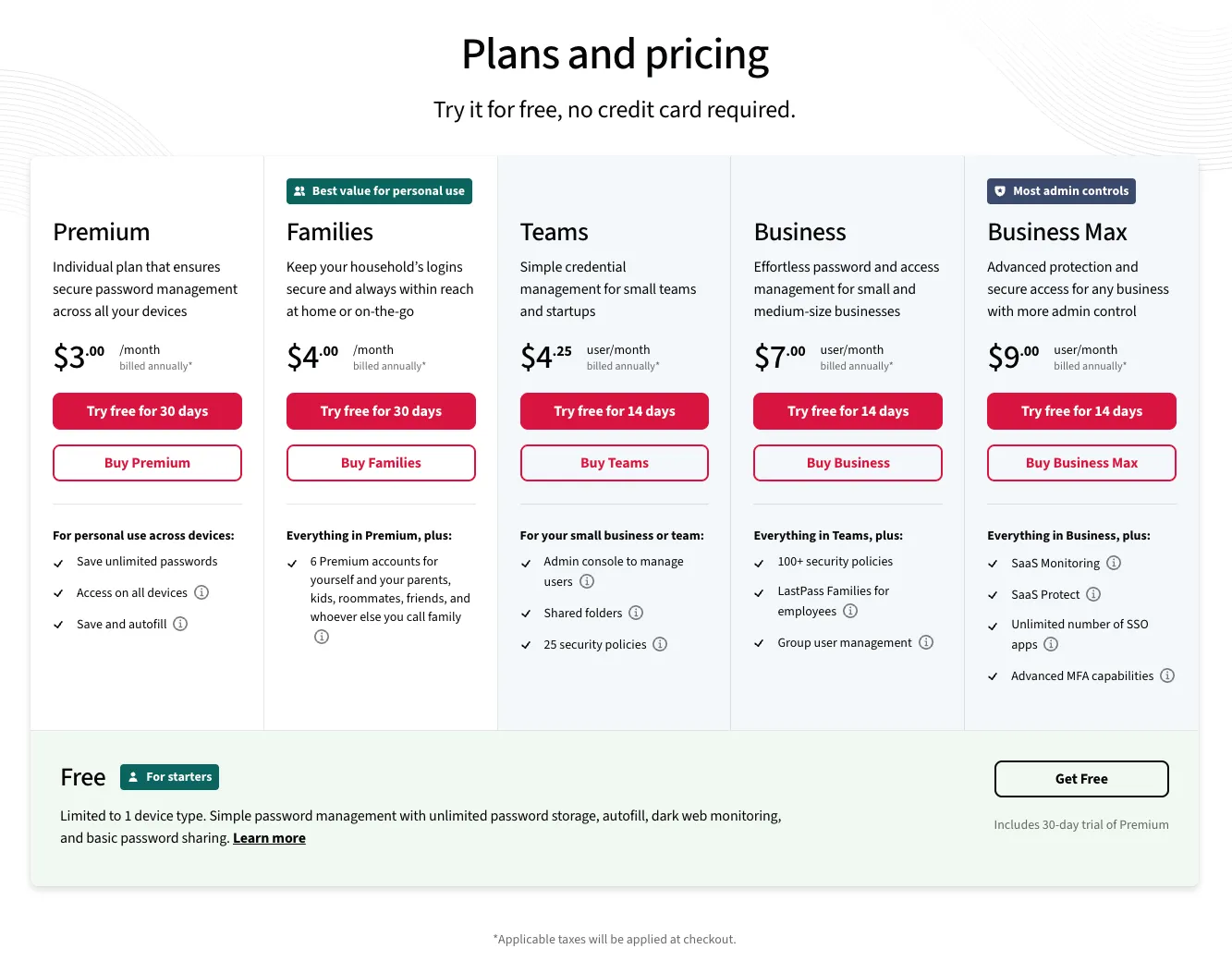
Even on the Business plan, LastPass limits SSO to three applications unless you purchase the Unlimited SSO add-on. Advanced MFA for workstations and VPNs is another separate purchase.
For growing teams, these hidden costs add up quickly.
Best LastPass Alternatives for Business and Teams
1. Passpack — Best for Small to Mid-Size Business Teams
Passpack is a business-focused password manager built specifically for teams and organizations. Unlike competitors that split their attention between consumer and business products, Passpack is designed exclusively for professional use.
Which means every feature, from onboarding to admin controls, is geared toward team collaboration and enterprise security.

The platform uses AES-256 encryption with a zero-knowledge architecture, meaning Passpack never has access to your data. It recently achieved SOC 2 Type II certification, a significant trust signal for businesses evaluating security after the LastPass breach.
In July 2025, Passpack launched Directory Integration with support for Microsoft Entra ID and Google Workspace, addressing one of the most common enterprise requirements for automated user provisioning.
Where Passpack truly stands out is pricing.
The Teams plan starts at just $1.50 per user per month (billed annually) for teams up to 20 users. The Business plan, which adds SSO, advanced reporting, domain control, and multi-administrator support, is $4.50 per user per month. There are no hidden add-on fees — every feature in your plan is included.
Compare that to LastPass Business at $7 per user per month plus separate charges for advanced SSO and MFA, and the cost savings are substantial.
Passpack offers a 28-day free trial with no credit card required. For a deeper look at what each plan includes, see our Passpack pricing review or explore the full Passpack review on Tekpon.
28-day free trial with full access to Teams or Business plans. No credit card required.
2. 1Password — Best for Enterprise and Cross-Platform Teams
1Password is one of the most established names in password management and a natural first stop for businesses leaving LastPass. Its polished interface, extensive integrations, and mature admin console make it particularly well-suited for larger organizations that need structured access controls and audit trails.
Security is built on a dual-layer protection system that combines your account password with a unique Secret Key, providing an additional safeguard even if your master password were compromised.
1Password also includes Watchtower, a real-time monitoring feature that flags weak, reused, and compromised passwords across your organization.

The Teams Starter Pack covers up to 10 users for $19.95 per month. The Business plan costs $7.99 per user per month (billed annually) and includes advanced features like custom roles, SSO integration, SCIM provisioning, and VIP support. Enterprise pricing is custom. 1Password offers a 14-day free trial.
The main drawback compared to more affordable alternatives is price. At $7.99 per user, a 50-person team would pay roughly $4,800 per year. For organizations that need the deepest integrations and compliance reporting, it may be worth it.
For small teams, the cost can be hard to justify. Read our 1Password pricing breakdown for more detail.
3. Keeper — Best for Compliance-Heavy Organizations
Keeper positions itself as a zero-trust, zero-knowledge security platform, and it backs that up with some of the strongest compliance credentials in the industry. The platform supports SOC 2, ISO 27001, FedRAMP, and StateRAMP certifications, making it a natural fit for organizations in healthcare, finance, government, and other regulated sectors.
Beyond standard password management, Keeper offers Privileged Access Management (PAM), secrets management, and a built-in secure messaging tool called KeeperChat. Its admin console includes granular role-based access controls, detailed audit logging, and advanced compliance reporting.
Keeper also uses Elliptic Curve Cryptography (ECC) alongside AES-256 for faster encryption and decryption, particularly on mobile devices.
The Business Starter plan (5-10 users) costs $7.00 per month as a flat fee. The Business plan for larger teams runs $3.75 per user per month (billed annually), and Enterprise pricing is custom. Every business plan includes a free Keeper Family plan for each user.
The main caution: add-ons like BreachWatch (dark web monitoring), advanced reporting, and Secrets Manager are priced separately, which can push costs up significantly for larger deployments.
Keeper offers a 14-day free trial for business plans.
4. Bitwarden — Best Free and Open-Source Option
Bitwarden is the go-to choice for teams that value transparency and cost efficiency. As an open-source password manager, its code is publicly auditable, and it undergoes regular third-party security audits. It is compliant with SOC 2, GDPR, HIPAA, and CCPA standards.
The free plan is remarkably generous for individuals, offering unlimited password storage across all devices. For teams, the business plans include everything from secure credential sharing and event logging to directory sync and SCIM provisioning. Enterprise organizations can also self-host Bitwarden on their own servers for maximum control over their data.

The Teams plan costs $4 per user per month. The Enterprise plan, which adds SSO, directory sync, custom roles, and enterprise policies, costs $6 per user per month. Both plans include premium features for all enrolled users and a complimentary Families plan for every team member — a generous perk that helps extend password hygiene to employees’ personal accounts.
Bitwarden’s interface is functional but less polished than 1Password or Dashlane. Teams that prioritize design and ease of onboarding for non-technical users may find the experience a bit utilitarian. But for security-first teams and developers, it is hard to beat the combination of open-source transparency and affordable pricing.
Check out the Bitwarden review on Tekpon for a full feature breakdown.
5. Dashlane — Best for Built-In VPN and Credential Monitoring
Dashlane differentiates itself by bundling a VPN and real-time phishing alerts directly into its password manager — extras that most competitors offer only through separate subscriptions or not at all. For businesses that want consolidated security tools, this integration can simplify the stack.
The platform uses AES-256 encryption and has achieved ISO 27001 certification. Its newer Omnix platform focuses on proactive credential intelligence, helping IT teams identify weak security practices, monitor SaaS usage, and respond to credential risks in real time.
Dashlane also supports passwordless authentication and SCIM-based provisioning for enterprise deployments.
The Business plan costs $8 per user per month. The Business Plus plan (100+ employees minimum) adds dedicated onboarding support and a customer success manager.
Note that Dashlane discontinued its free plan in September 2025, so there is no free-tier fallback for personal evaluation. A free trial is available for business plans.
Dashlane is one of the more expensive alternatives on this list, and the lack of a free option may be a barrier for teams that want to try before they buy.
However, the bundled VPN and credential intelligence features may offset that cost for organizations that would otherwise purchase those tools separately.
6. NordPass — Best for Teams Already Using Nord Products
NordPass comes from the team behind NordVPN and benefits from the same focus on encryption and privacy. It uses XChaCha20 encryption, a newer algorithm than the AES-256 standard used by most competitors, which some security professionals consider more future-proof.
For business users, NordPass includes a security dashboard, shared folders, SSO integration (with Entra ID, ADFS, and Okta on the Enterprise plan), and user/group provisioning via SCIM. The Sharing Hub in the Enterprise tier makes it straightforward to manage team-level credential access at scale.
NordPass Teams starts at $1.79 per user per month (10-user minimum). The Business plan is $3.59 per user per month (5-user minimum), and Enterprise costs $5.39 per user per month.
NordPass offers a free plan for individuals with unlimited passwords on one device, plus a 30-day money-back guarantee on paid plans.
The main limitation is the relatively recent entry into the business password manager space. NordPass does not yet have the same depth of admin controls, integrations, or compliance certifications as 1Password or Keeper.
For smaller teams — especially those already using NordVPN — the value proposition is strong.
7. RoboForm — Best Budget Option for Small Teams
RoboForm has been around since 1999 and remains one of the most affordable password managers available. Its strength is in the basics: reliable autofill, secure credential storage, and straightforward team management without unnecessary complexity.
RoboForm uses AES-256 encryption and zero-knowledge architecture. The platform includes a Security Center that scores password health across the organization, dark web monitoring for compromised credentials, and secure sharing with customizable permissions. It also supports multi-factor authentication through TOTP-based authenticator apps.
The individual premium plan costs just $0.99 per month. For business teams, pricing is available on request but historically runs around $3-4 per user per month with volume discounts for larger deployments. A 30-day free trial is available with no credit card required.
RoboForm’s desktop app is less feature-rich than its browser extension, and the interface feels dated compared to newer competitors. It also lacks some enterprise-grade features like SSO integration and SCIM provisioning.
But for small teams that simply need affordable, reliable password management without the bells and whistles, RoboForm delivers.
LastPass Alternatives Comparison Table
| Password Manager | Best For | Business Price (per user/mo) | Free Plan | Free Trial | Key Differentiator |
|---|---|---|---|---|---|
| Passpack | SMB teams | $1.50 (Teams) / $4.50 (Business) | No | 28 days | Business-only focus, SOC 2 Type II, lowest price |
| 1Password | Enterprise | $7.99 | No | 14 days | Deepest integrations, Secret Key + password protection |
| Keeper | Compliance-heavy orgs | $3.75 | Limited | 14 days | FedRAMP, PAM, secure messaging |
| Bitwarden | Open-source / self-host | $4 (Teams) / $6 (Enterprise) | Yes | 7 days | Open source, self-hosting, public audits |
| Dashlane | Built-in VPN + monitoring | $8 | No (discontinued) | Yes | VPN included, Omnix credential intelligence |
| NordPass | Nord ecosystem users | $3.59 | Yes | 30 days | XChaCha20 encryption, NordVPN integration |
| RoboForm | Budget-conscious teams | ~$3-4 | Yes | 30 days | Lowest cost, strong autofill, 25+ years proven |
Start with Passpack’s 28-day free trial. No credit card needed.
How to Choose the Right LastPass Alternative
The best password manager for your team depends on three factors: how large your organization is, what security and compliance requirements you need to meet, and what you can afford.
For small teams (under 20 users) on a budget:
Passpack and NordPass offer the lowest per-user costs while still providing the core features teams need — encrypted vaults, secure sharing, admin controls, and multi-factor authentication. Passpack’s Teams plan at $1.50 per user per month is the most affordable business-grade option available.
For mid-size businesses that need SSO and directory integration:
Passpack Business ($4.50/user), Bitwarden Enterprise ($6/user), and Keeper Business ($3.75/user) all offer these capabilities at a lower price than 1Password or Dashlane. If you use Microsoft Entra ID or Google Workspace, check whether your chosen tool supports automated provisioning through these directories — Passpack, 1Password, and Keeper all do.
For enterprises in regulated industries:
Keeper’s FedRAMP and StateRAMP certifications make it the default choice for government-adjacent organizations. 1Password’s Enterprise plan offers the deepest admin controls and compliance reporting. Both provide dedicated account management for large deployments.
For teams that want maximum transparency:
Bitwarden’s open-source model lets you inspect the code yourself and even self-host the server. No other major password manager offers this level of visibility into how your data is handled.
Migration tip:
Final Verdict
The best LastPass alternatives in 2026 offer more security, more transparency, and often better pricing than the platform they are replacing. The right choice depends on your team’s priorities.
- Choose Passpack if you want the best value for a small to mid-size business team, with SOC 2 Type II security and no hidden add-on costs.
- Choose 1Password if you need the deepest enterprise integrations and the most polished user experience.
- Choose Bitwarden if open-source transparency and self-hosting matter to your organization.
- Choose Keeper if regulatory compliance — especially FedRAMP or HIPAA — is a hard requirement.
Whatever you choose, switching from LastPass is easier than staying and hoping the fallout from 2022 does not reach your team. Most of these alternatives offer free trials long enough to evaluate the platform, import your existing credentials, and start building better password hygiene across your organization.