QuillBot AI Checker (also called QuillBot AI Detector) is a free tool that scans text and identifies whether it was written, edited, or paraphrased by artificial intelligence. It analyzes up to 1,200 words per scan, highlights specific sentences flagged as AI-generated, and works with content produced by ChatGPT, Claude, Gemini, and other large language models.
Whether you are a content marketer screening freelancer drafts, a student checking an essay before submission, or an educator verifying academic work, the QuillBot AI Detector provides a fast, no-signup way to assess how much of a text reads as machine-written. In this guide, we cover exactly how it works, how accurate it is, how it compares to paid alternatives, and how to integrate it into your workflow step by step.
What Is QuillBot AI Checker?
QuillBot AI Checker is the informal name for QuillBot’s AI Content Detector — a feature built into the broader QuillBot writing suite. You paste your text in, select the language, and the tool returns a sentence-level analysis showing which parts are likely AI-generated, AI-edited, or human-written.
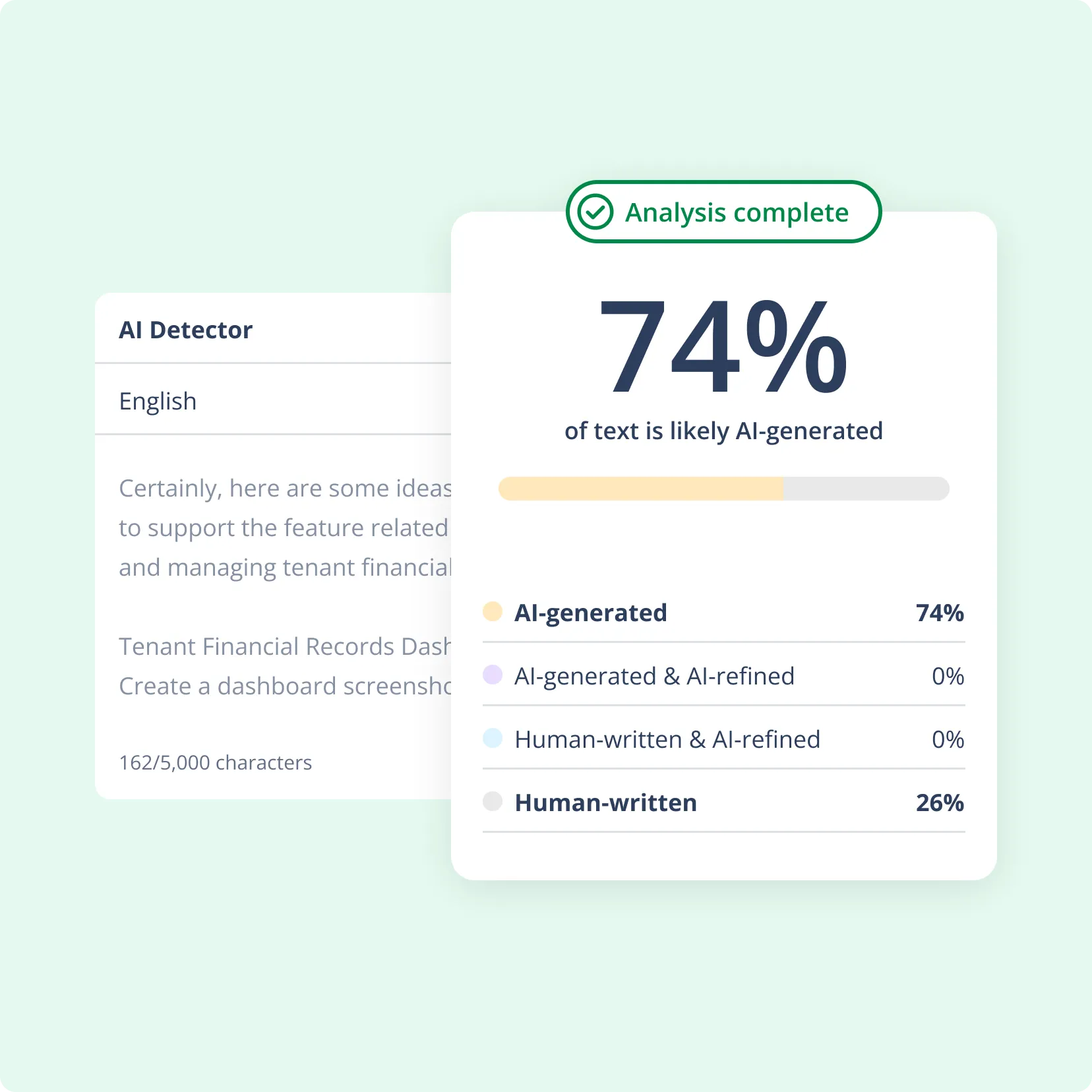
Unlike many AI detectors that only give a single document-wide score, the QuillBot AI Detector distinguishes between fully machine-written text and content that was merely refined with AI assistance. This sentence-level granularity is what makes it particularly useful for marketing teams and publishers who use AI to draft but need the final copy to pass as human-written.
Key facts about QuillBot AI Checker at a glance:- Free to use for texts up to 1,200 words — no account required
- Approximately 10 free scans per day, with one file upload at a time
- Minimum input of 80 words for reliable detection results
- Detects content from ChatGPT, GPT-4, GPT-5, Claude, and Gemini
- Supports six languages: English, French, Spanish, German, Dutch, and Portuguese
- Uses a custom model that evaluates word patterns, sentence variety, and probability distributions
- Premium unlocks unlimited word counts, bulk file uploads, and faster processing
The tool sits alongside QuillBot’s Grammar Checker, Plagiarism Checker, Paraphraser (with 10 modes), and AI Humanizer. This means that once the AI Checker flags a section, you can fix it without leaving the platform — paraphrase it, humanize the tone, or correct grammar issues all in one place.
How Accurate Is QuillBot AI Detector?
Accuracy is the most common question about any AI detection tool, and the honest answer for the QuillBot AI Detector is: it depends on the content type and length.
Independent testing across multiple review sites consistently places QuillBot’s detection accuracy at roughly 75–80% on long-form English text (600+ words of expository, unedited AI content). That is a solid baseline for a free tool, though it trails dedicated paid detectors that specialize in AI detection as their core product.
Where accuracy holds up — and where it drops:When QuillBot AI Checker performs well
The detector is most reliable on longer, straightforward texts. Unedited ChatGPT or Gemini outputs of 600 words or more in English get flagged accurately the majority of the time. Blog posts, marketing copy, and standard business writing fall into this sweet spot. The tool’s custom model architecture picks up telltale AI signals like overly formal tone, predictable sentence structure, generic language, and low vocabulary variability.
When accuracy drops
Reliability decreases in several scenarios. Texts under 80 words cannot be analyzed at all, and anything under 200 words produces inconsistent results. Heavily paraphrased AI content — where a human has edited the draft or run it through QuillBot’s own Paraphraser — is harder to detect. Creative writing, fiction, and highly stylized content also generate more false positives, since unusual prose can mimic AI patterns. Mixed human-AI drafts, where a person writes half and ChatGPT writes the other half, remain the toughest challenge for any detector on the market.
How it compares to the industry
For context, Originality.ai leads the market at approximately 94% accuracy with only 5% false positives. GPTZero follows at around 89% accuracy with the lowest ESL bias in the industry (2%). Turnitin claims 98% but independent testing shows real-world accuracy closer to 90–95%, especially on paraphrased content. QuillBot’s 75–80% accuracy is lower, but its free tier and integrated writing suite are advantages that standalone detectors do not offer.
How to Use QuillBot AI Checker Step by Step
Using the QuillBot AI Checker is straightforward, but getting the best results requires more than just pasting text and hitting a button. Here is a complete walkthrough for content marketers, students, and publishers.
-
Step 1 — Prepare your content
Start by gathering the text you want to check. This could be a freelancer’s blog post, an AI-generated first draft, a student essay, or a piece of marketing copy from your team. Make sure the text is at least 80 words long — shorter content will not produce meaningful results. For the most accurate analysis, aim for 600 words or more.
-
Step 2 — Open the AI Content Detector
Navigate to QuillBot’s AI Content Detector tool. No account is needed for free scans. You will see a text input area where you can paste content directly or upload a file. Select your language from the six supported options (English, French, Spanish, German, Dutch, or Portuguese).
-
Step 3 — Run the detection scan
Click the “Detect AI” button. Within seconds, QuillBot will return a detailed report. The report includes an overall AI percentage score and sentence-by-sentence highlighting. Sentences flagged as likely AI-generated are color-coded, while human-written sections remain unmarked. The tool also differentiates between fully AI-written text and content that has been AI-edited or AI-paraphrased.
-
Step 4 — Interpret the results
Look at both the overall score and the individual sentence highlights. A document scoring 20% AI-generated may only have a few formulaic sentences that need reworking. A document scoring 80% or higher likely needs a substantial rewrite. Pay particular attention to introductions and conclusions — AI-generated text tends to use generic, predictable phrasing in these sections, which is exactly what the detector catches.
-
Step 5 — Fix flagged sections
You have three options for revising flagged content:
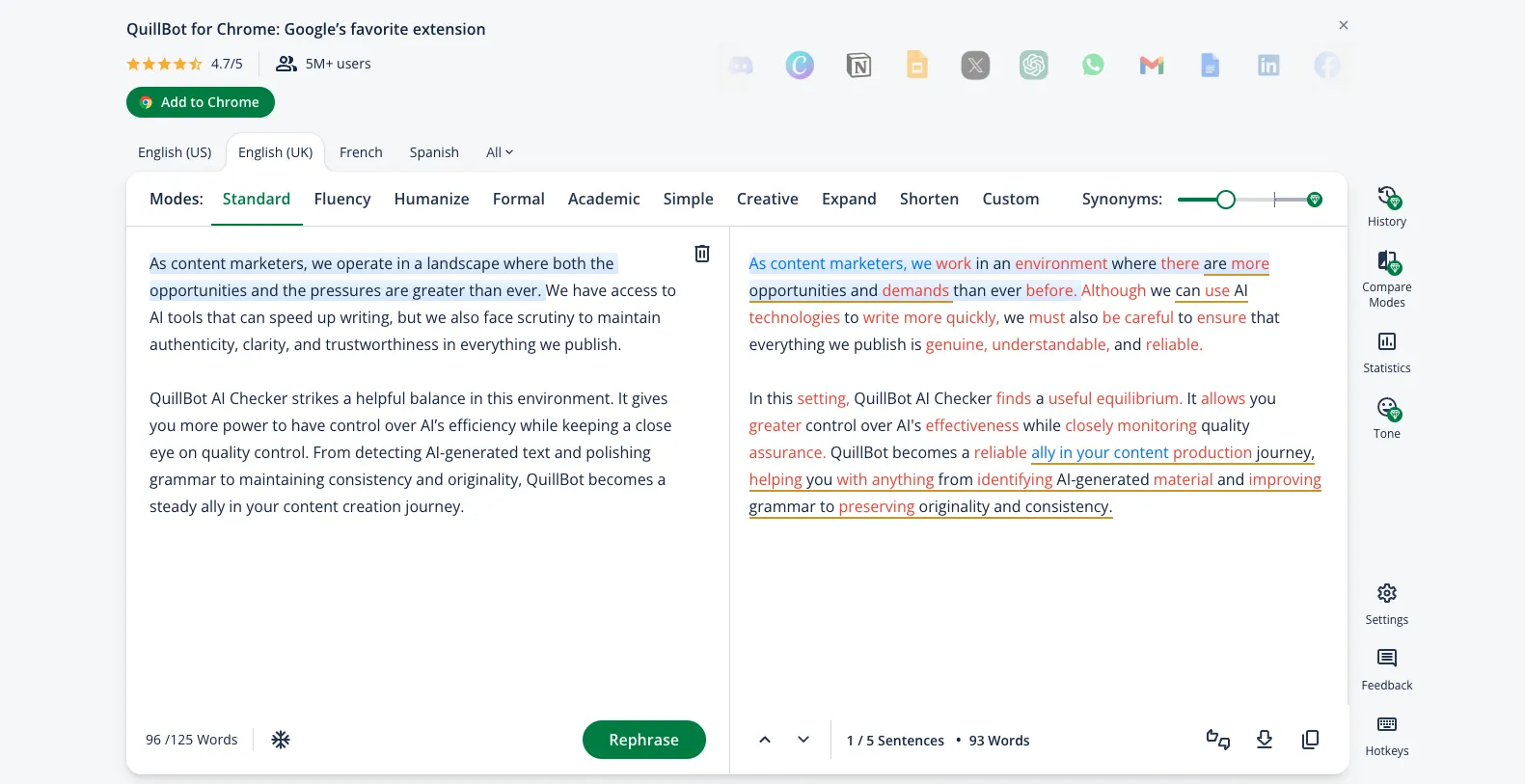
Use the Paraphraser. Copy flagged sentences into QuillBot’s Paraphraser and choose from 10 modes — Standard, Fluency, Creative, Shorten, Expand, Formal, Simple, Academic, Custom, and more — to rewrite the text. The Fluency mode works best for maintaining meaning while removing AI-sounding patterns.
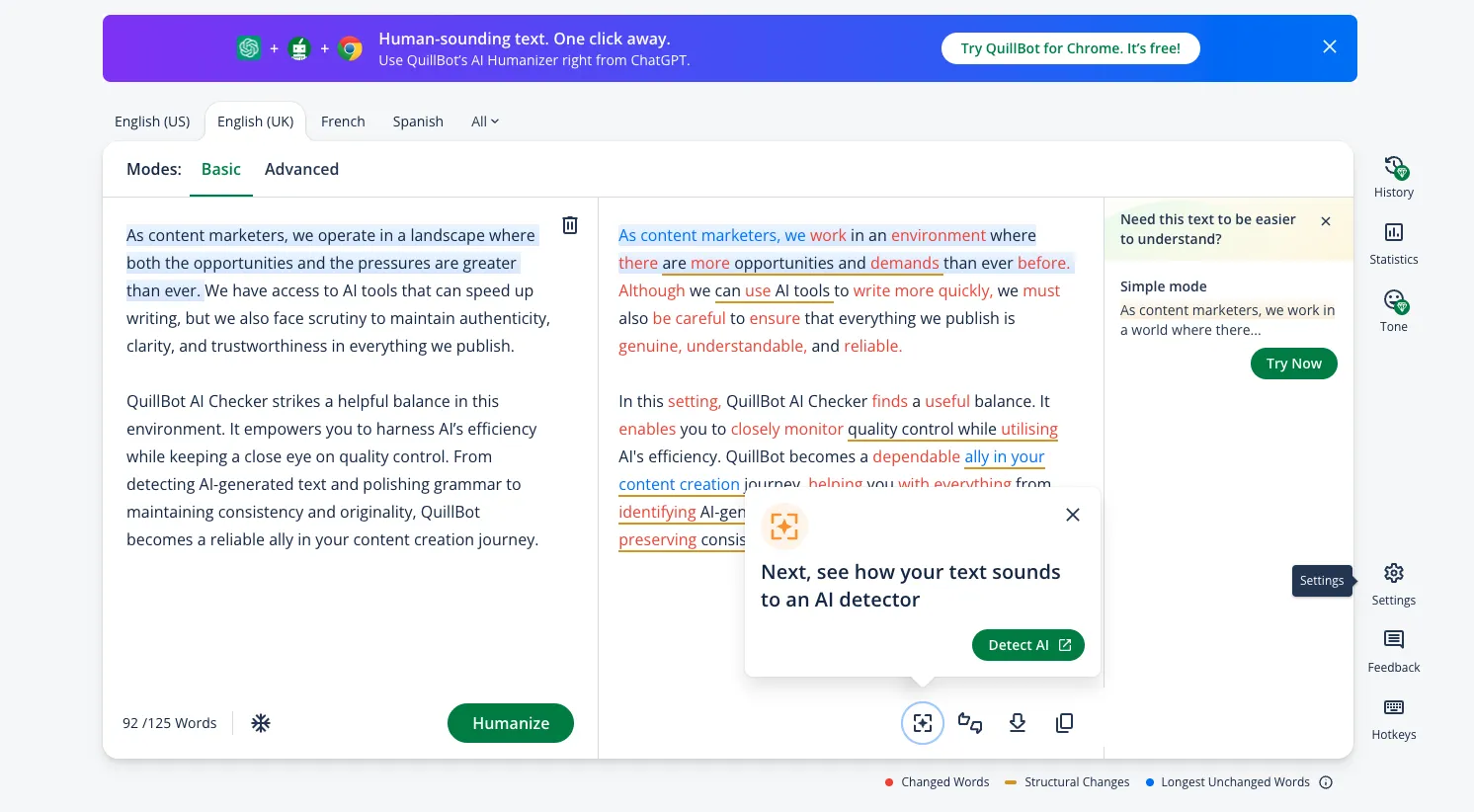
Run the AI Humanizer. For stubborn sections that still read as machine-written after paraphrasing, QuillBot’s AI Humanizer specifically targets the patterns detectors look for — adding variability, adjusting tone, and removing the formulaic structure that characterizes AI output.
Edit manually. The most reliable fix is always a human rewrite. Add personal anecdotes, brand-specific language, opinions, or data points that only a person would include. Injecting your brand’s personality into generic AI text is often the fastest path to a natural-sounding result.
-
Step 6 — Run grammar and plagiarism checks
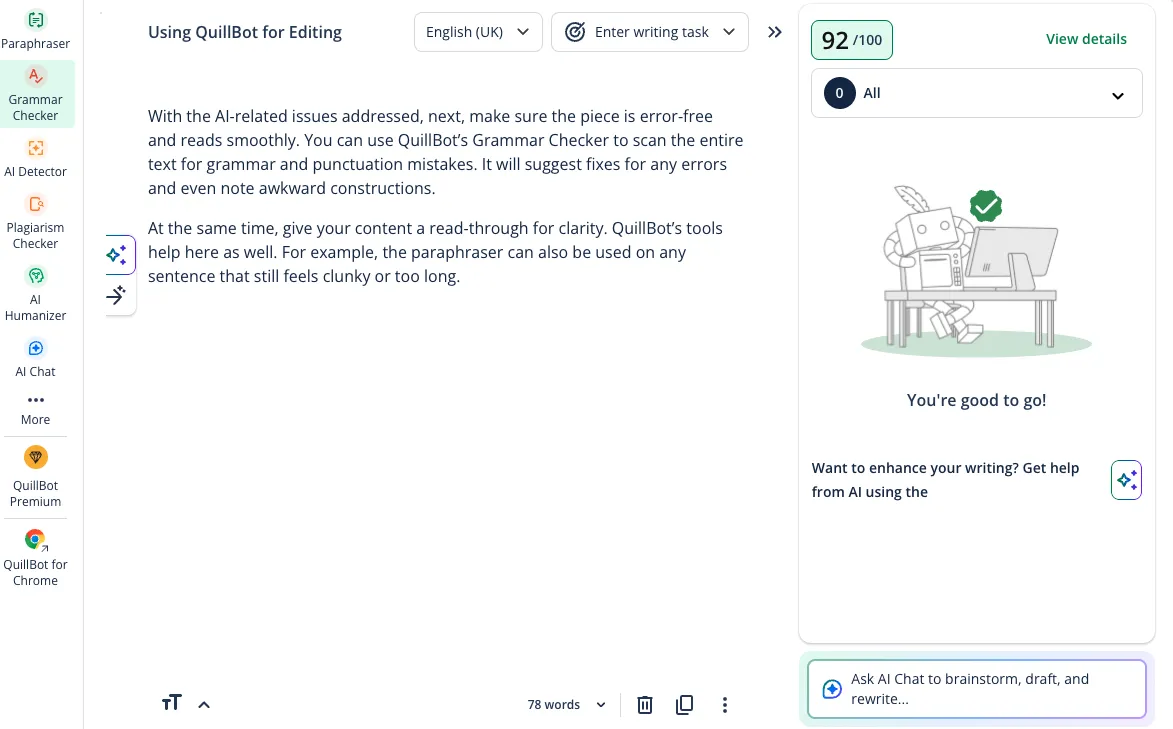
After fixing the AI-flagged content, run QuillBot’s Grammar Checker to catch any errors introduced during editing. Then use the Plagiarism Checker to verify originality — this is especially important for AI-generated drafts, which can inadvertently reproduce common phrases or known texts. A clean plagiarism report adds an extra layer of confidence before publishing.
-
Step 7 — Re-scan and finalize
Run the AI Checker one final time on your revised text to confirm the score has dropped to an acceptable level. Most content marketers aim for under 15% AI detection. Once the score is satisfactory, give the piece a final human read-through for tone, logic flow, and brand consistency before publishing.
Scan your content with QuillBot AI Checker — free up to 1,200 words
QuillBot AI Checker: Free vs Premium
QuillBot offers AI detection on both its free and paid plans, but the differences matter depending on your volume and workflow needs.
- Free plan: Up to 1,200 words per scan, approximately 10 scans per day, single file upload, no account required. Ideal for occasional checks on individual articles or essays.
- Premium plan: Unlimited word counts, bulk file uploads, faster processing, and detailed reporting with percentage breakdowns. QuillBot Premium pricing starts at $8.33/month on the annual plan (billed as $99.95/year). Monthly billing is $19.95/month. Students get a discounted rate starting at $6.25/month.
For individual content creators, students, and small bloggers, the free tier covers most use cases. For marketing teams processing 10+ articles per week, freelance editors reviewing client work in bulk, or publishers running compliance checks across a content library, Premium pays for itself in time saved. The unlimited word count alone removes the biggest friction point — no more splitting long whitepapers into 1,200-word chunks.
Premium also unlocks the full writing suite without limits: unlimited paraphrasing (all 10 modes), unlimited grammar checks, expanded plagiarism scanning, and unrestricted access to the AI Humanizer. Since the real value of the AI Checker is its integration with these fix-it tools, Premium users get the complete detect-and-fix workflow.
QuillBot AI Detector vs Competitors
How does QuillBot’s AI detection stack up against the most popular alternatives? Here is an honest comparison based on independent testing and publicly available data.
QuillBot vs Originality.ai
Originality.ai is a dedicated AI detection and plagiarism platform built for professional content teams. It leads the market with approximately 94% detection accuracy and only 5% false positives. Its models are trained on outputs from the latest AI systems including GPT-5 and Claude.
However, Originality.ai has no free tier — pricing starts at $14.95/month. QuillBot’s advantage is clear: free access up to 1,200 words and a bundled writing suite for fixing what the detector flags.
QuillBot vs GPTZero
GPTZero is the most recognized name in AI detection, particularly in education. It achieves around 89% accuracy with the lowest ESL bias of any major detector (2%), which means non-native English speakers are less likely to be falsely flagged. GPTZero offers a limited free plan and paid tiers starting at $10/month. For pure detection accuracy, GPTZero wins.
For an all-in-one writing and detection toolkit, QuillBot offers more functionality per dollar.
QuillBot vs Turnitin
Turnitin dominates academic submissions and is used by most universities worldwide. It claims 98% accuracy with less than 1% false positives, though independent testing shows real-world rates closer to 90–95% on paraphrased content.
Turnitin is not available to individual users — it is sold to institutions only. Students who want to pre-check their work before submitting to Turnitin often use the QuillBot AI Checker as a free screening step.
QuillBot vs Copyleaks
Copyleaks offers AI detection and plagiarism checking with enterprise-level features including API access, LMS integrations, and multi-language support across 30+ languages. Its detection accuracy is competitive with GPTZero.
Copyleaks pricing starts at $9.99/month. Where QuillBot pulls ahead is usability: the combined Paraphraser, Grammar Checker, and Humanizer mean you can detect and fix issues in one platform instead of switching between tools.
Bottom line:
Who Should Use QuillBot AI Checker?
The QuillBot AI Detector fits different workflows depending on your role and goals.
Content marketers and publishers
Marketing teams that use AI to accelerate content marketing production face a specific challenge: drafts need to sound human and on-brand before publishing. The QuillBot AI Checker lets editors screen every piece before it goes live, then use the Paraphraser and Humanizer to clean up flagged sections. For teams managing multiple writers and freelancers, this creates a consistent quality gate across all content.
Students and academic writers
Students using AI tools for research, outlining, or initial drafts can run their essays through the QuillBot AI Checker before submission. It serves as a pre-submission screening step — particularly useful for catching sections that sound too formulaic or generic. QuillBot’s paraphrasing tool for students then helps rework those sections into the student’s own voice.
Educators and editors
Teachers and university staff who do not have institutional access to Turnitin can use QuillBot’s free AI Checker as a preliminary screening tool. Freelance editors reviewing client submissions can run a quick AI scan before starting line edits, which helps prioritize which sections need the most attention.
SEO professionals
Search engines continue to prioritize original, high-quality content. SEO teams concerned about AI content penalties can use the QuillBot AI Detector to audit existing content libraries, flag pages with high AI scores, and systematically optimize content for SEO with human rewrites. The tool’s sentence-level analysis makes it practical for auditing hundreds of pages and triaging the worst offenders first.
Best Practices for Getting the Most Out of QuillBot AI Checker
The tool is simple to use, but a few practices will significantly improve your results.
- Always check 600+ words at a time. Short snippets produce unreliable scores. If you are checking a short email or social post, add surrounding context to bring the word count above the 600-word threshold for best accuracy.
- Run detection before any edits. Check the raw draft first to get a true baseline AI score. If you edit first and then check, you cannot tell whether the flagged sections were AI-written or just awkwardly human-written.
- Use the Paraphraser in Fluency mode for subtlety. Creative mode changes too much and can introduce new issues. Fluency mode smooths AI patterns while preserving meaning and tone — it is the best mode for content marketing and academic writing.
- Do not rely on any single detector. No AI detection tool is 100% accurate. For high-stakes content — academic submissions, legal documents, published journalism — cross-check with a second detector like GPTZero or Originality.ai.
- Treat the AI Checker as a diagnostic, not a verdict. A high AI score does not necessarily mean the text is bad. It means the text exhibits patterns commonly associated with AI output. Sometimes, technical writing or formal reports naturally score higher. Use your judgment alongside the score.
Get started with QuillBot AI Checker — no account needed
QuillBot AI Checker FAQ
Is QuillBot AI Checker free to use?
Yes. QuillBot AI Checker is free for texts up to 1,200 words with no account required. Free users get approximately 10 scans per day and can upload one file at a time. Premium subscribers get unlimited word counts, bulk uploads, and faster processing.
How accurate is QuillBot AI Detector?
QuillBot AI Detector achieves roughly 75–80% accuracy on long-form English text of 600 words or more. Accuracy drops on content under 80 words, heavily paraphrased AI text, creative writing, and mixed human-AI drafts. It performs best on expository, unedited AI-generated content.
What is the difference between QuillBot AI Checker and QuillBot AI Detector?
They are the same tool. QuillBot AI Checker and QuillBot AI Detector are two names for one feature: the AI Content Detector built into QuillBot’s writing suite. It analyzes text and identifies sections likely written, edited, or paraphrased by AI.
Can QuillBot AI Detector identify content from ChatGPT, Claude, and Gemini?
Yes. QuillBot’s AI Content Detector is trained to identify text generated by ChatGPT, GPT-4, GPT-5, Claude, Gemini, and other large language models. It uses pattern analysis across word choice, sentence variety, and probability distributions to flag AI-generated sections.
What is the word limit for QuillBot AI Checker?
Free users can scan up to 1,200 words per check. The tool requires a minimum of 80 words to produce accurate results. Premium users get unlimited word counts and can upload files in bulk for batch processing.
How does QuillBot AI Detector compare to GPTZero and Originality.ai?
QuillBot AI Detector scores around 75–80% accuracy on long-form English text. Originality.ai leads with approximately 94% accuracy and 5% false positives. GPTZero achieves about 89% accuracy with the lowest ESL bias at 2%. QuillBot’s main advantage is its free tier and integration with paraphrasing and grammar tools in one suite.
Does QuillBot AI Checker work for academic writing?
QuillBot AI Checker can flag AI-generated text in academic work, and its free tier makes it accessible to students. However, most universities rely on Turnitin for official submissions. QuillBot works well as a pre-submission check before running content through an institution’s required detector.
What languages does QuillBot AI Detector support?
QuillBot AI Detector supports six languages: English, French, Spanish, German, Dutch, and Portuguese. Accuracy is highest for English-language content and drops for shorter texts or creative styles in other supported languages.
Final Verdict on QuillBot AI Checker
The QuillBot AI Checker is not the most accurate AI detector on the market — tools like Originality.ai and GPTZero outperform it on pure detection. What makes it uniquely practical is the combination of a genuinely useful free tier with an integrated suite of tools that fix the problems it finds.
For content marketers, the detect-then-fix workflow (AI Checker → Paraphraser → Humanizer → Grammar Checker → Plagiarism Checker) eliminates the need to switch between multiple platforms. For students, the free 1,200-word limit covers most essays and assignments. For SEO professionals auditing content at scale, the sentence-level analysis tells you exactly which sections need human intervention.
If your priority is maximum detection accuracy for high-stakes decisions, invest in Originality.ai or GPTZero. If you want a free, all-in-one writing quality tool that includes AI detection as part of a broader editing workflow, QuillBot AI Checker is the most practical choice available in 2026.