Customer service can make or break a company. When buyers expect fast, personal help across every channel, the support stack you choose matters. Zendesk is one of the most recognized names in that space – but what is Zendesk used for, and is it the right fit for your team?
Zendesk is an AI-powered, cloud-based customer service platform used to manage support conversations across email, live chat, phone, and social media from a single workspace.
Companies use it to turn every request into a trackable ticket, automate routine work, build self-service help centers, and measure support performance. It works for small teams and large enterprises alike, though as we will cover, that breadth is not always a good thing.
The expectations behind tools like this keep rising. 88% of customers now expect faster responses than they did a year ago, and 74% expect support to be available 24/7, according to Zendesk’s customer service research.
A further 76% say they would choose a company that lets them share text, images, and video in one continuous conversation rather than starting over each time. Zendesk exists to meet those expectations without burying support teams.
Want the product-level breakdown? Read our full Zendesk review.

What Is Zendesk Used For?
At its core, Zendesk is used to centralize and speed up customer support. These are the jobs it does day to day:
- Centralized customer support: chat, email, voice, and social messages land in one shared agent workspace, so replies stay fast and consistent.
- Help desk ticketing: every request becomes a ticket that can be prioritized, routed, and resolved, so nothing slips through.
- Live chat and messaging: real-time support across web and mobile, including WhatsApp and other channels.
- Knowledge base and self-service: a help center that lets customers find answers on their own and takes pressure off agents.
- Analytics and reporting: dashboards on response times, ticket volume, and satisfaction so you can see what to fix.
By pulling every channel into one place, agents reply with full context instead of switching between tools.
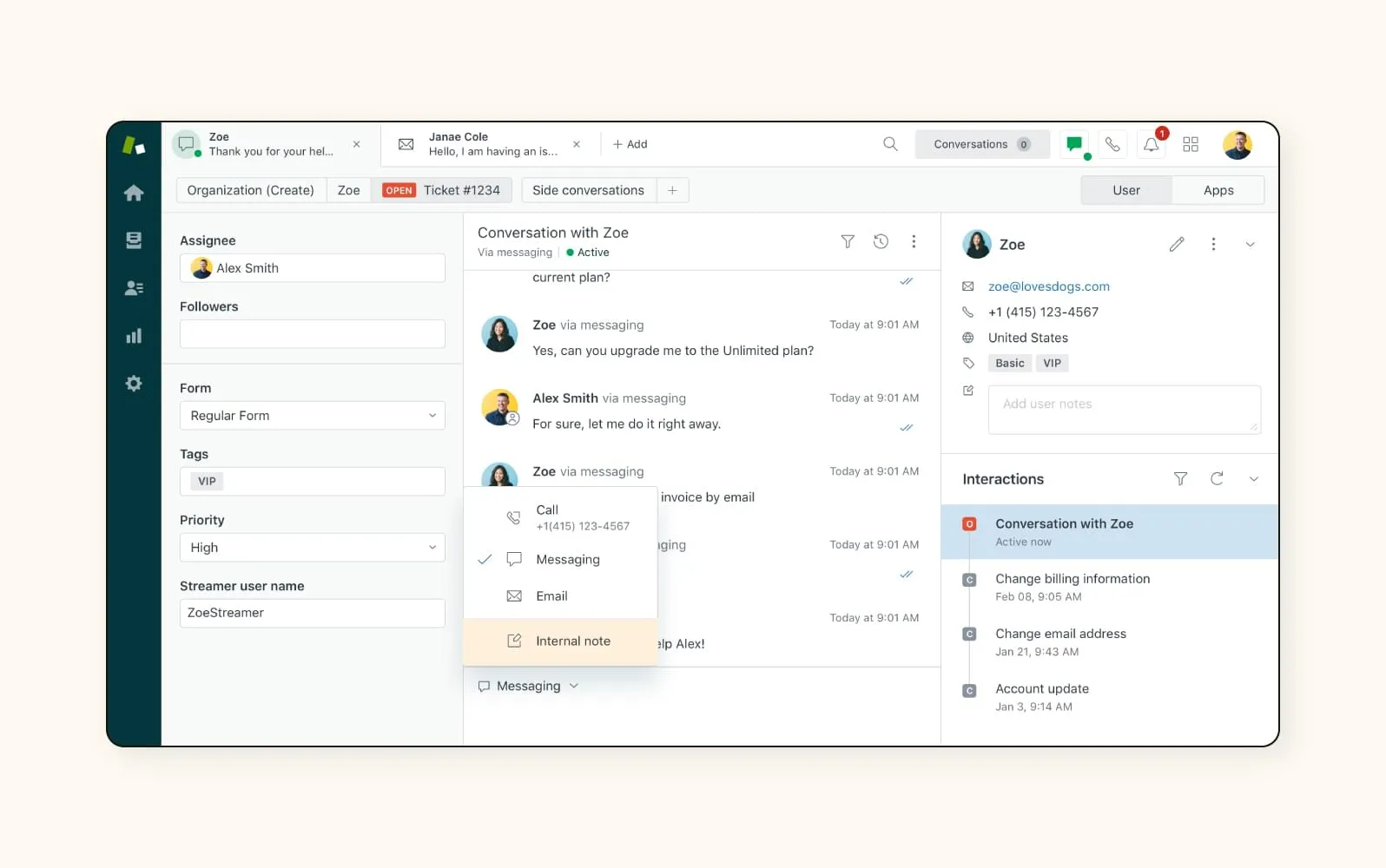
Each conversation becomes a ticket that can be tracked from first message to resolution, which is what keeps a busy queue from turning into chaos.

How Does Zendesk Work?
Zendesk is built so support runs smoothly for agents and customers alike. Four pieces do the heavy lifting:
- Ticketing system: every inquiry – phone, email, chat, or social – becomes a ticket with full context attached, so agents stay organized.
- Agent workspace: one clean interface to view, prioritize, and answer tickets, with macros, internal notes, and prebuilt workflows that save time.
- Customer portal: a self-service hub where customers submit requests, track status, and search answers, even outside business hours.
- Analytics dashboard: live data on satisfaction, response times, and volume so teams can spot patterns and close gaps.
The ticketing view is where agents spend most of their day, triaging and replying from a single screen.

On the customer side, the self-service portal lets people solve simple issues themselves and check on open requests at any hour.

Key Features of Zendesk
- Unified ticketing: every message ends up in one place for faster, more consistent answers.
- Smart knowledge base: a structured help center that gives instant answers and frees up agents.
- Automation and macros: rules, triggers, and canned responses handle repetitive work.
- AI agents and insights: AI resolves common issues around the clock and surfaces trends in customer requests.
- Multi-brand support: manage several brands, regions, or products from one account.
- Omnichannel coverage: live chat, voice, email, and messaging apps without losing context.
The AI layer is where Zendesk has invested most recently, handling routine tickets and flagging patterns a human might miss.

Who Zendesk Is Best For
Zendesk fits a wide range of industries, but it shows its value most clearly here:
- E-commerce: handles order, shipping, and return questions from email, chat, and social in one queue during busy seasons.
- SaaS companies: self-service centers, live chat, and automated follow-ups that keep users informed and reduce churn. See our take on AI customer service.
- Healthcare: centralizes patient inquiries and appointment questions with the reliability the sector demands.
- Education: supports students and staff across enrollment, course, and account questions without losing requests in inboxes.
Live chat is often the channel that ties these use cases together, giving customers help the moment they need it.

When Zendesk Is Overkill
Here is the part most “what is Zendesk used for” articles skip: Zendesk is not always the right call. Its strength – depth and breadth – can become a cost and complexity problem for smaller teams.
You may not need Zendesk if:
- You are a small team with simple needs. If a shared inbox and a few canned replies cover you, a lighter tool like Help Scout is faster to run and cheaper.
- Budget is tight. Zendesk’s per-agent pricing and add-ons add up quickly once you want automation and AI features.
- You want fast setup. The full platform takes configuration and admin time. Simpler help desks get you live in a day.
- Your volume is low. If you handle a modest number of tickets a month, you will pay for capacity and features you never touch.
If any of these sound like you, it is worth comparing Zendesk against lighter options before committing. Our Freshdesk vs Zendesk and Freshdesk vs Help Scout comparisons are good starting points.
Zendesk vs Lighter Alternatives
A quick way to see where Zendesk fits against two common alternatives:
| Tool | Best for | Standout strength | Watch-out |
|---|---|---|---|
| Zendesk | Mid-market to enterprise, multi-channel teams | Depth, AI, omnichannel, multi-brand | Cost and setup complexity |
| Freshdesk | Growing teams that want power without the price | Strong features at a lower entry point | Can still get complex at higher tiers |
| Help Scout | Small teams and simple, email-led support | Fast setup, clean shared inbox | Fewer advanced/omnichannel features |
Browse the full category on Tekpon’s help desk software page to weigh more options.
The Bottom Line on Zendesk
Zendesk is used to bring every support conversation, channel, and metric into one place, with AI and automation that genuinely lighten the load for busy teams.
For mid-market and enterprise support operations, that depth is worth it. For a small team with straightforward needs, a lighter help desk often delivers the same outcome for less money and less setup.
The right question is not just what Zendesk does, but whether its depth matches your stage. If you are scaling support across channels, it is a strong fit. If you are not there yet, compare before you commit.
Frequently Asked Questions
Zendesk is primarily a customer service help desk, not a sales CRM. It centralizes support tickets, live chat, and self-service across channels. Zendesk does offer a separate sales product, but its core use is managing and resolving customer support conversations, not running a sales pipeline.
It depends on volume and complexity. Zendesk is worth it for small businesses handling support across several channels or planning to scale quickly. For a small team with simple, email-led support, a lighter tool such as Help Scout is usually faster to set up and more cost-effective.
The most common alternatives are Freshdesk, Help Scout, Zoho Desk, and Intercom. Freshdesk offers similar power at a lower entry point, Help Scout suits small email-led teams, and Zoho Desk fits businesses already in the Zoho ecosystem. Compare them on Tekpon’s help desk software category page.
Yes. Zendesk offers a free trial of its support plans so you can test the agent workspace, ticketing, and automation before paying. There is no permanent free plan, so once the trial ends you move to a paid tier. You can start a trial through Tekpon’s Zendesk deal.
Zendesk is omnichannel: it handles email, live chat, voice, web and mobile messaging, and social channels including WhatsApp, all from one agent workspace. That matters because 76% of customers want to move across channels in a single conversation without repeating themselves.