Continue with LinkedIn
or
Recover my Password
Submit your Tekpon Account E-mail address and you will receive an email with instructions to reset your password.

PureVPN for Teams Reviews for 2026

Enterprise-review-ready business VPN for distributed teams
Premium Seller
User Score:
4.5/5

Score is based on User Sentiment from reviews and public chatter. We weight volume, recency, and consistency, then normalize to 5.

See our Methodology

What is PureVPN for Teams?

PureVPN for Teams is the business-tier vpn for teams product from PureSquare, positioned as a business VPN built to pass enterprise security reviews and satisfy cyber insurance underwriting. It is built for IT and security leaders who need to give distributed workers encrypted access to internal tools, produce evidence for SOC 2 Type I and II audits, support ISO 27001 and 27002 controls, cover HIPAA and PCI DSS workflows, and answer cyber insurance questionnaires without standing up new hardware.

Over 5,000 teams run on it, from 2-person startups on the free plan up to enterprise deployments like HelloRache’s 5,000 Virtual Medical Assistants and DAZN’s NAT integration across 36+ locations.

The feature set is specific to that buyer. A centralized admin dashboard, per-user dedicated IPs, a Team Server that shares one IP across up to 50 people, mandatory MFA enforcement, IP allowlisting, Single Sign-On and SCIM provisioning on the Pro plan, and audit-ready activity logs. Starter begins at $7/user/mo on annual billing for 1-10 seats and scales down to $3/user/mo at 501+ seats, with Pro custom-quoted for larger enterprise deployments.

Remote Access VPN deploys in minutes to a few hours with no new hardware. For IT leaders shortlisting business VPN software to replace a legacy site-to-site setup or pass the next enterprise security review, the free plan for 2 users and the 14-day money-back guarantee on paid plans make a pilot low-risk.

Found in these Categories

Best For

  • StartUps
  • Small Business
  • Medium Business
  • Large Enterprise
  • Non-profit Organization

PureVPN for Teams Pricing

Starting From:
$ 7 /user/mo (annual billing, 1-10 seats)
Pricing Model: Subscription
Claim Deal
Starter scales by seat count from $7/user/mo (annual, 1-10) down to $3/user/mo (annual, 501+). Pro is custom-quoted. Free plan covers 2 users / 5 devices. Add-ons: Static IP $3.99-$4.99/IP/mo, Port Forwarding $1.99-$2.99/PF/mo, Team Server $50/mo. All paid plans include a 14-day money-back guarantee.
Free Trial
Free Version

Free Plan

Free
Forever

Starter

(1-10 Seats)

$7
per user (annual billing)
Monthly

Pro

Custom Pricing
Custom Quote

Looking to Save Time & Money

Audit, consolidate, and save—powered by our internal buying team. Let our experts analyze your current software stack and identify opportunities for cost savings and efficiency improvements.

  • Stack Audit
  • Cost Reduction
  • Expert Team
Optimize My Stack

PureVPN for Teams Features

  • Access Controls/Permissions
  • No Log Policy
  • Web Inspection
  • Static IP
  • Router Support
  • Multi-protocol
  • Policy Management
  • Integrated Kill Switch
  • DNS Leak Protection
  • Cross-Platform App Availability
  • Anonymous Browsing
  • Remote Access Control
  • Peer-to-Peer
  • Multi-language
  • Centralized admin dashboard
  • Per-user dedicated IPs
  • IP allowlisting
  • Team Server
  • Remote Access VPN
  • Single Sign-On (SSO)
  • SCIM provisioning
  • Role-Based Access Control
  • Device posture checks
  • Application-level access
  • Activity audit logs
  • MFA enforcement
  • Port Forwarding
  • Split Tunneling
  • AES-256 encryption
  • Secure WiFi protection
  • 256-bit SSL
  • WireGuard protocol
  • OpenVPN protocol
  • IKEv2 protocol
  • KPMG-audited no-logs
  • SOC 2 Type I
  • SOC 2 Type II
  • ISO 27001 support
  • HIPAA controls support
  • PCI DSS controls support
  • Cyber insurance ready
  • GDPR compliant
  • 24/7 live chat
  • 6,500+ servers

PureVPN for Teams Integrations

User Sentiment - PureVPN for Teams Reviews

4.5/5
Based on 72,320 user reviews across the web
AI-powered Insight: This summary represents a comprehensive analysis of user reviews and opinions found across the web, including G2, Capterra, TrustPilot, and other review platforms. Our AI aggregates sentiment and identifies key themes from verified user feedback.
What users love most
  • Fast connections for remote teams

    G2 Teams reviewers describe PureVPN for Teams as fast and stable even under heavy, daily use, using it primarily to connect remote workers to shared company resources without noticeable slowdowns.

    SaaSGenius and multiple VPN review sites confirm PureVPN generally delivers good speeds on modern protocols like WireGuard and IKEv2, which is critical for video calls, collaboration tools, and always‑on tunnels.

  • Large global server footprint

    PureVPN’s infrastructure spans thousands of servers in 65+ countries, giving distributed teams plenty of location options for latency, geo‑testing, and localised access.

    Business reviewers value being able to route remote staff through nearby gateways or specific markets, and PureDome’s corporate profile adds dedicated gateways for even more control.

  • Team dashboard and dedicated IPs

    PureVPN for Teams and PureDome both expose central dashboards for user management, letting admins add or remove members, create groups, and set policies from one interface.

    G2 Teams users explicitly praise the ability to assign dedicated IPs per user or team, which reduces platform security triggers and simplifies firewall whitelisting for SaaS, admin panels, and internal apps.

  • Value pricing for business use

    Across Capterra, SoftwareAdvice, and B2B reviews, PureVPN is repeatedly described as affordable or “seriously cheap” on longer plans, making it attractive for startups and SMBs that need many seats without enterprise‑VPN pricing.

    SaaSGenius notes that PureVPN for Teams offers good value per seat with unlimited bandwidth, multi‑device usage, and business features at lower prices than many zero‑trust or SASE competitors.

  • Good streaming and geo‑unblocking

    TheBestVPN and AndroidCentral report PureVPN hit 100 percent success in unblocking major streaming sites in recent tests, and Reddit users say it works well for geo‑locked live sports, which can be useful for marketing, QA, or media teams.

    Business VPN reviewers also see this as a plus for testing regional content, ads, and localized experiences from within a corporate network.

  • Responsive 24/7 live chat support

    Trustpilot and Capterra reviewers frequently name individual PureVPN agents who solved issues fast, calling the chat “just a second away” and “great” when tickets are handled promptly.

    PureDome and Teams users on G2 mention quick support resolutions, which is critical when remote workers cannot access internal systems and uptime is on the line.

Areas for Improvement
  • Connection stability on some routes

    PureVPN for Teams reviewers and consumer users alike report intermittent disconnects or trouble connecting to certain servers, which can disrupt long‑running sessions and remote‑work flows.

    Android and desktop app reviews mention that connections sometimes drop without obvious reason or need manual server switching, adding friction for less technical staff.

  • Apps and UX need more polish

    Google Play and some expert reviews criticise clunky mobile apps, inconsistent UX, and occasional bugs, particularly on Windows and Android.

    Teams and PureDome admins would benefit from more refined dashboards, clearer error messaging, and better protocol handling, rather than having to dig through guides or tweak settings manually.

  • Limited enterprise‑grade controls

    Compared with OpenVPN Access Server, zero‑trust network access platforms, or full SASE stacks, PureVPN for Teams and PureDome lack some deep enterprise features such as fine‑grained per‑app policies, device posture checks, or advanced SOC‑level analytics.

    For small teams, this is often fine, but mid‑market IT leaders may still prefer more comprehensive zero‑trust or SD‑WAN solutions when compliance and complex networks are in scope.

Leave a Review

Tell us your opinion about PureVPN for Teams and help others make informed decisions.
Account creation required to leave a review.

PureVPN for Teams Company Details

Company Name

PureSquare (GZ Systems Ltd.)

Headquarters

Hong Kong

Questions about PureVPN for Teams?

Get in touch with the vendor for more information.

Own this Software?

Processing Your Request

Please wait for a response.

Request to be contacted

PureVPN for Teams may contact you regarding your request.

Fields marked with an asterisk (*) are required

PureVPN for Teams vs. Similar Products

Select up to 3 Software, to enable Comparison

Compare Selected Software

Editorial Review: PureVPN for Teams Deep Dive

Rashi Arora |
Copy Link

What PureVPN for Teams Actually Does

At its core, PureVPN for Teams gives a company one place to provision VPN access, enforce policies, and see who connected from where. The admin console supports user roles, group-based assignments, MFA, and optional device posture checks.

From the user side, installing the client takes minutes on Windows, macOS, Linux, Android, iOS, and the major browsers, with additional apps for Android TV and Amazon Fire TV.
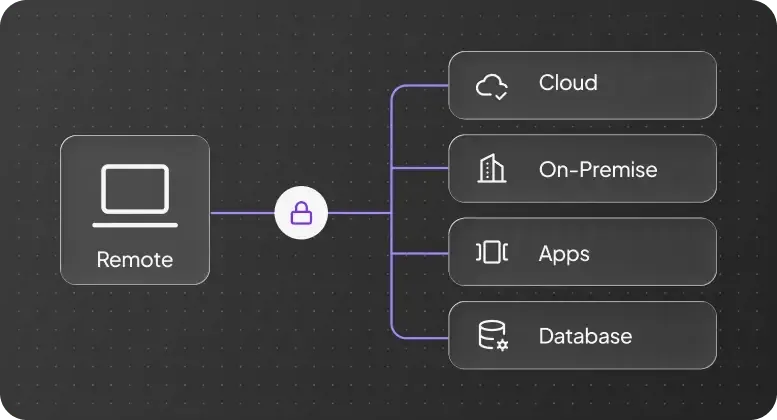
PureVPN for Teams remote access architecture connecting a remote user to cloud, on-premise, apps, and database resources through an encrypted tunnel

Three capabilities sit at the center of the product. The first is the per-user Dedicated IP, which gives each team member a fixed, allowlistable IP address instead of a shared pool. The second is the Team Server, which assigns one static IP to an entire group of up to 50 people so a back-office tool, a CMS, or a CRM can be locked down to a single ingress.

The third is Remote Access VPN, which deploys in minutes to a few hours with no new hardware, using encrypted tunnels with access control lists on private gateways and MFA enforcement on every connection.
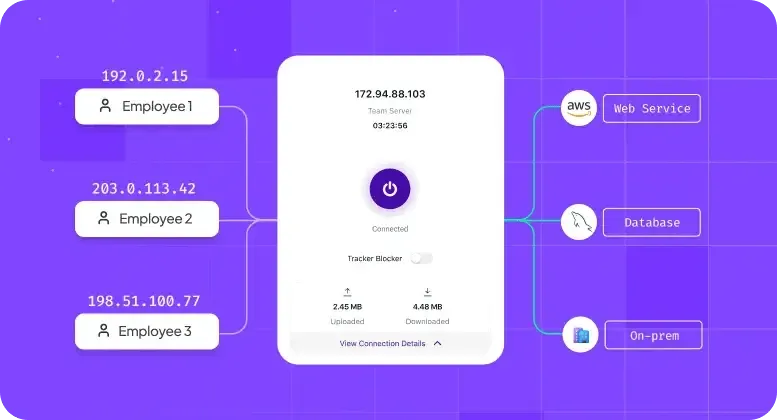
PureVPN for Teams Team Server routing three employees through a shared static IP to AWS, database, and on-prem workloads

Around those three pillars sit the things most buyers expect by default: AES-256 encryption, WireGuard and OpenVPN protocols, split tunneling, an internet kill switch, secure WiFi protection, port forwarding for specific inbound services, and unlimited bandwidth.

PureVPN for Teams positions all of this as a single business-tier SKU, not a bolt-on to the consumer app.

Who PureVPN for Teams Is Built For

PureVPN positions the product across five industry profiles that map directly to enterprise security review and cyber insurance pressure points. The pricing and deployment scale from 2-person startups on the free plan all the way to 501+ seat enterprise contracts, with Pro custom-quoted beyond that.
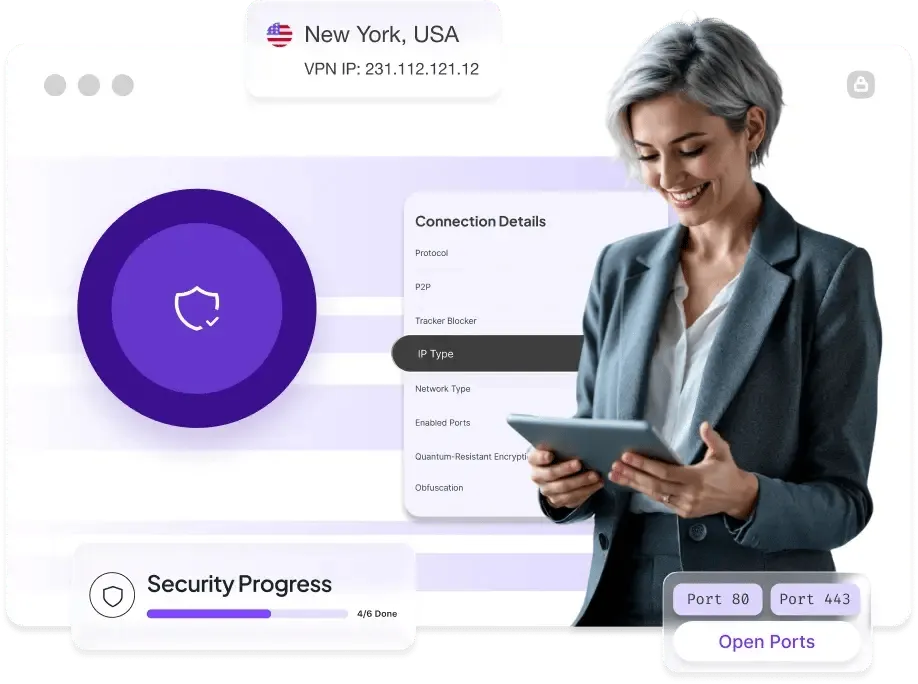
A business user reviewing PureVPN for Teams connection details including quantum-resistant encryption, obfuscation, open ports, and security progress

  • B2B SaaS companies selling into enterprise: need to answer SOC 2 and vendor security questionnaires from larger buyers. Per-user dedicated IPs and MFA enforcement produce direct evidence for those questionnaires.
  • FinTech and HealthTech: PCI DSS and HIPAA control support for cardholder data and PHI workflows. Fusion Markets runs six dedicated gateways across its globally distributed team. HelloRache secures 5,000 Virtual Medical Assistants on it. VaQya runs HIPAA-compliant billing and Spark Change Health runs conditional-access coaching on it.
  • IT consultancies and MSPs: managing client networks that must pass audits and insurance reviews. Centralized admin dashboards, audit logs, and role-based access let a small IT team support multiple client environments.
  • Remote and hybrid teams: encrypted access to private cloud resources and internal tools. Rewaa, a global IT-solutions company, runs PureVPN for Teams across its distributed workforce.
  • Advertisement and media QA: geo-restricted ad validation and streaming tests across regions. DAZN runs NAT integration on dedicated PureVPN servers across 36+ locations.

The common thread is a distributed workforce, a pending enterprise security review, and either an audit deadline or a cyber insurance renewal. PureVPN cites three numbers to frame the buyer problem: a 68% year-over-year increase in security breaches, 81% of companies reporting pressure to maintain data privacy, and an average data breach cost of $4.35 million globally. Those are PureVPN’s own figures. The broader point – that network access is an underinvested layer in most security stacks – lines up with how IT teams are budgeting in 2026.

Plans, Pricing, and What Comes With Each

PureVPN for Teams sells three tiers: a Free plan, a Starter plan, and a Pro plan. Pricing on Starter scales by seat count and billing term, with annual billing cutting roughly 13% off the monthly rate across every bracket.

The Starter plan covers up to 1,000 accounts with no device limit per user, the admin dashboard, per-user static IP whitelisting, the Team Server, and multi-factor authentication.
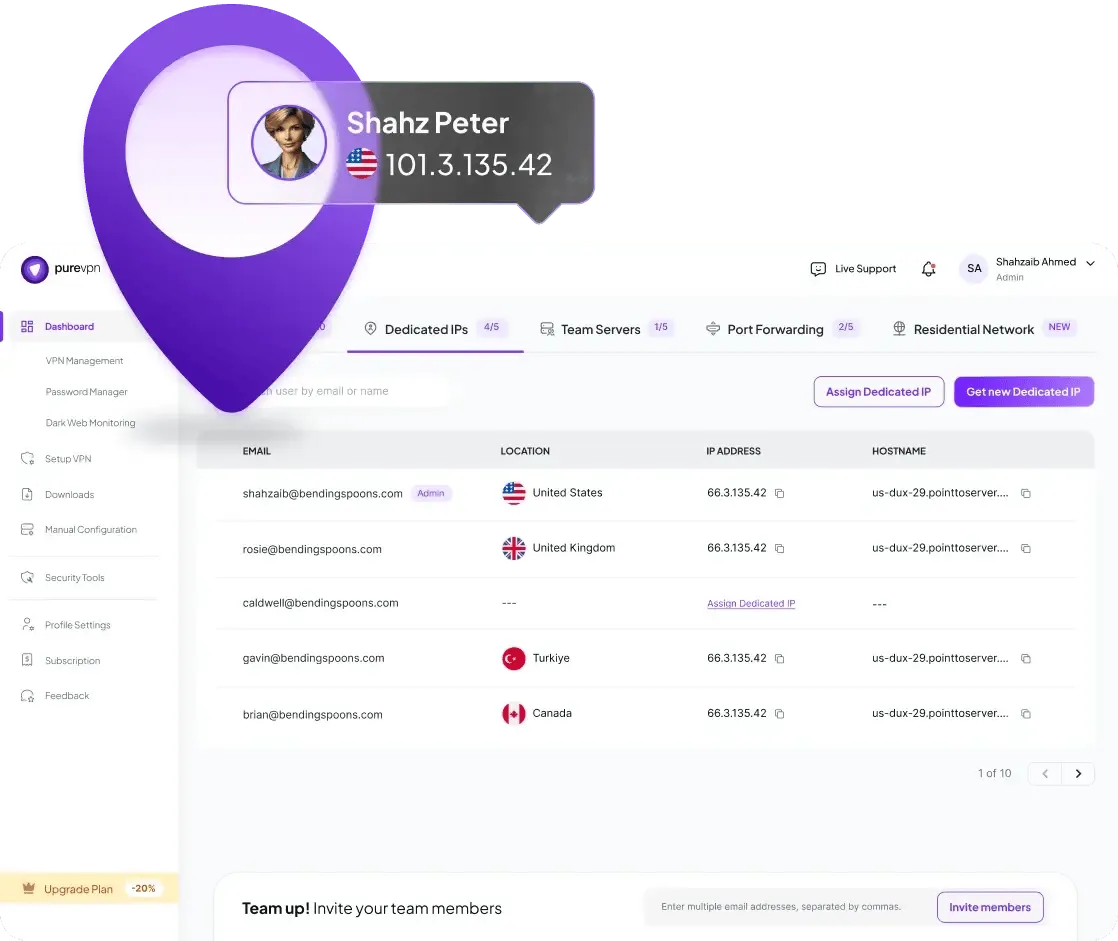
PureVPN for Teams admin dashboard showing per-user dedicated IPs assigned to team members in the US, UK, Turkey, and Canada

The Pro plan is priced custom and adds Single Sign-On with Okta, Microsoft Entra ID (formerly Azure AD), Google Workspace, and Microsoft 365, SCIM user provisioning, granular role-based access, device-based access control, application-level access, complete audit logs, and a dedicated account manager with a Slack channel.

Several features that enterprise buyers sometimes expect as baseline are sold as add-ons: Static IPs at $4.99/IP/mo monthly or $3.99/IP/mo annual, Port Forwarding at $2.99/PF/mo monthly or $1.99/PF/mo annual, and a Team Server at $50/month. Budget for those at scale.

The full seat-by-seat breakdown plus the Pro inclusion list lives on the dedicated PureVPN for Teams pricing review.

PureVPN backs every paid plan with a 14-day no-questions-asked money-back guarantee.

Security Reviews, Compliance Coverage, and Cyber Insurance

PureVPN for Teams is positioned explicitly as a business VPN built to pass enterprise security reviews. For companies selling into larger buyers, responding to vendor security questionnaires, or renewing cyber insurance policies, the product is packaged to answer procurement questionnaires directly. Here is how each framework maps to what the tool actually provides.
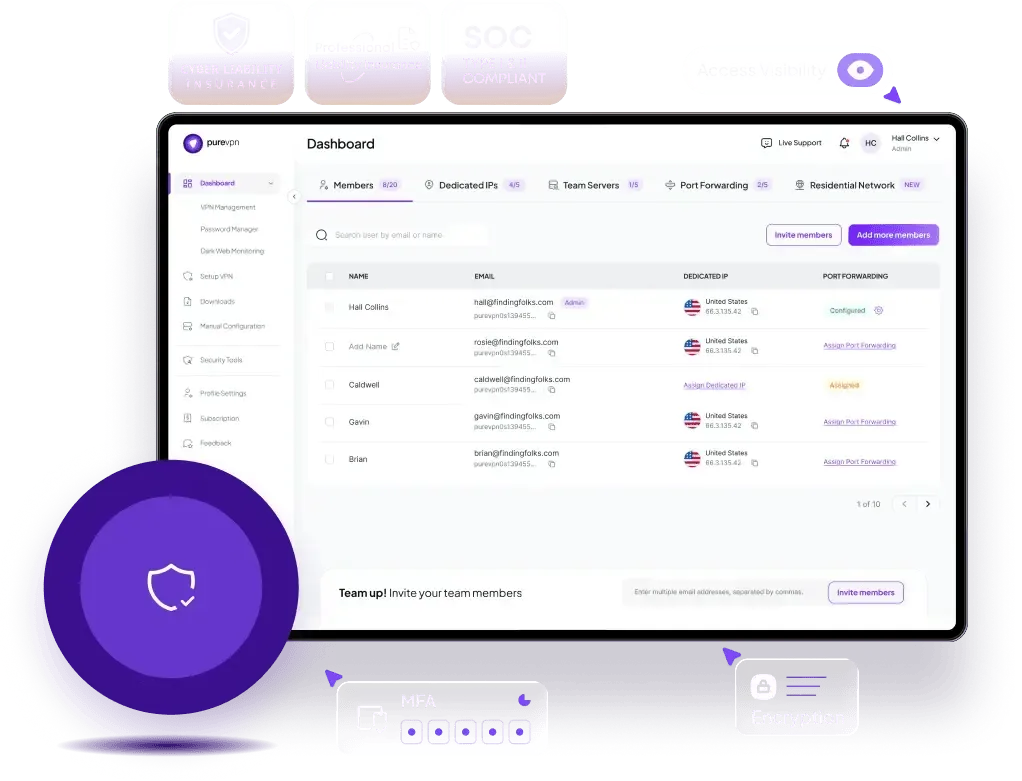
PureVPN for Teams admin dashboard with SOC Type I and II, cyber liability insurance, and professional liability insurance badges plus MFA and encryption controls

  • SOC 2 Type I and Type II: PureVPN for Teams is documented as supporting both Type I and Type II attestations. The product provides evidence for the Trust Services Criteria around security, availability, and confidentiality through encrypted transmission, MFA enforcement, centralized access management, and a KPMG-audited no-logs posture. Buyers still own their own SOC 2 audit, but the VPN layer produces the required control evidence.
  • ISO 27001 and ISO 27002: Controls for access management, cryptographic controls, communications security, and supplier security are supported through per-user dedicated IPs, IP allowlisting, role-based access on Pro, audit logs, and 256-bit encryption in transit. This matters for teams pursuing ISO 27001 certification or responding to Annex A control questionnaires.
  • HIPAA: Encrypted transmission and controlled remote access for protected health information. The product supports the technical safeguards required under the HIPAA Security Rule (access control, transmission security, audit controls), and a Business Associate Agreement should still be reviewed during procurement. HelloRache’s 5,000 Virtual Medical Assistants and VaQya’s HIPAA billing workflows run on the platform.
  • PCI DSS: Secure access to cardholder data environments, encrypted transmission of account data, and access controls that support PCI DSS v4.0 requirements around remote access to the CDE. Fusion Markets runs six dedicated gateways for its globally distributed team.
  • Cyber insurance questionnaires: Underwriters increasingly demand evidence of encrypted remote access, MFA across privileged users, and auditable access logs. PureVPN for Teams ships documentation designed to answer those questions directly – useful for teams at renewal or negotiating premiums.

Supported protocols include WireGuard for low-latency remote access, OpenVPN, and IKEv2. On the Pro plan, device posture checks can enforce minimum OS versions, antivirus presence, and certificate validation before a device is allowed onto the network.

Activity logs give administrators a full audit trail down to application-level access events – the evidence an auditor or underwriter will actually ask for.

Pros and Cons

PROs

  • Built to pass enterprise security reviews and cyber insurance questionnaires
  • SOC 2 Type I and Type II, ISO 27001/27002, HIPAA, and PCI DSS control support in one product
  • Transparent, volume-discounted per-seat pricing from 11 to 501+ users
  • Strong enterprise access controls on Pro: SSO, SCIM, RBAC, device posture, audit logs
  • Per-user dedicated IPs plus a shared Team Server for flexible IP allowlisting
  • Mandatory MFA enforcement across the team from day one
  • Remote Access VPN deployable in minutes to a few hours with no new hardware
  • 18+ years of operating history under the PureSquare parent company
  • 24/7 live chat support with strong reviewer sentiment at scale

CONs

  • Delivered as VPN-plus-access-control, not full zero-trust; buyers wanting fine-grained per-app policies across hundreds of internal services may still prefer a dedicated ZTNA or SASE platform
  • HIPAA and PCI DSS are positioned as control support, not end-to-end certifications – buyers still own their own compliance posture
  • Static IPs, Port Forwarding, and extra Team Servers are sold as add-ons
  • Pro plan pricing is custom and a demo call is required for a per-seat quote
  • Consumer PureVPN brand has a mixed review history that can spill into B2B procurement trust reviews

How PureVPN for Teams Compares

Against its closest Tekpon-listed peers, PureVPN for Teams lands in a distinct niche. It offers more affordable entry pricing than Perimeter 81 at the 1-10 seat bracket, broader geographic server coverage than OpenVPN Access Server, and a more traditional VPN delivery model than the zero-trust-first approach of Twingate.

Where NordLayer and Twingate have built their brands specifically around ZTNA, PureVPN’s Pro plan pulls many of those controls – RBAC, device posture, application-level access – into a VPN-native architecture that is easier for a small IT team to operate.

Buyers shortlisting a secure business vpn for remote teams should test a pilot group on real workloads before committing to multi-year annual pricing. For a broader category view, see Tekpon’s network security software category.

Bottom Line

PureVPN for Teams is a credible pick for distributed teams of any size that need to pass an enterprise security review, satisfy a cyber insurance questionnaire, or produce audit evidence for SOC 2 Type I/II, ISO 27001/27002, HIPAA, or PCI DSS without a year-long rollout.

It is strongest for B2B SaaS companies selling into enterprise, FinTech and HealthTech operators with regulated workloads, IT consultancies and MSPs managing multiple client networks, and remote-hybrid teams that want per-user static IPs, MFA enforcement, and an admin console a small IT team can actually run.

Case studies back the range: 2-person startups on the free plan, mid-market teams on Starter’s 11-50 and 51-100 tiers, and enterprise deployments like HelloRache’s 5,000 Virtual Medical Assistants and DAZN’s global streaming QA on Pro.

It is less strong where a buyer specifically wants a zero-trust-native architecture with fine-grained per-app policies across hundreds of internal services, published Pro pricing, or a consumer brand with a cleaner long-term review history.

The 14-day money-back guarantee on paid plans and the free plan for 2 users make it low-risk to pilot. Anyone shortlisting a business VPN should put PureVPN for Teams on the comparison sheet and benchmark it on real workloads before signing an annual contract.

Get a free plan for 2 users or start a Pro trial. 14-day money-back guarantee on all paid plans.

PureVPN for Teams Frequently Asked Questions

Yes. PureVPN for Teams is the business-tier product built on the same infrastructure as the consumer PureVPN, but layered with a centralized admin dashboard, per-user dedicated IPs, SSO and SCIM on Pro, audit logs, MFA enforcement, and team-management controls. It is sold as a separate SKU at teams.purevpn.com and is positioned for distributed teams of every size – from 2-user startups on the free plan to 501+ seat enterprise deployments on Starter, plus Pro for custom-quoted enterprise contracts.

The free plan covers 2 users on 5 devices at no cost. Among paid plans, Starter on annual billing begins at $7/user/mo for 1-10 seats and drops to $3/user/mo at 501+ seats annual.

Yes. PureVPN for Teams offers a 2-user free plan plus a Pro plan demo and free trial. Both let buyers test the admin dashboard and client apps before committing to a contract.

SOC 2 Type I and Type II, ISO 27001 and ISO 27002, HIPAA controls support, PCI DSS controls support, and GDPR. The product provides control evidence (encrypted transmission, MFA, access management, audit logs, KPMG-audited no-logs) that buyers can attach to their own audits. Full certification still belongs to the buyer’s own compliance program.

Yes – this is one of the product’s positioning pillars. Cyber insurance underwriters increasingly require evidence of encrypted remote access, MFA across privileged users, and auditable access logs. PureVPN for Teams ships documentation designed to answer those questions directly, which can help teams renew policies and negotiate premiums.

PureVPN documents deployment time as minutes to a few hours, with no new hardware required. The admin dashboard handles provisioning; clients install on Windows, macOS, Linux, Android, iOS, and the major browsers. On Pro, SSO with Okta, Entra ID, Google Workspace, and Microsoft 365 plus SCIM provisioning can cut rollout time further.

For most buyers, yes – it covers encrypted remote access, MFA, IP allowlisting, RBAC on Pro, device posture checks, and audit logs. Buyers who specifically need fine-grained per-app policies across hundreds of internal services may still prefer a dedicated ZTNA or SASE platform. PureVPN for Teams is positioned between a traditional VPN and a full zero-trust stack, and case studies (HelloRache’s 5,000 Virtual Medical Assistants, DAZN’s global streaming QA, Fusion Markets’ six dedicated gateways) show the product running at enterprise scale.

Windows, macOS, Linux, Android, iOS, plus browser extensions for Chrome, Firefox, and Edge. Apps for Android TV and Amazon Fire TV are also available.

About the Authors

Rashi Arora |

Writer

Rashi Arora

Product Owner @ Broadcom

Content Writer & Review Specialist
Rashi Arora is currently working as a Project Manager at Aventra Group. Prior to this, she was a Product Owner at Broadcom. Rashi has gained expertise by managing renewals on Salesforce CPQ and improving the Renewal Admin Portal.
Ana Maria Stanciuc |

Editor

Ana Maria Stanciuc

Head of Content & Editor-in-Chief @ Tekpon

Creative Content Chief
Ana Maria Stanciuc is a highly skilled writer and content strategist with 10+ years of experience. She has experience in technical and creative writing across a variety of industries. She also has a background in journalism.

PureVPN for Teams Alternatives

Please, wait...

We are processing your request.

This website uses cookies

Cookies are small text files that can be used by websites to make a user’s experience more efficient.

The law states that we can store cookies on your device if they are strictly necessary for the operation of this site. For all other types of cookies we need your permission. This means that cookies which are categorized as necessary, are processed based on GDPR Art. 6 (1) (f). All other cookies, meaning those from the categories preferences and marketing, are processed based on GDPR Art. 6 (1) (a) GDPR.

You can at any time change or withdraw your consent from the Cookie Declaration on our website.

You can read more about all this at the following links.

Necessary cookies help make a website usable by enabling basic functions like page navigation and access to secure areas of the website. The website cannot function properly without these cookies.

Preference cookies enable a website to remember information that changes the way the website behaves or looks, like your preferred language or the region that you are in.

These trackers help us to measure traffic and analyze your behavior to improve our service.

These trackers help us to deliver personalized ads or marketing content to you, and to measure their performance.