Fastmail is a premium email hosting service owned and operated by Fastmail Pty Ltd, an independent company that has never been acquired by a larger tech conglomerate. The platform serves customers in over 130 countries and is used by roughly 20,000 organizations worldwide, with the largest user base concentrated in the United States (63%), the United Kingdom (12%), and Australia (8%).
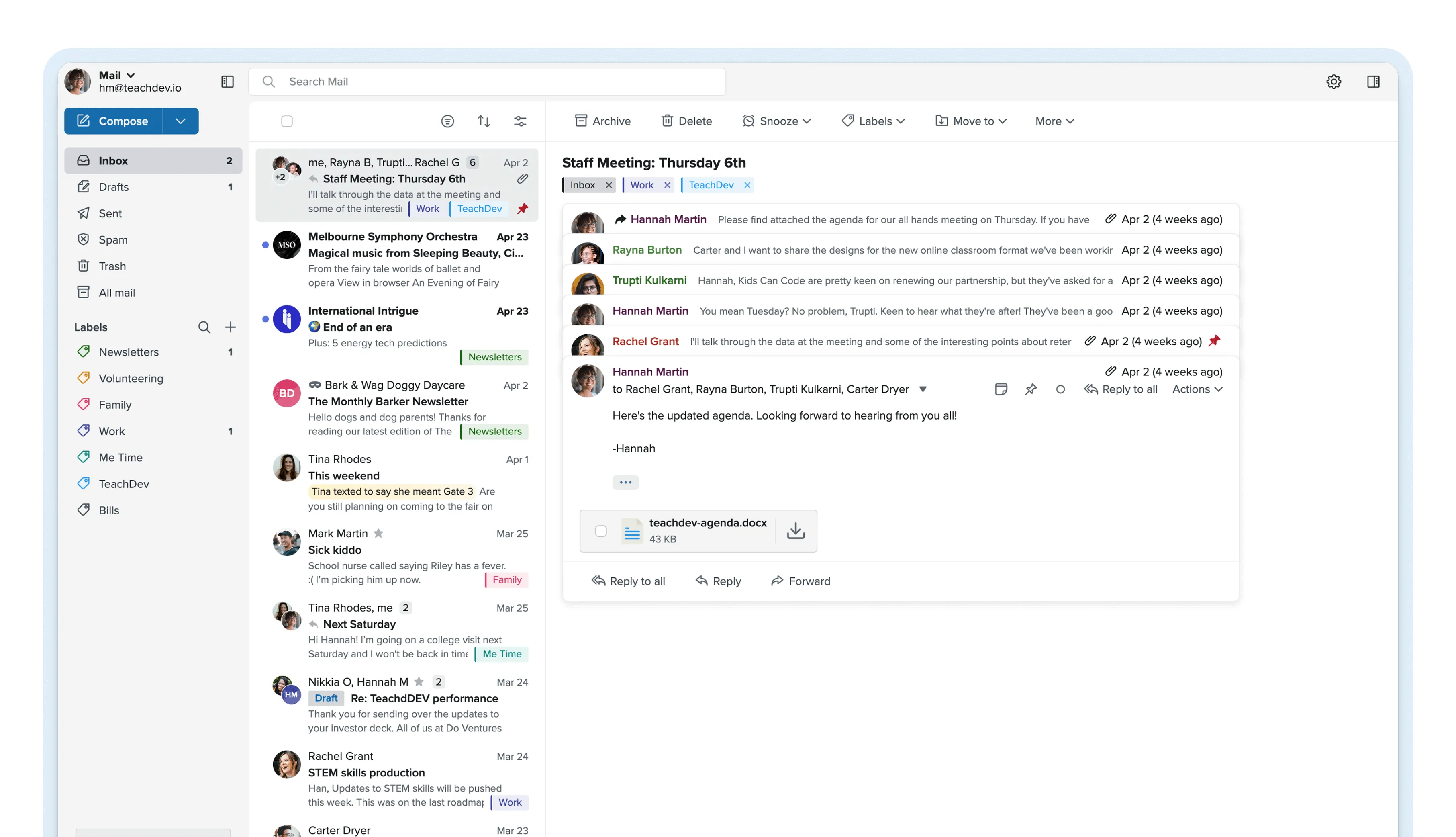
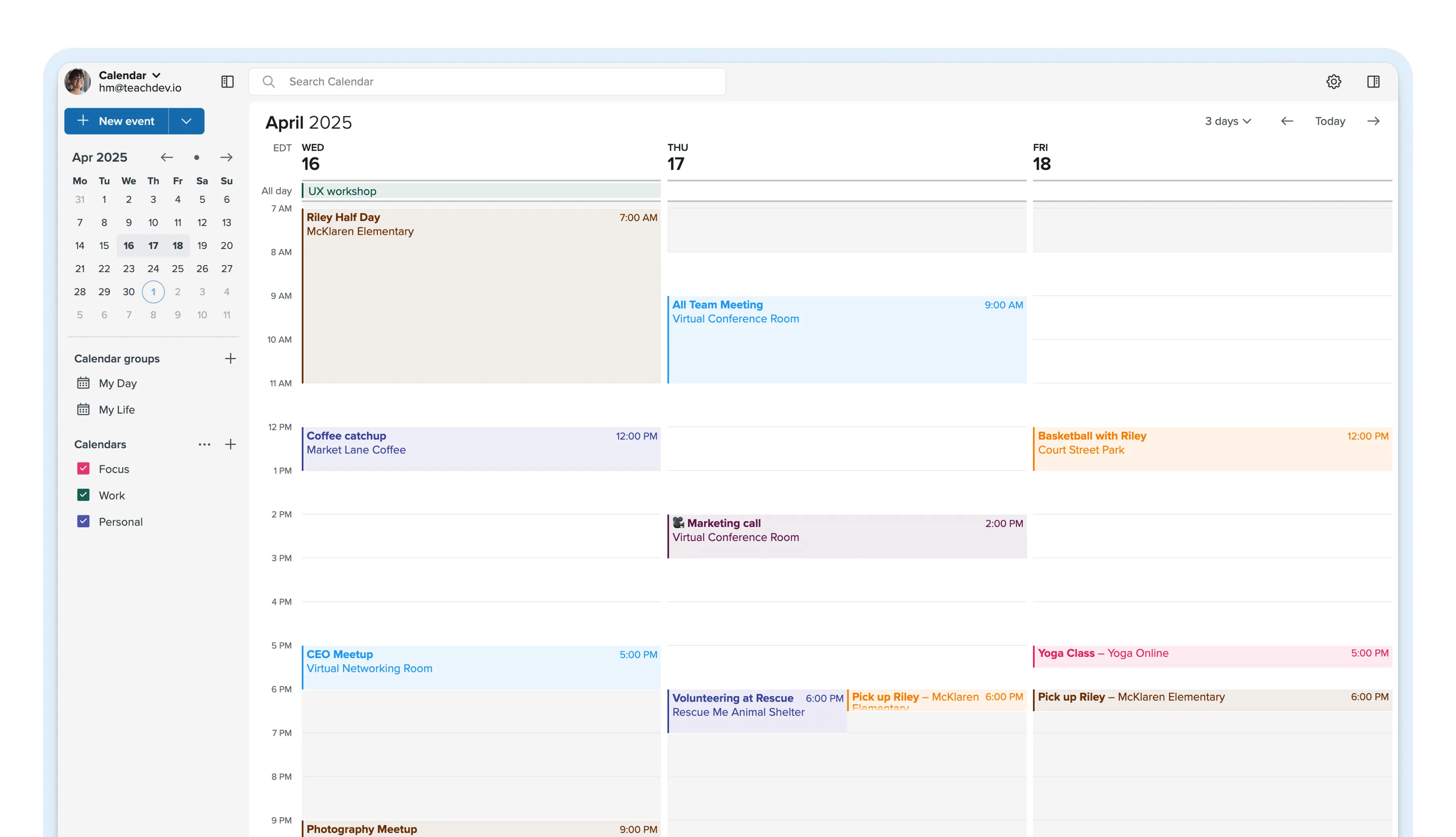
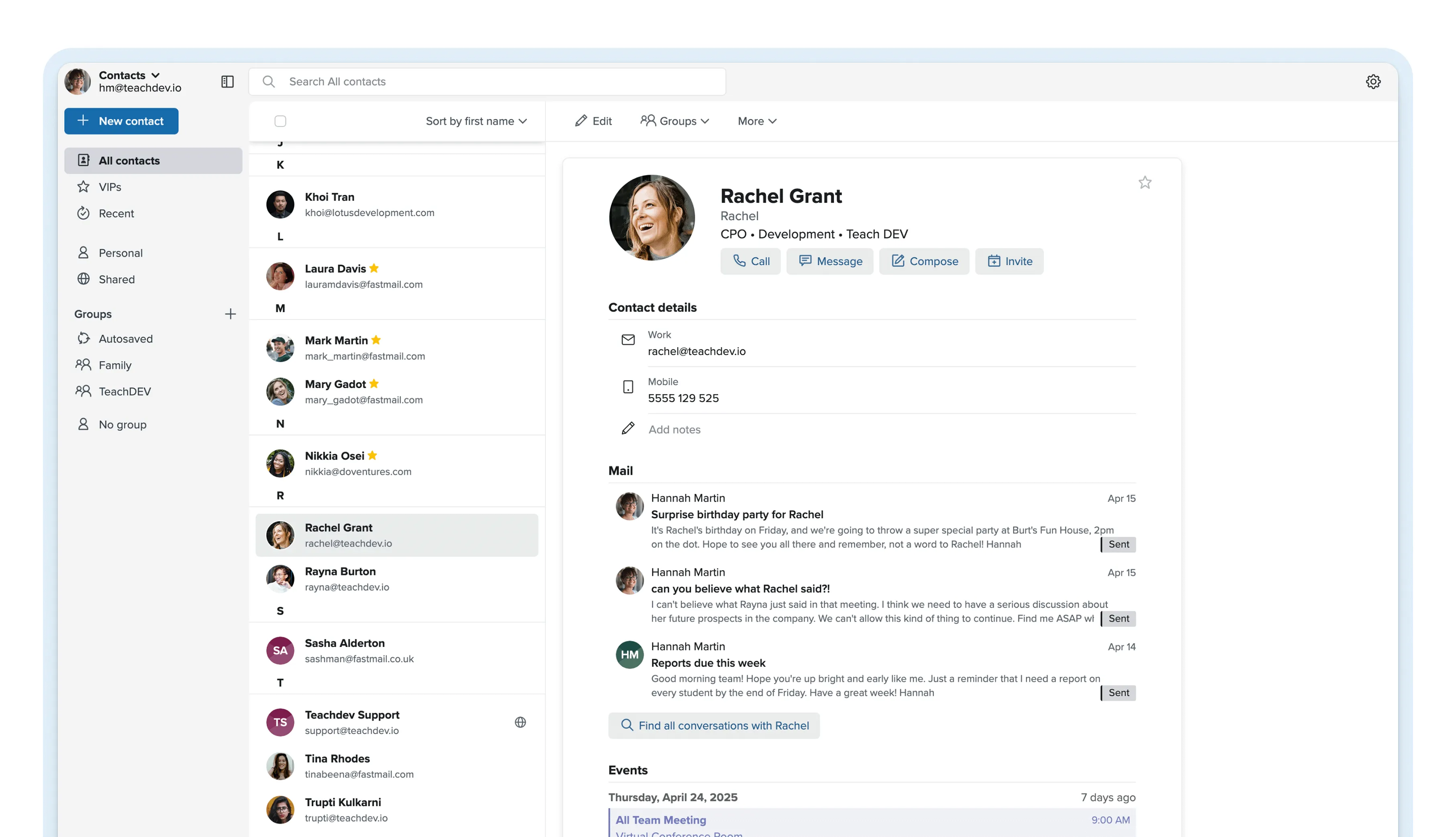
At its core, Fastmail provides email, calendars, contacts and file storage through a web interface, dedicated mobile apps for iOS and Android, and full support for standard protocols like IMAP, SMTP, CalDAV and CardDAV. The service supports custom domains, giving users the ability to send and receive mail from their own business or personal domain rather than a generic address.
Fastmail differentiates itself through speed, privacy and simplicity. The web client is built for performance, with instant search, keyboard shortcuts and a clean layout that prioritizes productivity over visual clutter. There are no ads, no tracking pixels, and no data mining. Fastmail’s email security model relies on strong TLS encryption for data in transit and AES-256 encryption for data at rest, along with two-factor authentication, app-specific passwords and session management tools.
Fastmail offers six plans across two categories. Individual ($6/mo), Duo ($10/mo) and Family ($14/mo) for personal use, plus Business Basic ($4/user/mo), Standard ($6/user/mo) and Professional ($10/user/mo) for teams. Annual billing saves roughly 15-17%. A 30-day free trial is available on all plans
Audit, consolidate, and save—powered by our internal buying team. Let our experts analyze your current software stack and identify opportunities for cost savings and efficiency improvements.
AI-powered Insight: This summary represents a comprehensive analysis of user reviews and opinions found across the web, including G2, Capterra, TrustPilot, and other review platforms. Our AI aggregates sentiment and identifies key themes from verified user feedback.
What users love most
Ad-Free, Privacy-Focused Experience
Users consistently highlight Fastmail’s commitment to privacy—no ads, no data mining, and no tracking—as a primary reason for switching from Gmail or other providers. The service respects user data, making it appealing for professionals handling sensitive information.
Fast, Clean Interface
The webmail interface receives praise for being snappy, lightweight, and intuitive. Multiple users note the minimal lag even with large email volumes, customizable themes, and excellent keyboard shortcuts that boost productivity.
Reliable Masked Email and Alias Features
The masked email (integration with 1Password) and unlimited alias creation are standout features users love. These tools let users create unique, disposable addresses for signups, making it easy to track which services leaked their email and block spam at the source.
Excellent Customer Support
Users frequently mention getting quick, helpful responses from real humans via email support—a stark contrast to larger providers. Support responsiveness is cited as a major differentiator, with users appreciating the competence and patience of the support team.
Powerful Search Functionality
Fastmail’s full-text search is praised as faster and more accurate than Gmail, allowing users to find old emails, attachments, or contacts instantly using partial keywords. This feature saves significant time for those managing large email archives.
Open Standards and Multi-Device Sync
Support for IMAP, SMTP, CalDAV, and CardDAV means users can access Fastmail from any client (Outlook, Apple Mail, Thunderbird, etc.) and sync seamlessly across devices without lock-in. This flexibility is highly valued by power users.
Areas for Improvement
No Free Trial or Free Plan
While Fastmail offers a 30-day trial, features like aliases and masked emails are locked behind paywalls during trial, limiting the ability to properly test the service. The lack of a free tier (unlike ProtonMail or Gmail) is a barrier for budget-conscious users exploring options.
Limited Spam Filtering
Some users report that spam and phishing protection isn’t as robust as competitors like Gmail or Tutanota, with more spam emails slipping through. The quarantine folder helps, but users wish filtering was more aggressive.
Mobile App UX Concerns
While the official iOS and Android apps are functional, users note the interface feels dated compared to modern alternatives. Specific complaints include lack of “view all accounts” on one screen, occasional app hangs requiring restarts, and custom dark mode that isn’t true black.
Search Limitations
Despite fast search, some users find it less powerful than Gmail—particularly when you don’t remember exact keywords. Complex searches aren’t always intuitive, and the search function in the mobile app is notably weaker than the web version.
Higher Pricing for Small Users
At $6+ USD/month for the Standard plan (50GB), Fastmail is more expensive than many competitors. For users with multiple email accounts or small teams, the per-user cost adds up quickly. The 40% price increase announced in December 2025 has frustrated some long-time customers.
Contacts Sync Issues
Google Contacts integration doesn’t sync with Fastmail’s address book, forcing some users to purchase third-party apps like DAVx5 to manage contacts across platforms. This creates friction for users migrating from Google Workspace.
Limited Payment Methods
Fastmail accepts primarily PayPal for payments, with many major credit cards declined. This is a frustration for international users and those using alternative payment methods.
Calendar Not as Feature-Rich as Gmail or Outl
While Fastmail includes calendar and contacts management, some users find these features lag behind integrated tools in Microsoft 365 or Google Workspace, particularly for collaborative scheduling.
Leave a Review
Tell us your opinion about Fastmail and help others make informed decisions.
Fastmail Review 2026 – Is this Private Email Service worth it?
Fastmail is an independent, ad-free email platform built for individuals and businesses who want full control over their inbox without sacrificing speed or privacy.
Founded in 1999 and headquartered in Melbourne, Australia, Fastmail has spent over 25 years refining a focused product that combines email, calendars, contacts and file storage into a single, privacy-first service.
Unlike free providers that monetize user data, Fastmail charges a straightforward subscription and keeps your information private by design.
In this Fastmail review, we cover everything from core features and security to pricing, integrations, pros and cons, and who the platform is best suited for in 2026. Whether you are comparing Fastmail to ProtonMail, Gmail, or Zoho Mail, this editorial aims to give you a clear, data-backed picture of what Fastmail delivers and where it falls short.
Fastmail User Experience and Performance
Where Fastmail consistently earns praise is in day-to-day usability. The web client loads quickly and feels responsive even on mailboxes with tens of thousands of messages. Search results appear almost instantly because Fastmail indexes everything server-side, a design choice that also makes search work identically across web, mobile and third-party clients.
Keyboard shortcuts cover nearly every action, from composing and replying to archiving and navigating between folders, which makes the interface particularly efficient for high-volume email users.
The mobile apps for iOS and Android mirror the web experience closely, with push notifications, offline access and the same clean interface.
Fastmail also offers full support for standard protocols like IMAP, SMTP, CalDAV and CardDAV, so users who prefer Apple Mail, Thunderbird or another third-party client can use Fastmail as a backend without ever opening the official apps. This flexibility is a significant advantage over providers that lock core features behind their own clients.
From an infrastructure standpoint, Fastmail serves roughly 20,000 organizations across more than 130 countries, with the largest user base in the United States (63%), the United Kingdom (12%) and Australia (8%).
The company has maintained strong uptime over its 25-year history and runs its own data centers rather than relying entirely on third-party cloud providers, giving it more direct control over performance and security.
Fastmail Key Features
Masked Email and Aliases
One of Fastmail’s most distinctive features is Masked Email, which generates unique, random email addresses that forward to your real inbox. This lets you sign up for services without exposing your primary address, and you can disable any mask instantly if it starts receiving spam.
Fastmail supports up to 600 aliases per account, and the Masked Email feature integrates directly with 1Password, making it easy to generate a new masked address during account creation on any website.
Custom Domains
Fastmail supports custom domains on all personal plans and business tiers, so you can use an address like you [at] yourbusiness.com or you [at] yourname.com instead of a generic @fastmail.com address.
Domain setup includes full DNS management guidance, MX record configuration and DKIM/SPF/DMARC support for email authentication. This makes Fastmail a viable choice for freelancers, consultants and small businesses that want professional email without the overhead of Google Workspace or Microsoft Outlook.
Calendar and Contacts
Fastmail includes a full-featured calendar with support for multiple calendars, event invitations, reminders and sharing. Calendars sync across devices via CalDAV, which means they work natively with Apple Calendar, Thunderbird and other standards-compliant apps.
The contacts manager supports tagging, notes, groups and CardDAV sync, making it straightforward to maintain a clean address book across all your devices.
Scheduled Send and Snooze
Scheduled Send lets you compose an email now and have it delivered at a specific time, which is useful for coordinating across time zones or batching communications. Snooze temporarily removes a message from your inbox and resurfaces it at a time you choose, helping you manage follow-ups without cluttering your task list.
Offline Access
Fastmail’s web and mobile apps support offline mode, letting you read, draft, search and manage your calendar without an internet connection.
Changes sync automatically when connectivity returns. This feature was significantly improved in late 2025, making it more reliable for users who travel or work in areas with inconsistent internet.
Advanced Search and Filters
Fastmail’s search is notably fast, returning results across your entire mailbox almost instantly. You can search by sender, recipient, subject, body text, date range, folder and attachment type.
Sieve-based filtering lets power users create sophisticated rules for automatically sorting, forwarding, rejecting or labeling incoming mail, going well beyond the basic filter options most email services provide.
File Storage
Every Fastmail account includes file storage that shares the same quota as your email. You can upload documents, images and other files directly through the web interface, organize them in folders, and share individual files or folders via links.
While it is not a replacement for a dedicated cloud storage service, it is convenient for keeping important attachments and reference documents accessible alongside your email.
Fastmail Security and Privacy
Privacy is central to Fastmail’s value proposition. The company does not serve ads, does not scan email content for advertising purposes and does not sell user data to third parties.
Fastmail’s privacy policy is straightforward: your data belongs to you, and the company accesses it only when required for service delivery or when compelled by law.
On the technical side, Fastmail uses TLS encryption for all connections, AES-256 encryption for stored data, and supports two-factor authentication via TOTP apps, security keys (U2F/FIDO2) and app-specific passwords.
The infrastructure is hosted in data centers with physical security controls, redundant power and network connectivity, and regular security audits.
It is worth noting that Fastmail does not offer end-to-end encryption in the way that ProtonMail does. Emails are encrypted at rest on Fastmail’s servers, but the company holds the encryption keys, which means it can technically access your data if required by a court order.
For most users this is an acceptable trade-off that enables features like server-side search and filtering, but users with extreme threat models may want to evaluate end-to-end encrypted alternatives.
Fastmail Integrations
Fastmail integrates with a focused set of tools rather than trying to connect to everything. Key integrations include 1Password for Masked Email generation, Bitwarden for password management, Google Calendar for calendar sync and Dropbox for file attachments.
The platform also supports JMAP (JSON Meta Application Protocol), an open standard that Fastmail helped develop, which enables faster and more efficient email syncing compared to traditional IMAP.
For users who rely on third-party email clients, Fastmail works with any app that supports IMAP and SMTP, including Apple Mail, Thunderbird, Mailbird and mobile clients like Spark or FairEmail.
CalDAV and CardDAV support extends compatibility to virtually any calendar or contacts app that uses open standards.
Fastmail Pros and Cons
What We Like About Fastmail
Speed and reliability: The web client is consistently fast, with near-instant search and smooth navigation even on large mailboxes. Uptime is excellent, backed by over 25 years of operational experience.
Privacy without complexity: You get a genuinely private email experience without needing to understand cryptography or manage encryption keys. The service just works while keeping your data out of advertising pipelines.
Masked Email: The integration with 1Password makes Masked Email one of the most practical anti-spam tools available. Generating and managing disposable addresses is frictionless.
Custom domain support on all plans: Even the Individual plan includes custom domain support, which many competitors reserve for higher tiers or business plans.
Standards-based approach: Full support for IMAP, SMTP, CalDAV, CardDAV and JMAP means you are never locked into Fastmail’s own apps. You can switch clients or migrate away without friction.
Human support: Every plan includes access to real human support staff, not chatbots or AI assistants. Response times are generally fast and the team is knowledgeable.
Where Fastmail Falls Short
No free plan: Unlike Gmail, Outlook.com or Zoho Mail, Fastmail has no free tier. The 30-day trial is generous, but there is no way to use the service indefinitely without paying.
No end-to-end encryption: Users who need zero-knowledge encryption for maximum privacy will find Fastmail lacking compared to ProtonMail or Tuta. Fastmail encrypts data at rest but holds the keys.
Limited ecosystem: Fastmail focuses on email, calendars, contacts and files. There is no built-in document editor, video conferencing, chat or office suite. If you need a complete productivity platform, you will still need additional tools.
Storage limits on lower tiers: The Business Basic plan includes only 6 GB per user, which can fill up quickly for users with heavy attachment traffic. Upgrading to Standard (60 GB) or Professional (150 GB) adds meaningful cost per user.
Recent price increases: Fastmail raised prices in late 2025, with increases of roughly 20-40% across plans. Long-time users on legacy pricing felt the impact, and some community feedback has been critical of the pace of increases relative to new feature delivery.
Who is Fastmail best for?
Fastmail for Privacy-Conscious Individuals
If you want to move away from Gmail or Outlook.com and stop having your email data used for ad targeting, Fastmail is one of the strongest options available. The Individual plan at $6 per month gives you 60 GB of storage, custom domains, Masked Email and a fast, ad-free experience.
Users who value privacy but do not need end-to-end encryption will find Fastmail hits the right balance between security and usability.
Fastmail for Families and Couples
The Duo and Family plans make Fastmail unusually cost-effective for households.
The Family plan covers up to six users with individual inboxes, shared calendars and a shared address book for $14 per month, which works out to under $2.50 per person. This is significantly cheaper than running separate individual subscriptions or paying for a family plan on most competing platforms.
Fastmail for Small Businesses
Small teams that need professional email with custom domains but do not require a full office suite will find Fastmail’s business plans compelling.
The ability to mix and match Basic, Standard and Professional licenses within a single account means you can assign heavier storage to executives and lighter plans to shared mailboxes or part-time staff, keeping costs under control. Shared addresses like support@ or info@ are included on all business tiers.
Fastmail for Developers and Power Users
Fastmail’s support for JMAP, Sieve filtering, WebDAV and open standards makes it a favorite among technically inclined users who want granular control over their email workflow.
The ability to write custom Sieve scripts for mail filtering goes far beyond what most email services allow, and JMAP support means developers can build efficient integrations without dealing with the limitations of legacy IMAP.
How Fastmail compares to alternatives
Choosing an email provider depends heavily on your priorities. Here is how Fastmail stacks up against the most common alternatives in 2026.
ProtonMail offers end-to-end encryption that Fastmail does not, making it the better choice for users with strict security requirements. However, Fastmail is generally faster, has better search capabilities (because it can search server-side) and offers more flexible plan structures for families and businesses.
If privacy through operational practices is sufficient for your needs, Fastmail delivers a smoother daily experience. If you need zero-knowledge encryption, ProtonMail is the clear winner.
Gmail is free and deeply integrated with Google’s ecosystem, but it scans email content to build advertising profiles and has a more complex, feature-heavy interface. Fastmail offers a cleaner, faster experience with no ads or tracking, custom domain support on every plan and better privacy protections.
The trade-off is that Gmail’s integration with Google Docs, Drive and Meet is hard to replicate outside Google’s ecosystem.
Fastmail vs Superhuman:
Superhuman targets power users willing to pay a premium ($30/user/month) for speed, keyboard shortcuts and AI-powered email triage. Fastmail offers similar speed at a fraction of the cost but lacks Superhuman’s AI features and polished onboarding experience.
For most users, Fastmail delivers 80% of the productivity benefit at 20% of the price.
Fastmail vs Microsoft Outlook:
Outlook is part of the Microsoft 365 ecosystem and includes deep integration with Teams, OneDrive, Word and Excel.
Fastmail cannot match this breadth of integrated tools, but it offers a simpler, faster and more private email experience for users who do not need the full Microsoft productivity suite.
Fastmail Review FAQ
For users who value privacy, speed and simplicity, Fastmail delivers strong value relative to its price point. The Individual plan at $6 per month is comparable to entry-level ProtonMail and significantly cheaper than Superhuman.
The main question is whether you need the broader ecosystem that free providers like Gmail or paid suites like Microsoft 365 include.
Yes. Gmail scans email content to build advertising profiles, while Fastmail does not serve ads, does not track users and does not monetize email data in any way. Fastmail also supports custom domains and Masked Email, giving users more control over their online identity.
However, Gmail offers end-to-end encryption through Confidential Mode for specific messages, which Fastmail does not.
No. Fastmail does not offer a free tier, but all plans come with a 30-day free trial that includes full access to every feature. No credit card is required to start the trial.
After the trial ends, you can export your data or choose a paid plan to continue. See the Fastmail free trial page for details.
Fastmail can replace the email, calendar and contacts components of Google Workspace, but it does not include document editing, video conferencing, cloud storage beyond file attachments or team chat.
Small businesses that primarily need professional email with custom domains and shared calendars will find Fastmail sufficient. Teams that rely heavily on collaborative document editing will still need a separate solution.
Fastmail uses TLS encryption for data in transit, AES-256 encryption at rest, two-factor authentication and app-specific passwords. The Business Professional plan adds email retention archiving for compliance requirements.
While Fastmail does not offer end-to-end encryption, its security practices are sufficient for most small and mid-size business needs, and it undergoes regular security audits.
Fastmail includes built-in migration tools that can import mail, contacts and calendars from Gmail, Outlook, iCloud and any IMAP-compatible provider.
The migration runs in the background and preserves your folder structure, labels and read/unread status. Most migrations complete within a few hours, and you can continue using your old provider during the transition.
The strongest alternatives depend on your priorities. ProtonMail is best for end-to-end encryption.
Zoho Mail offers a broader business suite at competitive pricing. Superhuman targets power users who want AI-driven email management. Thunderbird is free and open-source for users comfortable with desktop clients.
Yes. Fastmail supports IMAP, SMTP, CalDAV and CardDAV, which means it works with virtually any email client that uses standard protocols. This includes Apple Mail, Thunderbird, Mailbird, Spark, FairEmail and most other desktop and mobile email apps.
Fastmail also supports JMAP, a modern protocol it helped develop, for faster syncing with compatible clients.
Our Verdict on Fastmail
Fastmail is one of the most polished and reliable email hosting services available in 2026. It does one thing exceptionally well: delivering fast, private, ad-free email with strong calendar and contacts integration.
The Masked Email feature, custom domain support on every plan, and genuine human support set it apart from both free providers and many paid competitors.
The platform is not for everyone. Users who need end-to-end encryption should look at ProtonMail. Teams that require an integrated office suite should consider Google Workspace or Microsoft 365. And anyone expecting a free tier will need to look elsewhere.
But for privacy-conscious individuals, families and small businesses that want premium email hosting without the complexity or data collection practices of big tech, Fastmail remains a top-tier choice.
The recent price increases are worth noting, but the service continues to deliver excellent value for what it offers, particularly on the Family and Business Standard plans where the per-user economics are most favorable.
Ready to experience fast, private, ad-free email?
Start your Fastmail free trial today – no credit card required.
Ana Maria Constantin is the COO at Tekpon. With a creative background in design and photography, she leads SEO strategy, content operations, and AI-assisted editorial workflows. She writes the "Weekly SaaS Pulse" LinkedIn newsletter, covering SaaS, SEO, and marketing for founders and professionals.
Editor
Cristian Dina
Co-Founder @ Tekpon
Co-Founder @ Tekpon
Cristian Dina is the Co-Founder of Tekpon and the CEO of Tekpon AI Summit. His work has positioned Tekpon as a trusted software buying platform used by thousands of companies worldwide. As the CEO of Tekpon AI Summit, he's bringing together over 1,000 B2B SaaS and AI leaders. At just 23 years old, Cristian was included in the Forbes 30 Under 30 2025 list, representing a new generation of tech builders, bold thinkers who move fast, build with purpose, and create real impact.
We use cookies for critical website functionalities, personalised content and social media features, to analyse our traffic and marketing purposes.
This website uses cookies
Cookies are small text files that can be used by websites to make a user’s experience more efficient.
The law states that we can store cookies on your device if they are strictly necessary for the operation of this site. For all other types of cookies we need your permission. This means that cookies which are categorized as necessary, are processed based on GDPR Art. 6 (1) (f). All other cookies, meaning those from the categories preferences and marketing, are processed based on GDPR Art. 6 (1) (a) GDPR.
You can at any time change or withdraw your consent from the Cookie Declaration on our website.
You can read more about all this at the following links.
Necessary cookies help make a website usable by enabling basic functions like page navigation and access to secure areas of the website. The website cannot function properly without these cookies.
Preference cookies enable a website to remember information that changes the way the website behaves or looks, like your preferred language or the region that you are in.
These trackers help us to measure traffic and analyze your behavior to improve our service.
These trackers help us to deliver personalized ads or marketing content to you, and to measure their performance.