Continue with LinkedIn
or
Recover my Password
Submit your Tekpon Account E-mail address and you will receive an email with instructions to reset your password.

SurveyMonkey Reviews for 2026

Create online surveys and forms that mean business.
Premium Seller
User Score:
4.4/5

Score is based on User Sentiment from reviews and public chatter. We weight volume, recency, and consistency, then normalize to 5.

See our Methodology
Need help with procurement?

Save 40% on your SaaS stack with expert guidance

You tell us what you need. We deliver the right tools at the best price. Fast. Independent. Hassle-free.

Your Credentials

Tell us who you are

Your Business

Tell us about your Company

Tell Us Your Software Needs

Share your requirements and let our procurement experts help you find the best software deals, negotiate renewals, or compare alternatives — tailored to your business goals.

Please, wait!

Processing

Step
1 / 3
Back
Next Step

Disclaimer

By submitting this form, you agree to be contacted by the Tekpon Team and our Partners.

*Required fields!

Free Consultation

What is SurveyMonkey?

SurveyMonkey is the world’s most popular platform for surveys and forms, built for business and loved by users. Trusted by 260,000+ organizations and over 40 million people globally, the platform helps individuals and teams create, distribute, and analyze surveys, forms, and polls for customer feedback, employee engagement, market research, academic studies, and event planning.

Through an intuitive drag-and-drop interface, users can build professional surveys in minutes, or let the AI-powered Build with AI feature generate a complete draft from a simple prompt. The platform offers 500+ expert-designed templates, a 20,000+ question bank, and advanced customization including branching logic, skip logic, randomization, answer piping, and quotas. With over 30 AI features, backed by 2 machine learning patents and a foundation of 98 billion answered questions. SurveyMonkey generates 2.4 million AI predictions daily to help users create better surveys, detect response quality, analyze sentiment, and surface actionable insights.

SurveyMonkey includes specialized products such as Surveys, Forms, and Market Research solutions (including SurveyMonkey Audience, a global panel of 335 million+ respondents across 130+ countries), enabling teams to create data-driven insights for customer experience, HR, or marketing decisions. Its dashboards and integrations with 200+ apps, including Slack, Salesforce, HubSpot, and Microsoft Teams, streamline feedback management and collaboration across departments.

Overall, SurveyMonkey is built for teams and professionals seeking a flexible, scalable, and data-secure platform to gather opinions, measure satisfaction, and inform business strategy.

Found in these Categories

Best For

  • StartUps
  • Freelancers
  • Small Business
  • Medium Business
  • Large Enterprise
  • Non-profit Organization
  • Personal

SurveyMonkey Pricing

Starting From:
$ 39 /month
Pricing Model: Subscription
Get Started Free
SurveyMonkey offers individual plans starting at $39/month for the Advantage Annual plan, $99/month for Standard Monthly, and $119/month for Premier Annual. Team plans include Team Advantage at $25/user/month and Team Premier at $75/user/month, both requiring a minimum of three users. Enterprise plans are custom-priced, providing advanced features, integrations, and security for large organizations. Discounts apply for annual billing. A Basic Free plan is also available
Free Trial

Basic

Individual Plans

Free
Monthly

Standard Monthly

Individual Plans

$99
Monthly

Advantage Annual

Individual Plans

$39
per Month
Yearly

Looking to Save Time & Money

Audit, consolidate, and save—powered by our internal buying team. Let our experts analyze your current software stack and identify opportunities for cost savings and efficiency improvements.

  • Stack Audit
  • Cost Reduction
  • Expert Team
Optimize My Stack

SurveyMonkey Features

  • Answer Conditions
  • Email Distribution
  • Offline Response Collection
  • Question Conditions
  • Questions Library
  • Response Management
  • Skip Logic
  • Customizable Templates
  • Forms Creation & Design
  • Artificial Intelligence (AI)
  • Customizable Branding
  • Question Branching
  • Mobile Survey
  • Multi-Language
  • Data Import/Export
  • Anonymous Feedback
  • Sentiment Analysis
  • Reporting/Analytics
  • URL Customization
  • Email Reminders
  • API
  • Response Quotas
  • Activity Tracking
  • AI survey summaries
  • Real-time analytics
  • Response limits control
  • Team collaboration
  • Response notifications
  • A/B testing tools
  • Dashboard reporting
  • Survey scheduling
  • Integrations library
  • Survey sharing links
  • Panel audience access
  • Market research panels
  • Automated reminders
  • Survey scoring
  • Password protection
  • CSV and SPSS export
  • Survey tracking

SurveyMonkey Integrations

User Sentiment - SurveyMonkey Reviews

4.4/5
Based on 145,544 user reviews across the web
AI-powered Insight: This summary represents a comprehensive analysis of user reviews and opinions found across the web, including G2, Capterra, TrustPilot, and other review platforms. Our AI aggregates sentiment and identifies key themes from verified user feedback.
What users love most
  • User-Friendly Interface

    SurveyMonkey is often commended for its intuitive and user-friendly interface. Users value the speed with which they can create surveys without needing any coding knowledge, making it accessible for individuals with different levels of technical expertise. Its drag-and-drop functionality enables users to build surveys efficiently.

  • Wide Range of Question Types and Templates

    The platform offers an extensive library of question types and pre-designed survey templates, which users find helpful in saving time. From multiple-choice to open-ended questions and more advanced formats like Likert scales, SurveyMonkey’s flexibility helps users create customized surveys suited to their needs.

  • Robust Data Analysis and Reporting Tools

    SurveyMonkey provides strong analytical tools, allowing users to collect and analyze data in real-time. The platform offers detailed reporting features, including customizable charts, filters, and the ability to export results to formats like Excel or PDF. Users find these tools invaluable for making data-driven decisions.

  • Wide Integration Options

    SurveyMonkey integrates with a variety of third-party applications, including CRM platforms (like Salesforce), collaboration tools (like Slack), and email marketing services (like Mailchimp). This allows businesses to seamlessly incorporate survey data into their existing workflows, which is a major plus for larger organizations.

  • Survey Distribution Channels

    The platform allows users to distribute surveys through multiple channels, including email, social media, and websites, or through unique links. Users appreciate the flexibility in reaching their target audience, helping to increase response rates.

Areas for Improvement
  • Pricing for Premium Features

    SurveyMonkey provides a free version, but advanced features like in-depth data analysis, advanced reporting, and custom branding are only included in the paid plans. Some users find the premium plans to be quite expensive, particularly for smaller businesses or individual users who may not require all the features.

  • Limited Customization on Free Plan

    Users on the free plan often report feeling limited in terms of survey customization options. For example, the inability to remove the SurveyMonkey branding or access to more complex question types can be restrictive for those using the free tier.

  • Response Limits for Free Accounts

    The free version of SurveyMonkey caps the number of responses per survey, which can be a limitation for users who need to collect a large volume of data. The cap can hinder those conducting research or surveys with a large respondent base unless they upgrade to a paid plan.

  • Steep Learning Curve for Advanced Features

    While the platform is generally easy to use, some users mention a learning curve when it comes to using advanced features such as custom reporting, logic-based branching, and data analysis. More detailed tutorials or onboarding could help users take full advantage of these capabilities.

  • Customer Support for Free Users

    Several users have noted that customer support is primarily focused on paid users, with free users having limited access to direct support. This can be an issue if users encounter technical difficulties or need quick assistance with more complex features.

Leave a Review

Tell us your opinion about SurveyMonkey and help others make informed decisions.
Account creation required to leave a review.

SurveyMonkey Company Details

Company Name

Momentive Global Inc.

Headquarters

United States

Own this Software?

SurveyMonkey vs. Similar Products

Select up to 3 Software, to enable Comparison

Compare Selected Software

Editorial Review: SurveyMonkey Deep Dive

Rashi Arora |
Copy Link

Are you looking for some answers? Do you feel like someone who has plenty of ideas in mind? But not sure if those are the right ones. Are you in the initial stages of planning and setting up a business?

If you’re looking for some fresh perspectives to build a brand, maybe you should try using an online survey platform. So let’s go into this SurveyMonkey review and find out how to take feedback and then move forward.

SurveyMonkey online survey platform

We found SurveyMonkey as an ideal online survey platform for teams of all sizes – from solo researchers to enterprise organizations. With more and more companies investing in feedback-driven decision-making, the need for this kind of platform continues to grow.

SurveyMonkey is the world’s most popular platform for surveys and forms, trusted by 260,000+ organizations and over 40 million users worldwide. It lets businesses and individuals create custom surveys without coding, then collect and analyze responses with AI-powered insights.
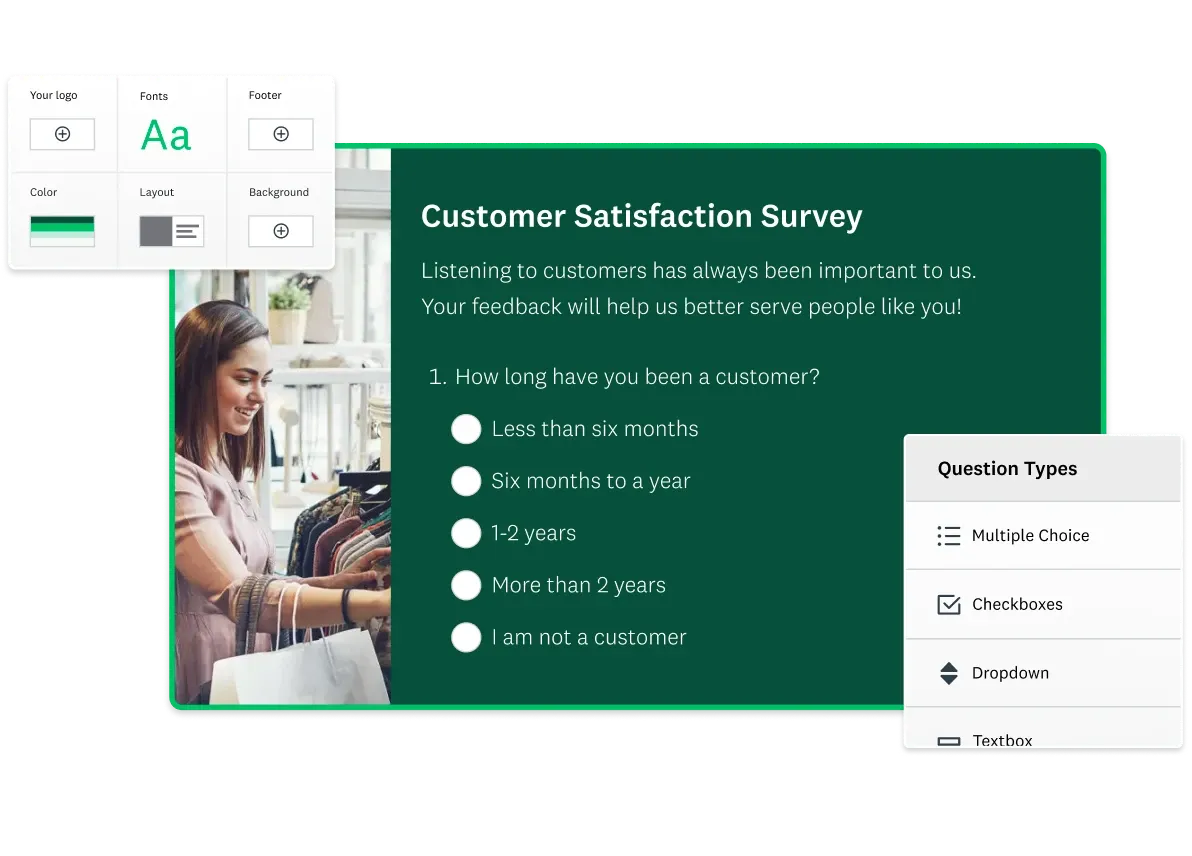
customer satisfaction survey from SurveyMonkey

With 9 out of 10 customers rating it easy to use and 58% of users going live with their first survey on the same day they sign up, SurveyMonkey remains a powerful choice for gathering customer feedback, employee sentiment, market research, and more. In fact, 80% of users reported seeing ROI within their first year on the platform.

So, does all of this make it the best survey platform? Let us take a closer look at the features that SurveyMonkey has to offer.

How does SurveyMonkey work? (Free vs paid version)

SurveyMonkey offers a freemium model. The Basic (free) plan lets anyone sign up and create unlimited surveys. However, it limits each survey to 10 questions and only allows you to view up to 25 responses per survey.

You can use common question types and dozens of free templates on the Basic plan, but advanced features (like skip logic, custom branding, exporting, and the full AI suite) require a paid subscription.

On paid plans, SurveyMonkey removes question and response limits. Key paid-only capabilities include:

  • Advanced logic (skip logic, display logic, randomization, answer piping).
  • Custom logo, themes, and URLs for branding (with AI-powered theme generation).
  • 24/7 email and phone support.
  • Access to all 500+ survey templates and 20,000+ question bank ideas.
  • Full AI features (Build with AI, Analyze with AI, Genius scoring engine, sentiment analysis, and response-quality detection).
  • Data exports (CSV, Excel, SPSS, PDF).
  • Benchmarks and statistical tests (on higher tiers).
  • Team collaboration (shared libraries, real-time editing/comments, consolidated billing).

Individual plans start at $39/month (Advantage Annual), while Team plans start at $25–30/user/month (Team Advantage, billed annually with 3+ users). Higher tiers (Team Premier, Enterprise) add features like multilingual surveys, workgroups for organizing teams, and enterprise-grade security. For a detailed breakdown of every tier and what’s included, see our SurveyMonkey pricing review.

How do I create a free SurveyMonkey questionnaire?

To create a new survey, click “Create Survey” in the upper-right corner after logging into your account, and choose from the options:

  • Start from scratch.
  • Use Build with AI – describe your goal in a prompt and the platform generates a complete draft in under a minute.
  • Copy and paste existing content (the “Paste and Create” feature auto-generates a draft questionnaire).
  • Start from one of 500+ expert-designed templates.

Once the survey is created, you can manually add questions or choose pre-written questions from the 20,000+ Question Bank.

  1. If you are using a template, you can review and customize the questions and answers.
  2. After the questions are set up, you need to apply logic to the survey. This option helps the survey designer better understand the data and create a personalized survey experience for its survey takers.
  3. Once the above steps are completed, you can review the survey and share it with your users.

SurveyMonkey features detailed

SurveyMonkey’s user interface is straightforward to use and adapt. The dashboard walks through the step-by-step process of creating, distributing, and analyzing surveys.

It also allows one to preview the survey made. In addition, all surveys created using the SurveyMonkey platform can be viewed on mobile, making it an excellent on-the-go application.

The SurveyMonkey platform has a lot to offer its customers.

  • Templates & Question Types

SurveyMonkey offers 500+ built-in templates for common use cases (customer satisfaction, employee feedback, event registration, NPS tracking, market research, and more). It supports a wide range of question types – including multiple choice, ratings, Likert scales, matrix, open text, ranking, and premium formats – plus a 20,000+ question bank of expert-written ideas. Templates and the AI “Build with AI” survey creator help even beginners start fast.
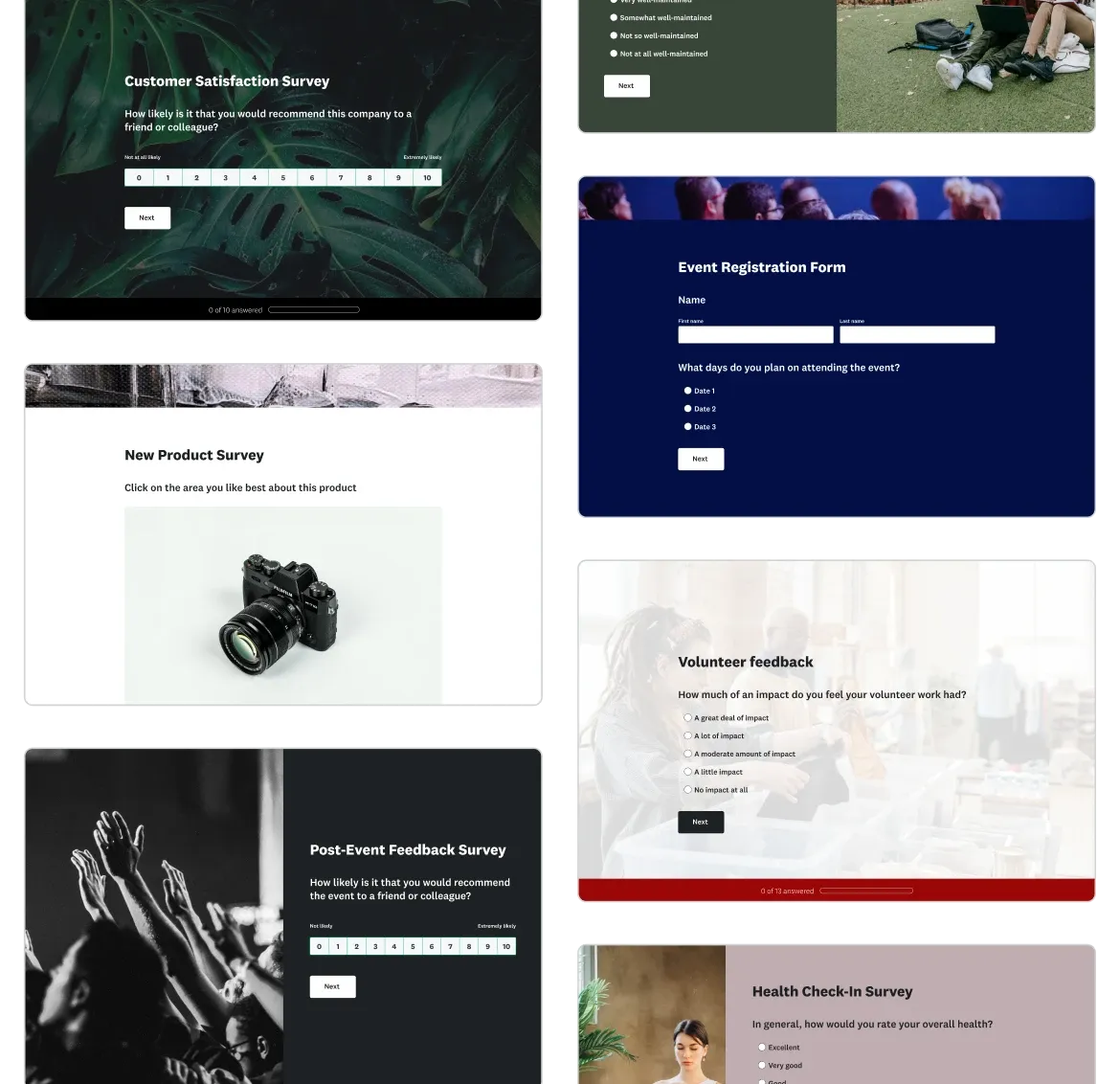
Templates SurveyMonkey

  • Customization

You can fully customize survey themes, branding, logos, and URLs. Paid plans let you apply your organization’s color scheme and logo – or use the AI-powered theme generator, which creates a polished, on-brand design from your logo or image automatically. Advanced survey flow features include skip logic, branching, randomization, answer piping, and quotas to tailor the experience to each respondent.

  • Survey creation workflow

The web interface is intuitive. After logging in (even via Google/Facebook), you choose a template or start blank, drag-and-drop questions, and preview on mobile.

If you paste content or goals, SurveyMonkey’s AI-powered “Paste and Create” can auto-generate a draft questionnaire. The platform also features question type prediction – as you type a question, the AI suggests the optimal format (multiple-choice, checkboxes, ranking, etc.) – and Answer Genius, which proposes ready-to-use answer choices you can insert with one click.

  • AI-Powered analysis

SurveyMonkey’s AI Analysis Suite – part of over 30 AI features built into the platform – lets you “chat” with your data using Analyze with AI. You can ask questions in plain English and get instant charts or segments. Open-ended responses can be auto-categorized by theme or sorted by sentiment (positive/negative) to surface key insights.
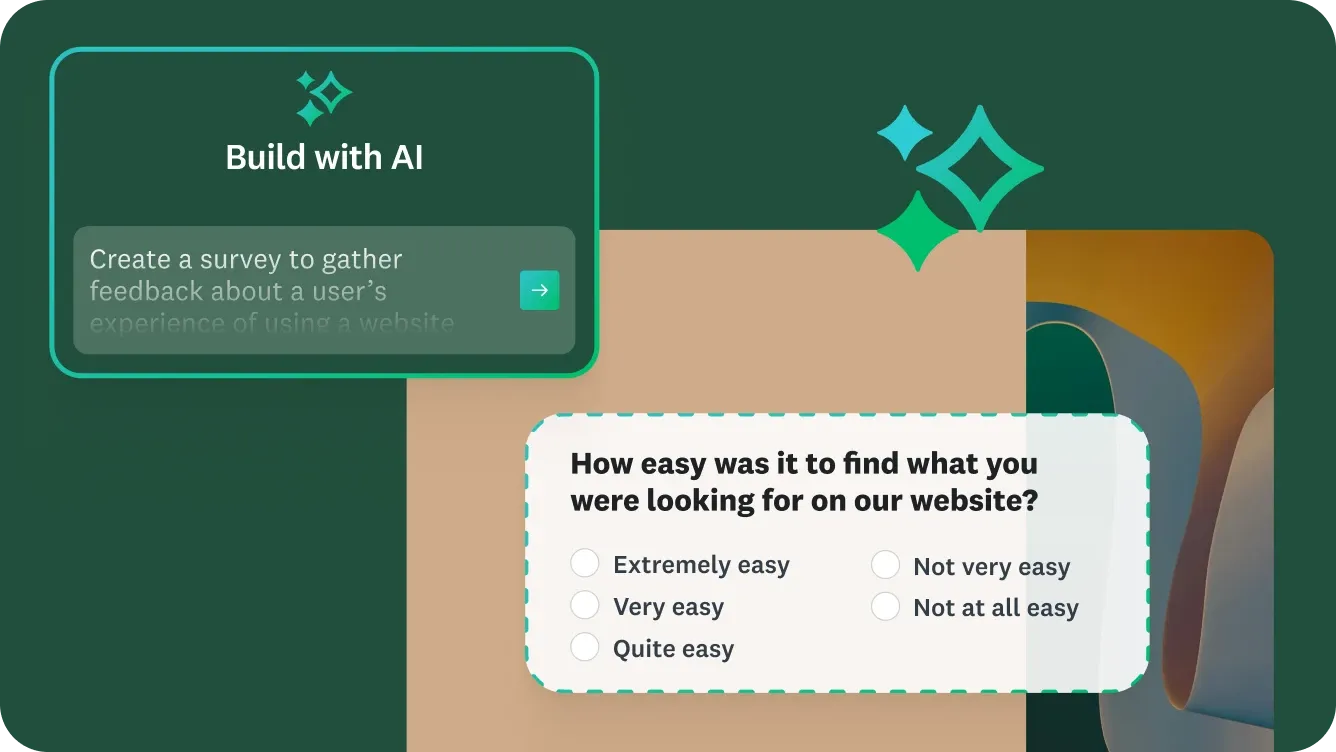
SurveyMonkey AI

These AI capabilities are powered by the SurveyMonkey Genius engine (backed by 2 machine learning patents) and run on a foundation of 98 billion answered questions – generating 2.4 million AI predictions daily. Even on standard paid plans, sentiment analysis and response-quality flags help you quickly zero in on what matters.

Here are the standout features for SurveyMonkey AI:

  • Build with AI: Describe your survey goal in a prompt, and the AI generates a survey draft in under a minute; no survey expert required.
  • Question type prediction: As you type a question, the AI suggests the optimal format (multiple-choice, checkboxes, ranking, etc.).
  • Answer-choice recommendations (“Answer Genius”): For any question you define, the AI proposes ready-to-use answer choices you can insert with one click.
  • Survey structure & quality tips: Detects potential issues in survey flow, question clarity, or length, and suggests improvements in real time.
  • Theme generation: Uses your logo, image, or brand colours to generate a polished, on-brand survey design automatically.
  • Response-quality detection: Flags low-quality responses (e.g., rushed, gibberish) so you can filter them out. (Higher-tier plans)
  • Sentiment & pattern analysis: Automatically categorises open-ended responses by sentiment (positive/neutral/negative) and surfaces statistically significant trends and patterns.

SurveyMonkey’s AI capabilities are designed to support the full survey lifecycle: creating, sending, analysing, and acting on surveys – with less manual effort and more insight.

  • Reporting & Exports

Survey results update in real time with charts and tables. You can slice and dice data by filters, demographics, or cross-tabs – making it easy to isolate trends by audience segment, time period, or custom criteria. Paid users can export complete data to CSV, XLS, SPSS or PowerPoint for deeper analysis in external tools like Tableau or Power BI.

Team plans add multi-survey analysis, which lets you compare results across surveys in an interactive dashboard. This is particularly useful for tracking metrics like CSAT or NPS over time, benchmarking results across departments, or consolidating feedback from multiple campaigns into a single view. Custom report filters and scheduled report delivery round out the reporting experience.

  • Mobile-Friendly

Surveys created in SurveyMonkey are automatically mobile-optimized. Respondents can complete them on phones or tablets without additional coding, and the responsive design ensures a clean experience across screen sizes. The SurveyMonkey mobile app (iOS/Android) also lets users create, edit, or launch surveys on the go – and view real-time results from anywhere.

  • Security & Compliance

SurveyMonkey takes data protection seriously with a comprehensive security stack built for enterprise requirements. The platform holds ISO 27001, SOC 2 Type II, and HIPAA compliance certifications, along with PCI DSS 4.0 for secure payment handling within surveys.

The platform features full data encryption at rest and in transit, and access is managed through SSO (single sign-on) integration with identity providers like Okta and Azure AD.

For larger organizations, SurveyMonkey offers role and permission-based workgroups that let admins organize teams, control access to surveys and data, and enforce governance policies.

Enhanced sensitive data protection features add an extra layer of security for industries like healthcare, financial services, and government that handle highly regulated feedback data.

According to SurveyMonkey, 89% of Enterprise customers report that the platform helps reduce organizational risk.

SurveyMonkey detailed integrations

Collaboration is the key to running any business effectively. Survey data integration adds more context, color, and meaning to the data in the apps.

SurveyMonkey connects to 200+ apps across categories including CRM, marketing automation, collaboration, analytics, and project management.

Popular integrations include Slack, Microsoft Teams, HubSpot, Mailchimp, Salesforce, Tableau, Power BI, Zoom, Google Sheets, and many more. For example, you can sync SurveyMonkey with Salesforce or HubSpot to trigger surveys after transactions and automatically log feedback in your CRM – creating a closed-loop feedback system without manual data entry.

The Mailchimp integration lets you embed survey links in email campaigns and analyze response data in Mailchimp. The Slack integration pushes real-time survey notifications to channels, so teams can act on feedback immediately. These connections help embed feedback directly into business workflows and ensure that insights reach the people who need them most.

SurveyMonkey integration with Mailchimp

Mailchimp and SurveyMonkey – the ultimate power couple on the market. That is right. The SurveyMonkey integration brings survey templates designed by experts directly into your Mailchimp account.

In addition, this combination helps get product feedback from the customer database, which is already present in the Mailchimp account, too, in an automated manner.

With the integration all set up, you can email the prospects a survey that emphasizes the most important and relevant questions. And then, the results can be analyzed directly in Mailchimp, thus resulting in better marketing decisions in less time.

SurveyMonkey integration with Salesforce

The integration with Salesforce has indeed proven helpful for companies, as it helps every department see customer feedback in an instant. This gives a 360-degree view to the designers.

Integrating Salesforce, a widely used CRM platform, allows organizations to automatically trigger surveys after transactional events – such as a closed deal, a support ticket resolution, or an onboarding milestone – to keep track of customer sentiments in real time. It also proves as a helpful platform in analyzing and monitoring CSAT scores, NPS, and other satisfaction ratings directly within Salesforce records, giving sales and support teams immediate visibility into customer health.

This altogether helps in deciding what factors are contributing to the growth.

Overall, SurveyMonkey promises to deliver a measurable and positive business impact with the Salesforce integration, especially for customer-facing teams. To integrate these two, one requires an enterprise license, and once that has been taken care of, connecting SurveyMonkey to Salesforce is an easy process.

SurveyMonkey alternatives and comparisons

While SurveyMonkey is the market leader, some teams may want to evaluate alternatives depending on their specific workflow, budget, or feature requirements. For a detailed look at how the platform stacks up, we’ve published dedicated comparison guides:

  • Top SurveyMonkey Alternatives – a breakdown of five strong competitors including SurveySparrow, Typeform, JotForm, Zoho Survey, and Google Forms, with use-case recommendations for each.
  • SurveyMonkey vs Qualtrics – a head-to-head comparison of the two leading survey platforms for enterprise use, covering AI features, pricing, security, and more.
  • Best AI Survey Tools in 2026 – a roundup of the top AI-powered survey platforms, highlighting how SurveyMonkey’s 30+ AI features compare to the competition.

Popular alternatives include platforms like Typeform (known for conversational survey formats), JotForm (offering deep form-building flexibility), and SurveySparrow (focused on chat-style, automated surveys). For enterprise-grade research needs, Qualtrics is often considered – though it comes at a significantly higher price point and lacks some of SurveyMonkey’s consumer-friendly AI features like Build with AI and the theme generator.

SurveyMonkey final verdict

We want to conclude by saying that if you are willing to invest in a professional survey platform and are looking for a combination of ease-of-use, AI-powered intelligence, and enterprise-grade security, SurveyMonkey is tough to beat. The platform is a complete package – from 500+ templates and 30+ AI features to a global audience panel of 335 million+ respondents for market research at scale.

SurveyMonkey comes with 24/7 support for its paying users, offers a seamless user experience (9 out of 10 users say it’s easy to use), and the AI-powered analytics are among the most sophisticated in the survey software category. Whether you need CSAT surveys, employee engagement programs, NPS tracking, or event feedback, the platform scales from small teams to Fortune 500 enterprises.

The platform is also well-suited for market research at scale, thanks to SurveyMonkey Audience – a proprietary global panel of 335 million+ respondents across 130+ countries that lets you reach precisely targeted demographics without sourcing your own sample.

You can always start with the free version, and if you like it, you can upgrade to paid plans as the need arises – because every feedback matters, no matter big or small.

So “No monkeying around with SurveyMonkey.”

SurveyMonkey Frequently Asked Questions

SurveyMonkey is a leading online survey platform that helps individuals and organizations collect feedback, conduct research, and make data-driven decisions. It’s used for customer satisfaction surveys, employee engagement, market research, and event feedback. With ready-to-use templates, AI-powered suggestions, and real-time analytics, it transforms raw opinions into actionable insights that drive smarter business outcomes.

SurveyMonkey’s AI engine helps users craft smarter, more engaging surveys by suggesting question phrasing, response types, and even optimal survey length. It analyzes responses in real time to identify trends, summarize key insights, and detect low-quality or biased data. This saves time and ensures your results are accurate, easy to interpret, and ready for presentation or decision-making.

Over 260,000 organizations worldwide use SurveyMonkey, from startups and schools to Fortune 500 companies. It’s popular among HR leaders, marketers, researchers, and nonprofits who need reliable feedback to improve performance, customer experience, or engagement. Whether you’re testing a new product or measuring employee satisfaction, SurveyMonkey adapts to your goals.

SurveyMonkey is widely used in:

  • Education: To evaluate teaching quality and student satisfaction.
  • Healthcare: For patient feedback and clinical research surveys.
  • Technology & SaaS: To measure user experience and feature adoption.
  • Professional Services: For client satisfaction and brand tracking.

Its flexibility makes it ideal for any industry that values measurable feedback.

SurveyMonkey itself doesn’t pay users to take surveys. It’s designed for businesses and researchers who want to collect feedback, not for users looking to earn. However, SurveyMonkey Audience, the company’s global research panel, compensates respondents for selected surveys through verified market research partners.

Yes. SurveyMonkey is a globally recognized, enterprise-grade survey platform trusted by top brands and institutions. It’s headquartered in the U.S. and complies with GDPR, HIPAA, and SOC 2 standards. Millions of users rely on it for secure, accurate feedback collection. If you’re invited to a SurveyMonkey survey, it’s safe, just ensure the sender is a verified organization.

SurveyMonkey collects limited technical data like IP addresses to prevent fraud and duplicate responses. However, your identity remains anonymous unless the survey creator specifically requests identifying details (like name or email). Participants can safely complete surveys without personal tracking or exposure.

Yes, but only for security and integrity purposes, to prevent spam and ensure each response is unique. IP data is stored securely and not shared with survey owners unless you grant permission or respond to a personalized survey link. SurveyMonkey adheres to strict global data protection regulations.

Yes. SurveyMonkey uses SSL encryption, access controls, and data anonymization to protect all survey data. Survey creators can choose whether responses are anonymous or identifiable. The platform’s compliance with privacy laws like GDPR and HIPAA ensures that both participants and businesses are protected at every stage.

SurveyMonkey connects seamlessly with popular business tools like Salesforce, Microsoft Teams, HubSpot, Slack, and Tableau. This allows teams to automate workflows. For example, sending surveys after customer interactions or pushing responses into dashboards for real-time reporting. These integrations make SurveyMonkey a natural part of enterprise decision-making.

While powerful, SurveyMonkey has a few limitations:

  • Some advanced features require paid plans.
  • Complex logic setup may take time to learn.
  • Custom branding options are limited in free tiers.

Despite this, its simplicity, AI insights, and integrations make it one of the most efficient survey tools available.

Google Forms is free and great for simple surveys, while SurveyMonkey offers professional-grade analytics, AI-powered survey design, and better reporting tools. Businesses choose SurveyMonkey for its customization, advanced logic, and data visualization, ideal for teams that need more than basic form collection.

Only if you’ve chosen to collect identifiable information. By default, responses are anonymous, but you can enable response tracking via email or contact fields. This flexibility allows you to protect respondent privacy or capture precise data when needed for follow-ups or reporting.

SurveyMonkey meets globally recognized compliance standards, including:

  • SOC 2 Type II Certification
  • HIPAA compliance (for healthcare surveys)
  • GDPR compliance for EU data
  • ISO 27001 controls

These certifications demonstrate SurveyMonkey’s commitment to maintaining enterprise-level data security and confidentiality.

Alternatives like Typeform, Qualtrics, or Jotform offer unique strengths: conversational forms, deep analytics, or design flexibility. However, SurveyMonkey remains the top choice for most businesses due to its AI-assisted creation, strong integrations, and trusted brand reputation.

Yes. SurveyMonkey is used by legitimate companies, universities, and organizations to gather authentic feedback. Scam surveys may mimic the platform’s format, so always check the sender’s details before clicking links. If the survey comes from a recognized source, it’s safe and credible.

SurveyMonkey’s clients include global leaders such as Samsung, Pfizer, Greyhound, Dell, and UC Berkeley. These organizations use it to measure customer experience, employee engagement, and brand health. Its versatility and data protection make it a preferred choice across industries.

SurveyMonkey’s Team Plans enable shared survey libraries, role-based permissions, and centralized analytics dashboards. Teams can collaborate on question design, track results together, and share insights in real time. Integration with tools like Slack or Power BI helps turn feedback into fast, actionable business decisions.

About the Authors

Rashi Arora |

Writer

Rashi Arora

Product Owner @ Broadcom

Content Writer & Review Specialist
Rashi Arora is currently working as a Project Manager at Aventra Group. Prior to this, she was a Product Owner at Broadcom. Rashi has gained expertise by managing renewals on Salesforce CPQ and improving the Renewal Admin Portal.
Ana Maria Stanciuc |

Editor

Ana Maria Stanciuc

Head of Content & Editor-in-Chief @ Tekpon

Creative Content Chief
Ana Maria Stanciuc is a highly skilled writer and content strategist with 10+ years of experience. She has experience in technical and creative writing across a variety of industries. She also has a background in journalism.

SurveyMonkey Alternatives

Get Better Pricing on SurveyMonkey

Save 15-40% with expert negociation

You tell us what you need. We deliver the right tools at the best price. Fast. Independent. Hassle-free.

Your Credentials

Tell us who you are

Your Business

Tell us about your Company

Tell Us Your Software Needs

Share your requirements and let our procurement experts help you find the best software deals, negotiate renewals, or compare alternatives — tailored to your business goals.

Please, wait!

Processing

Step
1 / 3
Back
Next Step

Disclaimer

By submitting this form, you agree to be contacted by the Tekpon Team and our Partners.

*Required fields!

Please, wait...

We are processing your request.

This website uses cookies

Cookies are small text files that can be used by websites to make a user’s experience more efficient.

The law states that we can store cookies on your device if they are strictly necessary for the operation of this site. For all other types of cookies we need your permission. This means that cookies which are categorized as necessary, are processed based on GDPR Art. 6 (1) (f). All other cookies, meaning those from the categories preferences and marketing, are processed based on GDPR Art. 6 (1) (a) GDPR.

You can at any time change or withdraw your consent from the Cookie Declaration on our website.

You can read more about all this at the following links.

Necessary cookies help make a website usable by enabling basic functions like page navigation and access to secure areas of the website. The website cannot function properly without these cookies.

Preference cookies enable a website to remember information that changes the way the website behaves or looks, like your preferred language or the region that you are in.

These trackers help us to measure traffic and analyze your behavior to improve our service.

These trackers help us to deliver personalized ads or marketing content to you, and to measure their performance.