TL;DR:
- Learn how to choose AI tools for your business with our complete 2026 guide.
- Discover the top 10 AI platforms (ChatGPT, Salesforce Einstein, Microsoft Copilot, HubSpot, and more), evaluate tools using 7 essential criteria, avoid common implementation mistakes, and calculate ROI.
- Includes 50+ tool recommendations across content creation, sales, customer service, and operations, plus a selection checklist and 30-day implementation roadmap.
- Small businesses save 40-60 minutes per employee daily with the right AI tools.
Introduction
Eighty-eight percent of organizations now use AI in at least one business function, up from 78% just a year ago. Yet 70–85% of AI projects fail to deliver results.
Why?
Most businesses choose the wrong tools for the wrong reasons.
The best AI tools for business in 2026 include ChatGPT for content creation, Salesforce Einstein for sales, Intercom for customer service, and Microsoft Copilot for productivity. These platforms save small businesses 40–60 minutes per employee daily.
This guide shows you how to choose AI tools that actually work. You’ll learn how to evaluate platforms, avoid costly mistakes, and measure real ROI, without technical expertise or major infrastructure changes.
Top 10 AI Tools for Business in 2026
Based on adoption rates, user satisfaction, and business impact across small businesses and startups, these are the top AI tools transforming business operations in 2026:
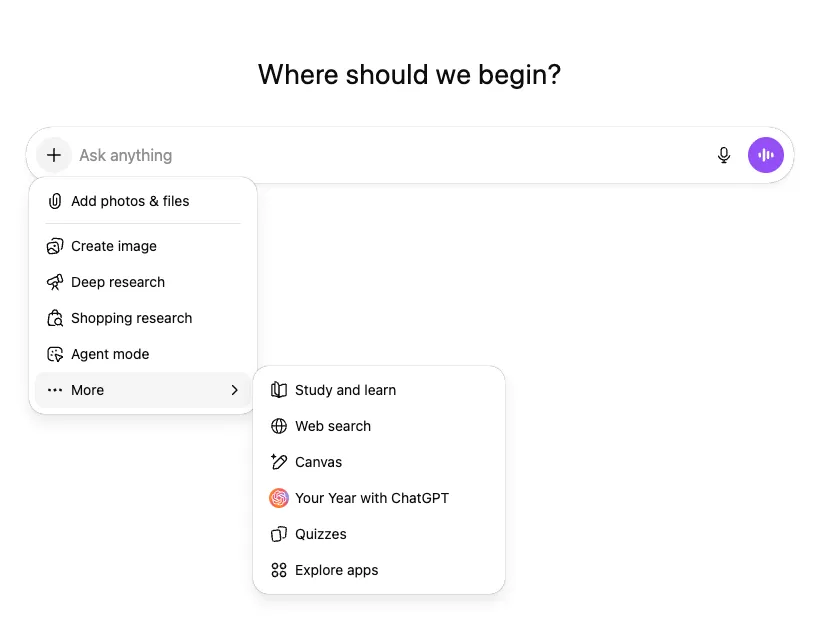
- ChatGPT (OpenAI): The most widely used AI tool with 77.9% trust among content marketers. Handles content creation, email writing, brainstorming, research, and customer service automation. Free tier available, Plus at $20/month.
- Microsoft Copilot: Embedded AI across Office 365 tools including Word, Excel, Teams, and Outlook. Used by Fortune 500 companies like Disney, Dow, and Novartis for productivity enhancement. $30/user/month.
- Google Gemini: Multimodal AI platform integrated with Google Workspace (Docs, Sheets, Gmail). Excels at text, images, code, and video generation. Strong for businesses in Google’s ecosystem.
- Salesforce Einstein: AI-powered CRM with predictive lead scoring, automated data entry, and sales forecasting. Sales teams using AI report 83% revenue growth vs 66% without AI.
- HubSpot Sales Hub: AI-driven email tracking, content creation with ChatSpot, and marketing automation. Integrates with 1,000+ apps. Plans from $45/month.
- Zapier: Connects 5,000+ business applications with AI-powered workflow automation. Essential for businesses using multiple software tools. Plans from $20/month.
- Grammarly: AI writing assistant for grammar, tone, and clarity across emails, documents, and communications. Trusted by businesses for professional writing quality. Free and premium tiers.
- Canva Pro: AI-powered design platform with Magic Write, AI image generation, and brand controls. Creates professional graphics without designers. $15/month.
- Notion AI: Documentation and knowledge management with AI-powered writing, summarization, and organization. Popular with remote teams. $10/user/month.
- Intercom: AI customer service with Fin 2 agent handling inquiries autonomously. Achieves 60%+ ticket deflection rates while improving satisfaction. From $74/month.
These tools represent the core categories of business AI: content creation (ChatGPT, Grammarly, Canva), productivity (Microsoft Copilot, Google Gemini, Notion AI), sales and marketing (Salesforce Einstein, HubSpot), automation (Zapier), and customer service (Intercom).
Most offer free trials, allowing businesses to test before committing. Check our Deals Section.
Why Most Businesses Choose the Wrong AI Tools
The AI marketplace has exploded with thousands of tools, each promising to transform your business. This abundance creates paralysis. Forty-four percent of U.S. businesses now pay for AI tools, with average contracts reaching $530,000 for enterprises. But adoption alone doesn’t guarantee success.
Most businesses make one of three critical mistakes.
First, they chase trends instead of solving actual problems. Choosing AI because competitors use it, or because a tool went viral on social media, leads to expensive tools sitting unused.
Second, they underestimate the implementation challenge. AI tools require clean data, proper training, and workflow redesign. Roughly 88% of AI pilots never reach production because teams lack defined business objectives.
Third, they focus purely on features rather than business outcomes. A tool with impressive capabilities means nothing if it doesn’t address your specific bottlenecks.
The cost of these mistakes extends beyond wasted subscription fees. Ernst & Young found that nearly all large companies implementing AI have experienced financial losses averaging $4.4 million due to model errors, compliance violations, or uncontrolled risks.
For small businesses, even a $1,000 monthly tool that doesn’t deliver results represents significant opportunity cost.
Start With Your Biggest Pain Points, Not AI Capabilities
Successful AI adoption begins with honest self-assessment. Before evaluating any tool, identify where your business bleeds time, money, or opportunities. This means looking at your operations through three lenses: efficiency, revenue, and customer experience.
Map Your Time Drains
Track where your team spends repetitive, manual hours.
Common time sinks for small businesses include data entry (customer information, invoices, receipts), meeting notes and follow-ups, email responses to routine questions, social media content creation and scheduling, and report generation.
One practical approach:
For example, if customer service reps spend three hours daily answering the same 20 questions, an AI chatbot handling those queries could free up 15 hours weekly per rep. At a $30 hourly rate, that’s $1,800 in monthly savings from a tool that might cost $200.
Identify Revenue Leaks
Revenue problems often hide in plain sight.
Look for leads going uncontacted, proposals taking too long to generate, follow-ups falling through cracks, pricing decisions made without data, and opportunities missed due to slow response times.
Sales teams using AI lead scoring and email automation report 50% more leads and 60–70% reduced call time, translating to 40–60% cost reductions.
A startup founder spending 10 hours weekly on proposals could use an AI writing assistant to cut that time in half, redirecting those hours to closing deals or product development.
The question isn’t whether AI can help, but whether the time saved justifies the investment.
Pinpoint Customer Experience Gaps
Customer experience issues compound over time.
Watch for slow response times (customers waiting hours or days for answers), inconsistent service quality, language barriers limiting your market, difficulty scaling support during growth, and inability to personalize at scale.
AI tools can provide 24/7 availability through chatbots, instant answers to common questions, multilingual support without hiring translators, and personalized recommendations based on customer behavior.
The key is matching the tool’s capabilities to your specific gaps.
Understanding AI Tool Categories for Business
AI tools cluster into distinct categories based on the problems they solve. Understanding these categories helps you search efficiently and compare apples to apples.
Content Creation and Marketing
These tools generate written content, images, videos, and creative assets. The most popular AI tools for content and marketing in 2026 include:
- ChatGPT (OpenAI): The leading AI for blog posts, emails, and brainstorming with 77.9% trust among content marketers. Free and Plus ($20/month) tiers available.
- Claude (Anthropic): Second most trusted AI tool (27.5% of marketers) for long-form content, analysis, and ethical AI assistance. Excels at detailed, nuanced writing.
- Google Gemini: Third most popular (16.3%) with strong multimodal capabilities for text, images, and video integrated with Google Workspace.
- Jasper: Specialized marketing copy AI with brand voice controls and workflow automation. Reduces content production time from weeks to hours. From $49/month.
- Copy.ai: AI copywriting tool for marketing emails, product descriptions, and ad copy. Strong for high-volume content needs.
- Canva Pro: AI design with Magic Write for copy, AI image generation, and brand templates. Perfect for businesses without dedicated designers. $15/month.
- Grammarly: AI writing assistant for grammar, tone, clarity, and professionalism across all business communications. Trusted by millions of businesses worldwide.
- Synthesia and HeyGen: AI video generation platforms creating professional videos with AI avatars, eliminating traditional video production costs.
For small businesses, content creation AI delivers quick wins. A solo founder can produce the output of a small marketing team. However, all AI-generated content requires human review and editing to maintain brand voice and accuracy.
Budget $15–200 monthly for these tools, depending on usage volume.
Customer Service and Support
AI-powered customer service tools handle inquiries, provide instant responses, and escalate complex issues to humans.
Intercom’s Fin 2 resolves common customer issues autonomously. Zendesk’s AI agents search across channels and provide generative responses. Tidio and Chatfuel build chatbots without coding. UserBot learns from interactions to improve over time.
These tools work best for businesses receiving repetitive questions.
If you’re answering the same inquiries repeatedly, a chatbot pays for itself quickly. However, maintain human oversight for complex or sensitive issues to preserve customer trust.
Sales and CRM Enhancement
Sales-focused AI automates outreach, scores leads, and provides conversation intelligence.
Salesforce Einstein offers predictive lead scoring and automated data entry. HubSpot Sales Hub tracks email opens and automates follow-up sequences. Apollo.io provides AI-driven lead generation with 210 million contacts. Gong analyzes sales conversations to identify what works and what doesn’t.
Sales teams using AI had revenue growth at an 83% rate compared to 66% for non-AI teams.
See how it can transform your lead generation and outreach efforts with no upfront cost!
For startups and small businesses, sales AI levels the playing field. You can run sophisticated nurture campaigns and lead scoring that previously required enterprise infrastructure. Start with tools that integrate with your existing CRM to minimize disruption.
Operations and Productivity
Operational AI streamlines workflows and coordinates team activities. Notion AI helps with documentation and knowledge management. Zapier connects apps and automates workflows with 5,000+ integrations. Asana and Monday.com use AI for project planning and risk detection.
Read our full comparison between Asana vs. Monday.com here.
Microsoft Copilot embeds AI into Office 365 tools. These platforms reduce manual coordination overhead, with employees reporting five hours saved weekly on average.
The ROI calculation for productivity tools is straightforward: time saved multiplied by hourly cost. If five employees each save five hours weekly using a $100 monthly tool, and their average cost is $30/hour, you’re saving $3,000 monthly for a $100 investment.
Data Analysis and Business Intelligence
These tools transform raw data into actionable insights.
Tableau integrates AI to generate visualizations from natural language queries. Power BI offers ML models for predictive analytics. Specialized tools like Mastercard’s AI improved fraud detection by an average 20%, reaching up to 300% in specific cases.
For small businesses, the value lies in making data-driven decisions without hiring data analysts.
Essential Evaluation Criteria for AI Tools
Once you’ve identified your needs and relevant tool categories, systematic evaluation prevents costly mistakes. Apply these criteria to create a shortlist.
Integration With Existing Systems
An AI tool that doesn’t connect to your current software creates more work, not less.
Check whether the tool integrates with your CRM (Salesforce, HubSpot, Zoho), communication platforms (Slack, Teams, Gmail), project management (Asana, Monday, Trello), accounting software (QuickBooks, Xero), and e-commerce platform (Shopify, WooCommerce).
Most modern AI tools offer extensive integration capabilities (for example, HubSpot connects with over 1,000 apps) but always verify your specific needs.
Integration failures are a leading cause of AI project abandonment. If data doesn’t flow automatically between systems, you’ll spend time on manual data entry, defeating the automation purpose.
During evaluation, test integrations with free trials or demos before committing.
Ease of Use and Learning Curve
Complex tools sit unused. The best AI tools combine power with intuitive interfaces.
Look for tools with no-code setup (configure without programming), visual workflows (see what’s happening), plain English commands (natural language interfaces), and comprehensive documentation (guides, videos, support).
Zapier exemplifies this with its simple trigger-action model that anyone can understand, now enhanced with an AI Copilot that builds workflows from conversational descriptions.
During evaluation, have team members who will actually use the tool test it. If they struggle during a trial, they’ll struggle after purchase. Factor training time into your ROI calculations – a tool requiring 20 hours of training per user has hidden costs.
Scalability and Flexibility
Your business will grow. Choose tools that scale with you by offering tiered pricing as usage increases, API access for custom development, multiple user seats without exponential cost increases, and adjustable feature sets as needs evolve.
A tool perfect for five employees might break down at 50.
Review pricing tiers carefully. Some tools offer generous free plans that become expensive as you scale. Calculate costs at 2x and 5x your current size to avoid unpleasant surprises.
For example, if a tool charges $20 per user monthly and you plan to grow from 5 to 25 employees, budget for $500 monthly rather than $100.
Data Security and Compliance
AI tools process your business data. Security lapses can cost your company its reputation and trigger regulatory fines. Verify the tool complies with GDPR, HIPAA, CCPA (as applicable), implements SOC 2 Type 2 certification, uses encryption for data at rest and in transit, provides role-based access controls, and maintains detailed audit logs.
Sixty percent of AI project failures stem from inadequate data governance or security issues.
For small businesses handling customer data, this isn’t optional. A data breach can destroy trust you’ve spent years building. During evaluation, ask vendors for security documentation and look for certifications from recognized bodies like ISO 27001.
Vendor Stability and Support
Many AI tools come from startups that might not exist in three years. While innovation often comes from new entrants, you need some assurance of continuity. Consider the company’s funding and runway, customer base size and retention, roadmap transparency, customer support quality and availability, and community and ecosystem strength.
Tools like Salesforce, Microsoft, and Google offer stability but potentially higher costs. Newer tools might offer better features but carry more risk.
Test support during trials by submitting actual questions. Response time and quality during the trial predicts your experience as a customer.
Also check whether support is tiered. Some vendors reserve quality support for enterprise plans, leaving small businesses with documentation only.
Total Cost of Ownership
Subscription fees tell only part of the story.
Calculate true costs including base subscription fees, per-user or per-seat charges, implementation and setup costs, training time and resources, integration development or maintenance, and hidden fees (overages, add-ons, premium features).
A tool advertised at $50 monthly might cost $200 after accounting for necessary add-ons and extra users.
Create a 12-month budget projection for each tool you’re considering. Include one-time costs like setup and training, plus recurring costs that might increase as you scale. This projection reveals whether a tool is truly affordable.
Common AI Implementation Mistakes and How to Avoid Them
Even with the right tool, implementation can falter. These mistakes derail AI projects regularly. Learning from others’ errors saves you time and money.
Skipping the Pilot Phase
Organizations rush from selection to full deployment, skipping small-scale testing. This leads to discovering problems after you’ve committed resources and built workflows around the tool.
The fix is simple: Run a pilot project with a small team or single use case. Set specific success metrics (time saved, tasks completed, accuracy rate). Test for 30–60 days before expanding. Identify and resolve integration issues at small scale.
A pilot lets you fail fast and cheap. If a tool doesn’t work as expected, you’ve invested weeks instead of months and limited costs instead of company-wide expenses. Ninety percent of organizations that start with internal-only AI tools see little ROI. Those that shift to external, production-facing applications see 50% more successful projects.
Ignoring Data Quality
AI tools are only as good as the data they process. Garbage in, garbage out remains true.
Poor data quality manifests as inconsistent formatting (addresses, phone numbers, names), incomplete records (missing crucial fields), outdated information (customers who left years ago), and duplicate entries (same person listed multiple times). These issues compound when AI processes them, creating unreliable outputs that erode trust.
Before implementing AI, clean your data. This might mean deduplicating contacts, standardizing formats, filling information gaps, and archiving obsolete records. While tedious, this upfront work ensures AI tools function properly. Some tools like Clay offer automated data cleaning, but human oversight remains essential.
Underestimating Change Management
Technology is easy. People are hard.
AI implementations fail when teams resist adoption because they fear job loss, don’t understand the benefits, lack training, or find the tool disrupts comfortable workflows. Salesforce found that 28% of employees use GenAI without formal approval or oversight, creating shadow IT risks.
Successful change management involves clearly communicating why you’re implementing AI and what it means for each role, providing comprehensive training with hands-on practice, starting with enthusiastic early adopters who become champions, gathering and acting on feedback during rollout, and celebrating wins to build momentum.
When employees understand AI augments rather than replaces them, resistance drops significantly.
Expecting Immediate Perfection
AI tools improve over time through learning and tuning. Expecting flawless performance from day one sets unrealistic expectations.
Initial accuracy might be 70–80%, improving to 90%+ with training and feedback. This is especially true for tools using machine learning models that adapt to your specific context.
Plan for an initial adjustment period of 30–90 days where you actively monitor, provide feedback, and fine-tune settings. During this time, maintain human oversight for critical functions. Document common errors and work with the vendor to address them.
Most quality AI tools improve noticeably over the first few months.
Treating AI as Set-and-Forget
AI tools require ongoing maintenance. Models drift as conditions change, integrations break with software updates, and new use cases emerge.
Organizations that fail to budget for continuous management see AI performance decay over time, sometimes dramatically. Set up regular monitoring of key performance metrics, schedule quarterly reviews of tool usage and ROI, assign someone responsibility for maintaining the tool, and stay updated on new features and capabilities.
Think of AI tools like hiring an employee who needs ongoing management, not buying furniture that sits unchanged. The investment doesn’t end at purchase. It requires continued attention to deliver sustained value.
How to Calculate ROI for AI Tools
Measuring return on investment separates successful AI adopters from those who waste money. A structured approach to ROI calculation justifies purchases and identifies underperforming tools.
Define Success Metrics Before Purchase
Start with clear, measurable goals tied to business outcomes.
- Time savings: hours reclaimed per employee per week.
- Cost reduction: expenses eliminated or decreased.
- Revenue impact: deals closed faster, leads generated.
- Quality improvements: error rates, customer satisfaction scores.
- Productivity gains: output increase per person.
These metrics vary by tool category. A customer service chatbot might target 60% ticket deflection, while a sales AI aims for 30% faster deal cycles.
Document baseline performance before implementation. If you’re implementing email automation to reduce response time, measure current average response time first. Without a baseline, you can’t prove improvement.
Calculate Hard and Soft ROI
ROI comes in two forms.
Hard ROI includes tangible financial gains in cost savings (reduced labor, eliminated services), revenue increases (faster sales cycles, more conversions), and operational efficiency (reduced waste, faster processing).
Soft ROI captures less tangible but important benefits like improved employee satisfaction, enhanced customer experience, increased innovation capacity, and better decision-making quality.
Organizations typically see $3.70 returned for every dollar invested in AI. However, 49% of organizations struggle to estimate and demonstrate value. The solution lies in tracking both hard and soft returns systematically.
Use This Simple ROI Formula
For basic ROI calculation, use this formula: (Annual Benefit – Annual Cost) / Annual Cost × 100 = ROI percentage.
Here’s a real example.
Let’s say you implement an AI meeting assistant like Laxis at $15.99/month ($192 annually). Benefits: Three employees save 45 minutes per week on meeting notes (2.25 hours total). At $30/hour average cost, that’s $67.50 weekly or $3,510 annually. The calculation: ($3,510 – $192) / $192 × 100 = 1,728% ROI.
This simplified model works for straightforward productivity tools. More complex implementations require multi-year projections accounting for setup costs, training time, gradual adoption, and compounding benefits.
Create a spreadsheet tracking costs and benefits monthly to capture the full picture.
Track Metrics Continuously
ROI isn’t static. Monitor your defined metrics monthly or quarterly using dashboard tools (many AI platforms include analytics), time tracking (for productivity tools), financial reports (for revenue-impacting tools), and user adoption rates (low adoption signals problems).
If a tool isn’t delivering expected ROI after 90 days, investigate why. Common issues include poor adoption, integration problems, inadequate training, or wrong tool for the problem.
Some tools take longer to show returns. Expect 6–12 months for measurable ROI on most AI investments, though some deliver value within weeks. The key is continuous measurement, not one-time assessment.
Complete List of AI Tools and Applications by Category
Here’s a comprehensive breakdown of the best AI tools and applications for business, organized by function and use case:
AI Content Creation Tools
- ChatGPT (OpenAI): General-purpose AI for writing, research, and brainstorming
- Claude (Anthropic): Long-form content with ethical AI focus
- Google Gemini: Multimodal AI integrated with Google Workspace
- Jasper: Marketing-focused AI copywriting platform
- Copy.ai: High-volume marketing content generation
- Grammarly: AI writing assistant for grammar and clarity
- Writesonic: SEO-optimized content creation
- Perplexity AI: AI search and research assistant
AI Design and Visual Creation Tools
- Canva: AI-powered graphic design with Magic Write and image generation
- Midjourney: Advanced AI image generation for creative projects
- DALL-E (OpenAI): Text-to-image generation integrated with ChatGPT
- Adobe Firefly: AI tools integrated into Adobe Creative Cloud
- Synthesia: AI video creation with avatars
- HeyGen: AI video generation platform
- Runway ML: AI video editing and generation
AI Productivity and Collaboration Tools
- Microsoft Copilot: AI across Office 365 (Word, Excel, Teams, Outlook)
- Notion AI: Documentation and knowledge management
- Slack AI: Conversation summaries and search within Slack
- Zapier: Workflow automation connecting 5,000+ apps
- Asana: AI-powered project management
- Monday.com: Work management with AI automation
- Trello: AI-enhanced kanban boards
AI Sales and CRM Tools
- Salesforce Einstein: AI-powered CRM and sales automation
- HubSpot Sales Hub: Email tracking and sales sequences
- Apollo.io: Lead generation with 210M+ contacts
- Clay: Data enrichment and research automation
- Gong: Conversation intelligence for sales calls
- Clari: Revenue forecasting and pipeline management
- Outreach: Sales engagement platform
- Salesloft: Sales execution with AI insights
AI Customer Service Tools
- Intercom: AI chatbot and customer messaging platform
- Zendesk AI: Customer support with AI agents
- Freshdesk: AI-powered help desk software
- Tidio: Easy chatbot builder for small businesses
- Drift: Conversational marketing and sales
- LivePerson: AI-powered conversational commerce
AI Coding and Development Tools
AI Data and Analytics Tools
- Tableau: AI-driven data visualization
- Power BI (Microsoft): Business intelligence with ML models
- Looker (Google): Data analytics platform
- DataRobot: Automated machine learning
AI Meeting and Communication Tools
- Otter.ai: AI meeting transcription and notes
- Fireflies.ai: Voice assistant for meetings
- Grain: AI-powered meeting recording
- Krisp: AI noise cancellation
- tl;dv: Meeting summaries and insights
AI Marketing and SEO Tools
- Surfer SEO: Content optimization for search rankings
- Semrush: SEO and marketing analytics with AI insights
- Jasper: AI marketing content generation
- MarketMuse: Content intelligence platform
- Sprout Social: Social media management with AI
This list represents the most widely adopted AI tools across business functions in 2026. Most offer free trials or freemium tiers, allowing small businesses to test capabilities before committing to paid plans. The key is selecting tools that integrate with your existing tech stack and solve specific, documented business problems rather than adopting AI for its own sake.
Recommended AI Tools by Business Function
Based on current market analysis and user adoption data, these tools consistently deliver value for small businesses and startups across key functions.
For Content and Marketing
ChatGPT Plus ($20/month): Versatile writing assistant for blogs, emails, brainstorming, and research. Most widely adopted AI tool with 77.9% trust among content marketers. Best for businesses needing flexible content support across multiple formats.
Jasper ($49/month): Specialized for marketing copy with brand voice controls and workflow automation. Reduces content production time from weeks to hours. Ideal for businesses running regular marketing campaigns.
Canva Pro ($15/month): AI-powered design tools including Magic Write for copy and AI image generation. Perfect for businesses creating visual content without dedicated designers.
For Customer Service
Intercom ($74/month): Fin AI Agent handles common questions autonomously, with Copilot assisting human agents. Priced per resolution, aligning costs with value. Best for fast-growing SaaS and self-serve products.
Tidio (Free–$499/month): Easy chatbot builder with 76% of users not requiring human transfers. Integrates with major messaging platforms. Ideal for small businesses seeking simple, effective automation.
Zendesk AI Agents ($55/agent/month): Generative search and autonomous agents across channels. Strong for businesses standardizing on Zendesk ecosystem.
Test AI-powered automation, ticketing, live chat, and more before making a commitment.
For Sales and Lead Generation
HubSpot Sales Hub ($45/month): AI-powered email tracking, lead scoring, and sequence automation. Free CRM included. Best for small teams wanting integrated sales and marketing.
Apollo.io ($49/month): Access to 210 million contacts with AI lead scoring and sequence automation. Strong for SDR teams building outbound programs.
Salesforce Einstein: Predictive analytics and automated insights within Salesforce. Ideal for businesses already using Salesforce CRM.
For Operations and Productivity
Notion AI ($10/user/month): Documentation, project planning, and knowledge management with AI. Strong for teams using Notion for collaboration.
Zapier ($20–$800/month): Connects 5,000+ apps with AI-powered workflow automation. Essential for businesses using multiple software tools.
Microsoft Copilot ($30/user/month): Embedded in Office 365 tools (Word, Excel, Teams, Outlook). Best for businesses standardized on Microsoft ecosystem.
For Data and Analytics
Tableau (from $70/user/month): AI-driven visualizations and natural language queries. Strong for businesses with substantial data needing insights.
Power BI ($10–$20/user/month): Microsoft’s business intelligence with ML models. Integrates seamlessly with Excel and Azure.
These recommendations reflect current market conditions (January 2026). Always test tools with free trials before committing, as capabilities and pricing evolve rapidly in the AI space.
Creating Your AI Tool Selection Checklist
Systematize your evaluation process with this practical checklist. Use it to compare multiple tools objectively.
Business Alignment
- Does this tool solve a specific, documented problem in our business?
- Have we quantified the current cost of this problem?
- Will this tool deliver ROI within 6–12 months?
- Does it align with our business priorities for the next year?
- Can we clearly articulate the expected benefit to stakeholders?
Technical Compatibility
- Does it integrate with our existing CRM, project management, and communication tools?
- Are APIs available for custom integrations if needed?
- What is the implementation timeline (days, weeks, months)?
- Do we have the technical resources to implement and maintain it?
- Is it cloud-based, on-premise, or hybrid?
Usability and Adoption
- Can team members use it without extensive training?
- Is the interface intuitive and well-designed?
- Does it offer mobile access if needed?
- Is documentation clear and comprehensive?
- Have we had team members test it during a trial?
Security and Compliance
- Does it comply with GDPR, HIPAA, or other relevant regulations?
- Is data encrypted at rest and in transit?
- Does it offer role-based access controls?
- Are audit logs available?
- Has the vendor provided SOC 2 or ISO 27001 certification?
Vendor and Support
- Is the company financially stable with adequate funding?
- What is their customer retention rate?
- Do they offer adequate support for our plan tier?
- Is there an active user community?
- How frequently do they release updates and new features?
Cost Structure
- What is the total monthly/annual cost including all users?
- Are there setup fees or implementation costs?
- What features are locked behind higher-priced tiers?
- How do costs scale as we add users or usage?
- Are there overage fees or usage limits?
- What is the contract commitment (month-to-month or annual)?
Pilot and Testing
- Does the vendor offer a free trial?
- Can we pilot with a small team before full deployment?
- What metrics will we track during the pilot?
- Who will own the pilot evaluation and reporting?
- What are our criteria for proceeding vs. rejecting the tool?
Rate each criterion as “meets,” “partially meets,” or “doesn’t meet” requirements. Tools scoring well across all categories warrant serious consideration. Those with significant gaps should be eliminated unless they offer unique capabilities you can’t find elsewhere.
Getting Started: Your First 30 Days
You’ve selected a tool. Now what? These first 30 days determine long-term success. Follow this roadmap to maximize your chances of positive outcomes.
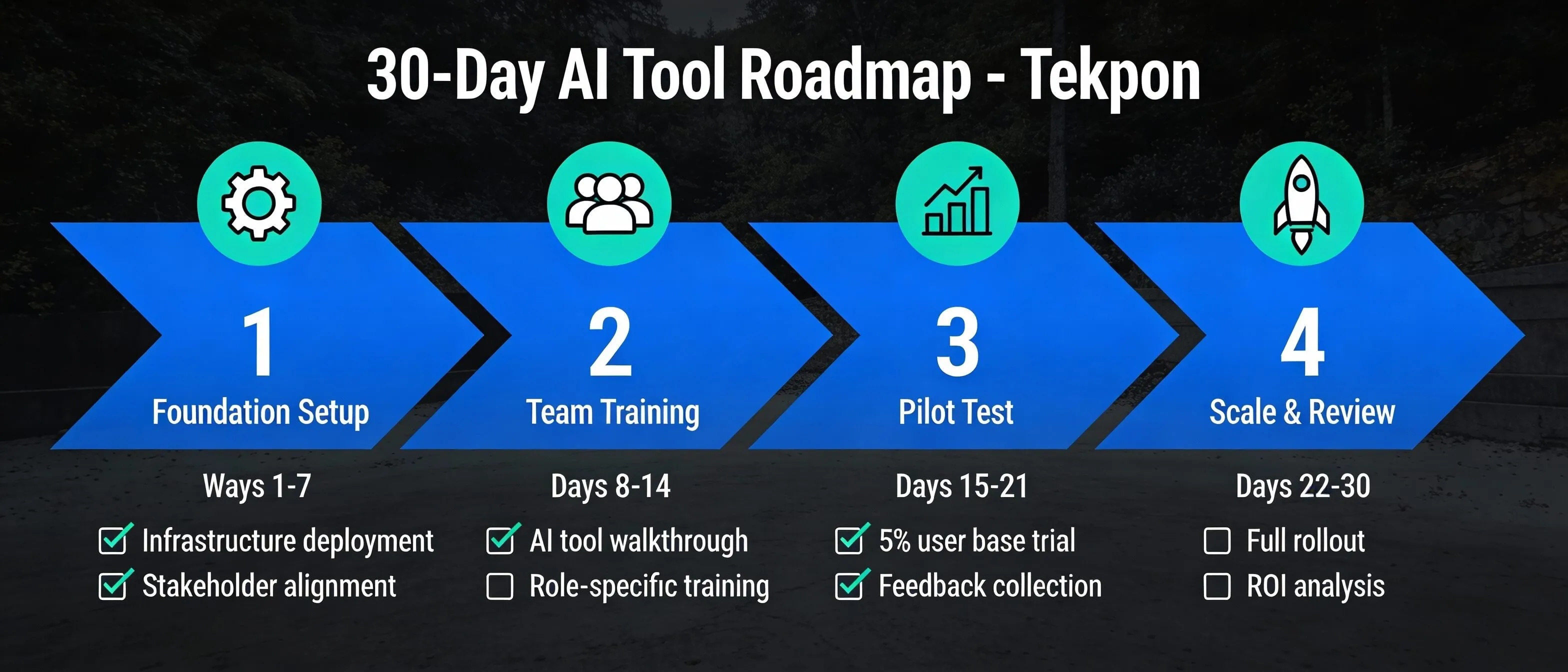
Days 1–7: Foundation Setup
Configure basic settings and integrations. Connect the tool to your essential systems (CRM, email, project management). Set up user accounts for pilot team members. Establish initial workflows or templates. Document configuration decisions. Assign roles and responsibilities for tool management. This foundation week prevents chaos later. Take time to configure properly rather than rushing to use the tool.
Days 8–14: Team Training
Conduct hands-on training sessions with pilot team. Cover core features and common workflows. Practice with real scenarios from your business. Address questions and concerns. Create quick-reference guides for team. Set expectations for learning curve and adjustment. Training investment pays dividends in adoption. Team members confident in using the tool actually use it. Those confused or intimidated avoid it.
Days 15–21: Active Use and Monitoring
Begin using the tool for real work. Monitor usage metrics and early results. Gather feedback from team members daily. Identify and resolve technical issues quickly. Adjust workflows based on what works and what doesn’t. Document common questions or problems. This active monitoring catches issues while they’re small and manageable.
Days 22–30: Evaluation and Optimization
Measure results against predefined success metrics. Calculate actual ROI based on first-month data. Identify underutilized features worth exploring. Address any persistent adoption barriers. Decide whether to expand, optimize, or reconsider. Document lessons learned. Present findings to stakeholders with recommendation. This evaluation determines your path forward. If the tool performed well, expand deployment. If not, either optimize your approach or cut losses early.
When to Walk Away From an AI Tool
Not every tool works for every business. Knowing when to abandon an investment saves money and refocuses effort on better alternatives.
Watch for these red flags.
Low adoption after adequate training signals fundamental mismatch. If team members avoid using the tool despite training and support, something’s wrong. Either the tool doesn’t fit your workflows, it’s too complex, or it doesn’t solve a real problem. Ninety days of low adoption suggests the tool won’t succeed.
No measurable improvement in target metrics after 60–90 days indicates the tool isn’t delivering value. If you implemented a sales tool to reduce deal cycle time and cycles haven’t shortened, the tool isn’t working. Don’t wait another quarter hoping for different results.
Constant technical issues disrupting workflows mean the tool isn’t ready for production use. Some AI tools launch before they’re truly stable. If you’re spending more time troubleshooting than benefiting, that’s not sustainable.
Better alternatives emerging in the market happen frequently in AI’s rapid evolution. If a competitor releases something significantly better, switching might be worthwhile despite sunk costs. The market rewards adaptability.
Vendor instability or poor support creates risk. If the company shows signs of financial trouble, support requests go unanswered, or the product roadmap stalls, these signal potential problems ahead.
The sunk cost fallacy kills businesses. Just because you’ve invested time and money doesn’t mean continuing is wise. Evaluate objectively based on current and future value, not past investment. Exit cleanly, document what you learned, and apply those lessons to the next tool selection.
Final Verdict: Building Your AI Tool Stack for Success
Executive Summary: Key Takeaways for Choosing AI Tools
The most important insights for selecting AI tools in 2026:
- Start with problems, not technology: Identify specific business pain points before evaluating tools. The best AI tools solve documented inefficiencies.
- Top AI tools for business include: ChatGPT for content, Microsoft Copilot for productivity, Salesforce Einstein for sales, HubSpot for marketing, Intercom for customer service, and Zapier for automation.
- Expected ROI: Businesses typically see $3.70 returned for every dollar invested in AI, with productivity gains of 26-55% and time savings of 40-60 minutes per employee daily.
- Integration is critical: Tools must connect to existing CRM, communication, and project management systems. Poor integration causes 70-85% of AI project failures.
- Pilot before scaling: Test tools with small teams for 30-60 days before company-wide deployment. This approach increases success rates by 50%+.
- Common mistakes to avoid: Chasing trends without clear objectives, underestimating data quality requirements, inadequate change management, and expecting immediate perfection.
- Measure continuously: Track hard ROI (cost savings, revenue impact) and soft ROI (employee satisfaction, customer experience) monthly to ensure tools deliver value.
- Budget realistically: Small businesses should budget $100-500 monthly for essential AI tools across content, productivity, and customer service functions.
Start Small, Scale Smart
Choosing the right AI tools comes down to disciplined process over excitement. Therefore, start with clear problems, not cool technologies. Evaluate systematically using objective criteria. Implement gradually with proper pilot testing. Moreover, measure continuously to ensure tools deliver promised value.
The most successful small businesses don’t implement AI everywhere at once. Instead, they identify their biggest constraint (customer service response time, sales pipeline management, or content creation) and solve it with one excellent tool. Once that succeeds, they expand to the next constraint.
Why This Focused Approach Works
This strategy delivers three key benefits:
- Build organizational confidence: Early wins prove AI’s value to your team and stakeholders
- Learn implementation best practices: Master deployment and training on a small scale before expanding
- Generate funding for expansion: ROI from initial tools pays for additional implementations
In fact, companies following this pattern achieve 26–55% productivity gains and see $3.70 returned for every dollar invested.
Keep Your AI Stack Current
Remember that AI tools are means to ends, not ends themselves. The goal isn’t adopting AI—it’s serving customers better, operating more efficiently, or growing revenue faster. Furthermore, when tools stop serving those goals, replace them. The AI market evolves quickly, and what’s optimal today might be outdated in six months.
Stay current with these practices:
- Test new tools quarterly through free trials
- Read independent reviews on platforms like Tekpon
- Follow tool providers on social media for updates
- Join AI communities for peer insights and recommendations
- Conduct annual AI stack reviews to eliminate redundancies
The Bottom Line
Your AI tool stack should evolve with your business. Annual reviews ensure you’re not paying for tools you’ve outgrown or missing better alternatives. Most importantly, maintain the mindset that AI augments your team’s capabilities rather than replacing human judgment, creativity, and relationship-building.
The businesses winning with AI aren’t those with the most tools. They’re businesses that chose the right tools, implemented them properly, and extracted maximum value through continuous optimization. Therefore, start small, measure obsessively, and scale what works. That’s how you choose AI tools that actually move your business forward.